Learn how to create professional training and marketing videos without filming. In this Synthesia review, read how AI avatars in 140+ languages save up to 90% of time and budget, and what pitfalls neural networks can pose.
Synthesia: Create Videos With AI Avatars
On this page
Synthesia AI is an AI tool for video creation, but its standout feature is the ability to generate realistic digital humans, or as they’re called, AI avatars.
Here’s how it works: instead of filming a video with an actor in a studio, you simply write a script. Then, the Synthesia avatar you choose brings it to life—speaking your text, moving, gesturing, and even showing emotions. The result is a video that could easily pass for one featuring a real person. They say their technology is trained on recordings of real actors, which is why the movements look so natural.
Of course, it’s not perfect yet. Some users notice that the avatars’ movements can occasionally seem a bit robotic, and facial expressions may not feel entirely lifelike. Plus, it’s not exactly cheap. There’s a free plan to try it out, but to fully unlock its potential, you’ll need a paid subscription.
What Can Synthesia Do?
This is a platform where you can create videos with digital avatars that look like real people and speak the text you provide.
- They offer a large library of ready-made avatars—over 150 different types, spanning various ages and appearances. You can choose the perfect fit for your project. If you want something unique, there’s an option to create a custom avatar, but this is a paid feature that requires your own video and voice.
- The Synthesia AI can voice text in over 120 languages, making it easy to produce the same video for different countries. Plus, the system automatically generates subtitles in the language of the voiceover.
- For those who struggle with scripting, there’s a script assistant. It helps organize your thoughts or brainstorm ideas for your video, making the process much smoother.
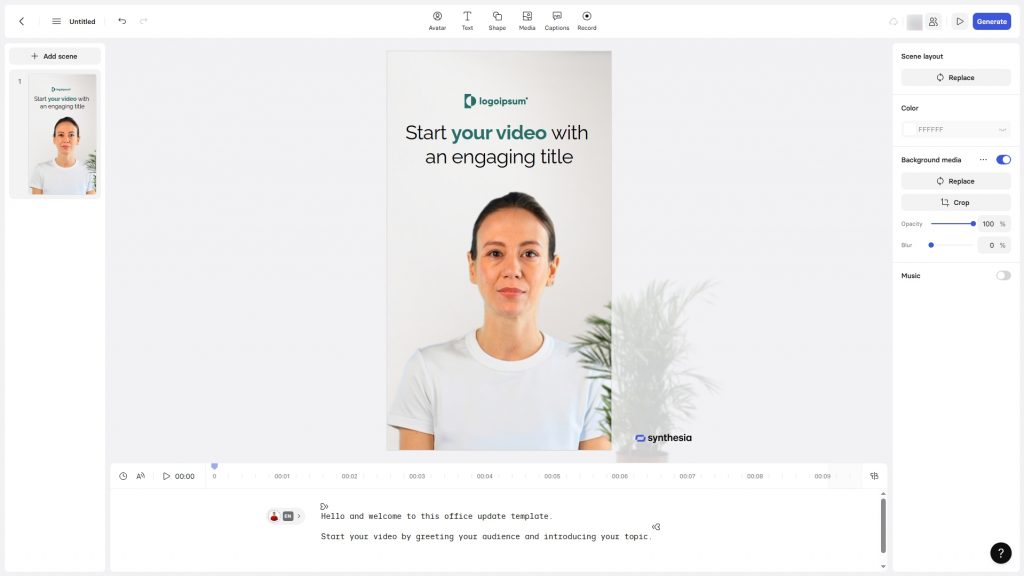
- The interface feels like a standard presentation editor—highly intuitive. You can add slides, insert music, images, and branding elements. There’s also a library of templates—pre-made layouts for training videos, marketing materials, or reports—to help you get started quickly without worrying about structure.
The result is a tool that truly simplifies video creation, especially for businesses or educational purposes. No need to rent a studio, hire a camera crew, or cast actors—everything happens right in your browser.
How It Works
- Getting started with Synthesia is surprisingly easy. Everything happens in your browser—no complex software to install, and no editing experience is required.
- First, you write a script, ideally one that sounds natural, like everyday speech.
- Then, you choose a digital presenter from the available options and customize the voice: you can select not just the language but also the accent and even the overall tone.
- Once everything’s set, the platform processes your input. The AI carefully ensures that lip movements perfectly sync with the spoken words to make the speech look natural.
- Finally, you just click the “Generate” button.
The system combines all the elements and creates a finished video. It’s like watching a photo develop—starting with nothing, then gradually revealing the final product. Except instead of a photo, you get a video with your avatar delivering your script.
When it’s done, you can download the video or share it via a link. If you spot any mistakes, it’s easy to fix—just go back, tweak the script, and regenerate the video. No need to start from scratch.
- User-friendly interface, no editing skills needed.
- Extensive library of avatars and voices.
- Support for over 120 languages.
- Lip movements can sometimes look slightly unnatural.
- No fully free plan available.
- Limited personalization on lower-tier plans.
Who Can Benefit from Synthesia?
Synthesia offers numerous opportunities for automating video content. It enables quick production of videos for various business needs.
- For example, imagine a marketer or content creator who needs to regularly produce videos for social media or a website. When time or budget for full-scale shoots is limited, an AI avatar is a lifesaver. You input the script, and the system generates a video with a realistic digital presenter delivering it with proper articulation, even in multiple languages. No need to hire actors or rent a studio—it’s done in minutes.
- For educators and trainers, this AI avatar tool is a game-changer. Say you need to create a training course for employees in ten different countries. Instead of filming ten versions with different presenters, you write one script, and Synthesia’s AI generates videos with the same avatar speaking in English, Spanish, German—or any language you need. The time and cost savings are massive.
- Large companies can also benefit from Synthesia. When security and consistent communication standards matter, this tool enables the creation of high-quality videos for onboarding new employees, internal training, or corporate announcements. You can even create a custom AI avatar that represents your brand with recognizable features and speech patterns.
- And of course, it’s perfect for those who are camera-shy. If you have an important message but don’t want—or can’t—appear on camera, your personal AI avatar can deliver it for you, maintaining visual engagement with your audience without requiring you to step in front of the lens.
Pricing Plans and Paid Features
Synthesia offers several subscription options. The most basic is Starter, starting at $30 per month. This entry-level plan includes a limited number of video minutes per month and a small selection of avatars. It’s a great way to test the platform and see how it works.
For more robust needs, there’s the Creator plan at $90 per month. This offers a larger video time limit and access to an extensive library—over 180 avatars to choose from. This plan is ideal for those who find the tool valuable and plan to use it regularly.
For businesses, there’s the Enterprise plan. Pricing is customized, but it includes unlimited video creation, the ability to order custom avatars, priority support, and enhanced security features.
For payment, Synthesia accepts most major international credit cards, ensuring the platform is widely accessible. You can also purchase Synthesia gift cards through select online services, which can simplify the payment process for some users.
Conclusion
If you’ve ever needed to create a training video, corporate announcement, or social media content, you know how much time and effort it takes. Synthesia’s AI makes it possible to do this in just minutes. You write a script, select a digital avatar from their library, and the system generates a video where the avatar delivers your message—available in multiple languages.
What’s great is that the interface is incredibly user-friendly, similar to a standard presentation editor, so you can get the hang of it quickly. No need to rent a studio, hire a camera crew, or cast an actor—the AI avatar works tirelessly and is always available. If you need to tweak the script, just edit the text and regenerate the segment without starting over.
Of course, there are some drawbacks. Lip movements on AI avatars can sometimes look slightly artificial, though the technology is already quite advanced. There’s no fully free version—just a demo to test the platform. And creating a unique, custom AI avatar requires upgrading to the Enterprise plan, which is more suited for businesses than individual users.
Overall, if you need to quickly produce high-quality videos, this AI avatar tool is a practical solution—especially when the focus is on delivering information rather than filming yourself.
❓ Frequently Asked Questions
Answers to relevant questions about this AI tool
Sources
-
Synthesia Official Pricing — synthesia.io
-
Synthesia Help Center - Plans, Pricing & Licenses — help.synthesia.io
-
Synthesia Legal Hub — synthesia.io
-
Synthesia Customer Terms of Service — synthesia.io
-
Synthesia Privacy Policy — synthesia.io
-
Synthesia on TechCrunch — techcrunch.com
-
Synthesia Reviews on G2 — ai.g2.com