Steam Lua & Manifest Generators: What They Actually Do
On this page
Spend any time in Steam forums and you’ll eventually hit a thread where someone drops two words with no explanation: “lua” and “manifest.” People trade zip files, argue about bans, and act like everyone already knows what these things are. If you’ve ever wanted a plain answer, this is it. Lua and Manifest Generators are web tools that produce two small text files Steam-adjacent software reads, and understanding what those files carry tells you exactly what the tools are for, and where the risks sit.

First, What Are These Two Files?
Let’s define the pieces before the tool, because the tool only makes sense once you know what it hands you.
-
A manifest is a record of a game’s files. Every game on Steam is split into “depots,” bundles of content like the base game, a language pack, or a piece of DLC, and a manifest lists the exact version of one depot: which files, which build. Think of it as the packing slip for one box of a game’s contents.
-
A Lua file is a short, readable script. In this context it does one job: it tells third-party software how an app, its depots, and its packages fit together. Lua itself is a lightweight programming language, so the file is plain text you can open and inspect, not a locked binary.
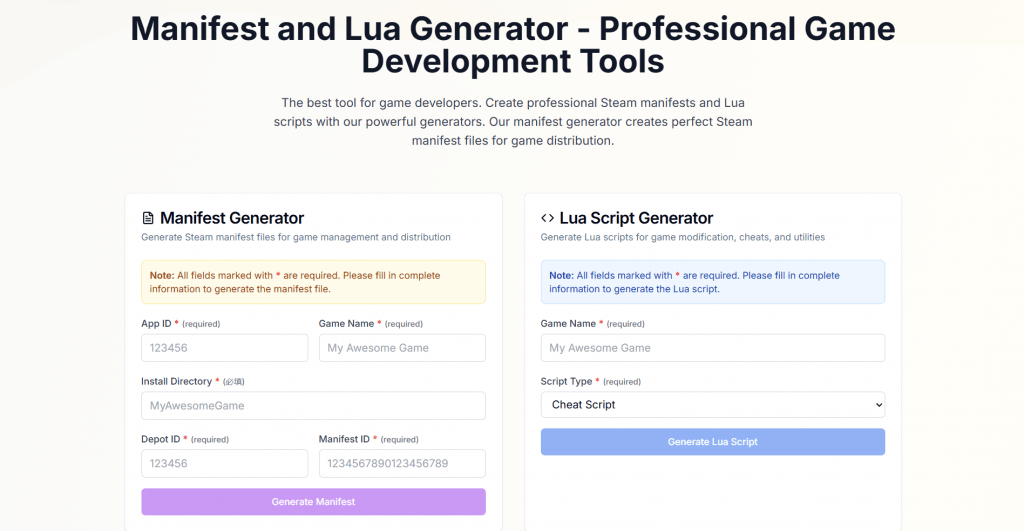
Put simply, the manifest says what the files are, and the Lua script says how they connect. A generator lua and manifest tool builds both from details you type in.
How the Generator Works
The workflow is deliberately simple, which is most of the appeal. You pick the tool, fill in a form, and download the result:
-
Enter the AppID. Every Steam product has a numeric ID that pins down the exact edition, a demo, a soundtrack, or a specific DLC. You confirm it on the Steam store page or a database like SteamDB.
-
Add the depot details. The generator asks which depots and packages you’re describing.
-
Generate and download. The tool returns the manifest and the matching Lua script instantly, with copy-to-clipboard and download buttons, and no account required.

That output then gets imported into companion software such as SteamTools, which reads the Lua file to register the app. The generator lua and manifest steam category exists to skip the hand-editing that step used to require. Before these web forms existed, people assembled the files by hand in a text editor, matching depot IDs line by line, which was slow and easy to get wrong. The generator turns that into a fill-and-download form, and that convenience is the entire reason the category caught on.
The Other Half: Lua Utility Scripts
The same site carries a second, unrelated toolbox that has nothing to do with Steam: small Lua code snippets for developers. This is where the language’s general-purpose side shows up. A random number generator lua snippet returns dice rolls or spawn values for a game script; a random string generator lua produces IDs or test data; and an ai code generator lua feature drafts starter functions from a plain-English description. If you write Lua for game engines like Roblox or Love2D, these are handy, and they carry no Steam baggage at all. Bundling them alongside the manifest tools is why the site pitches itself broadly to developers.
Pros, Cons, and Pricing
There is nothing to pay. Every generator lua and manifest site in this category, including manifestandluagenerator.app, runs entirely free, with no account, no trial, and no paid tier. That is partly the point: the tools are lightweight web forms, cheap to host, and easy to duplicate, which is why so many identical clones exist under different names. Access is unrestricted by region, and the interface is primarily English.
-
Free to use, browser-based, with no installation and no signup.
-
Produces both files instantly, which removes the fiddly manual editing.
-
The developer-focused Lua utilities (random number generator lua, string, and AI snippets) are genuinely useful and risk-free.
-
Files are plain text you can read before using, so nothing is hidden.
-
The site loads worldwide, including from Russia, with no regional block.
-
The core manifest use case violates Steam’s terms and risks an account ban.
-
The companion software it feeds is unofficial and a known malware vector.
-
No support, no accountability: these sites appear, vanish, and clone each other.
Who Uses It, and the Honest Caveat
Here’s where a useful review has to be straight with you. The site markets itself as a tool “for game developers,” and the utility scripts genuinely are. The manifest and Lua side is a different story. In practice, the generator lua and manifest cysaw style tools (cysaw is one of several near-identical sites) are used to add games and DLC to a Steam account through software like SteamTools or GreenLuma, often content the user has not bought.
That matters for three concrete reasons, so weigh them before you touch any of it:
-
It breaks Steam’s rules. Using third-party software to load content you don’t own violates the Steam Subscriber Agreement, and Valve can suspend or ban the account. These generators are not Valve products and carry no Valve guarantee.
-
The companion tools are a security risk. SteamTools, GreenLuma, and the many mirror sites are unofficial downloads. Security researchers regularly flag builds bundled with malware, and your Steam login is exactly what that malware wants.
-
Legality depends on what you load. Generating a text file is harmless; using it to access copyrighted games you haven’t purchased is not, and the responsibility lands on you.
Final Thoughts
Strip away the “for developers” framing and Lua and Manifest Generators are two tools wearing one coat. The Lua utility snippets are a small, legitimate convenience for anyone writing game scripts. The manifest generators are a front door to loading Steam content through unofficial software, and that path runs straight into Valve’s rules, a real ban risk, and downloads that security tools flag for good reason.
Knowing which half you’re looking at is the whole point. If you write Lua, the snippet tools are worth a bookmark. If the manifest side tempts you, the honest advice is to understand exactly what you’d be risking your account and your PC on first.
❓ Frequently Asked Questions
Answers to relevant questions about this AI tool