Refero Review: The Ultimate Design Inspiration Website for UI/UX
On this page
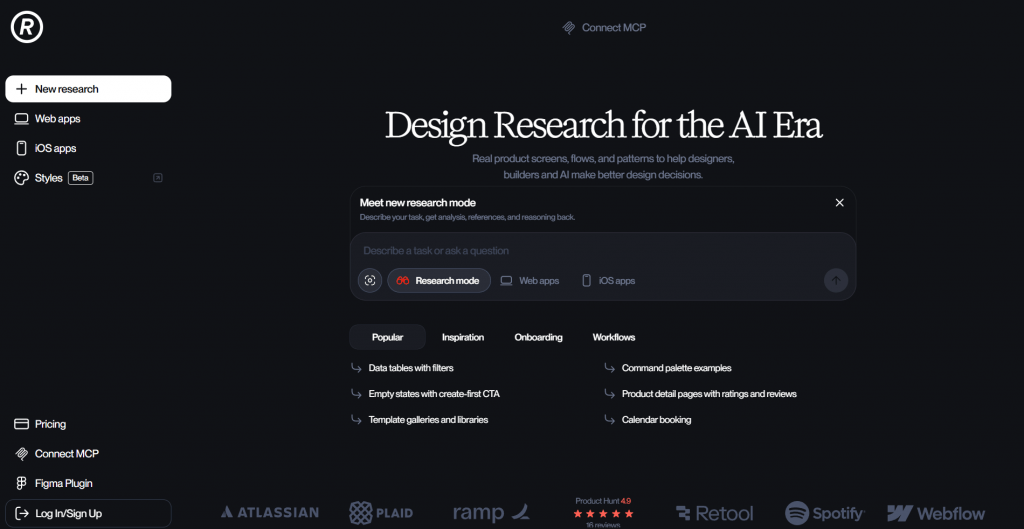
Refero.design is a professional database of real-world web interfaces and iOS applications, featuring over 112,000 screens. The platform is engineered for researching UI patterns, page architectures, and component-level design. It enables users to discover specific visual solutions (e.g., pricing tables, analytics dashboards, navigation systems) without the overhead of analyzing end-to-end user journeys (UX flows). The target audience includes webmasters, SEO specialists, UI designers, and front-end developers.

The platform is primarily utilized for visual benchmarking, competitive analysis, and rapid prototyping. Styles.refero.design operates as an autonomous sub-module for design digitization. It extracts a comprehensive design system (color palettes, typography, grid spacing) from a specified URL or brand, compiling it into a downloadable DESIGN.md specification file. This file is ingested into the context windows of AI engineering tools (Cursor, Windsurf, Claude) to impose strict, deterministic visual constraints during code generation. The tool resolves the persistent issue of generative design inconsistency and eliminates the reliance on subjective text prompts by restricting the Large Language Model (LLM) to exact mathematical brand parameters.
Analysis of the Refero.design Platform
The visual reference market is historically segmented into two distinct categories: concept aggregators (such as Dribbble and Behance), which host conceptual, often un-codable designs, and user flow aggregators (like Mobbin), which focus heavily on the transition logic between screens. Refero occupies a specialized niche: it acts as an aggregator of static components and page layouts exclusively from live, operational products across the SaaS, E-commerce, and FinTech sectors.
Core Utility and Deliverables
The primary engineering value of Refero lies in component isolation. The database architecture allows for granular filtering not just by overarching websites, but by specific UI nodes. The index is categorized by page typologies (Pricing, Checkout, 404, Dashboard), individual elements (Navigation, Modal, Footer, Data Table), and aesthetic profiles (Minimal, Brutalism, Neumorphism).
The platform provides:
- Immediate access to market-validated UI solutions, eliminating the manual process of registering for dozens of services, capturing DOM states, and organizing local screenshot libraries.
- Parallel comparative analysis, allowing an engineer to observe how enterprise-level companies (e.g., Stripe, Vercel, Linear) architect the exact same feature, such as a mega-menu for complex e-commerce taxonomies.
- Workspace organization via Collections tailored to specific development sprints or client projects.
The platform does not provide raw vector source files (like .fig or .sketch). The physical deliverable is a high-resolution visual artifact demonstrating the structural anatomy of a specific interface.
Target Audience
The tool addresses the operational bottlenecks of several technical disciplines involved in web resource deployment.
- Webmasters and SEO Specialists: Deployed for architecting high-conversion landing pages and commercial nodes. When optimizing behavioral metrics (Core Web Vitals, Dwell Time), interface usability is critical. Refero allows specialists to rapidly extract established usability standards for specific niches.
- UI/UX Designers: Utilized to bypass the “blank canvas” phase during the Discovery process. Designers compile mood boards based strictly on functional, coded patterns before initiating wireframes.
- Product Managers (PMs): Used to substantiate product hypotheses during stakeholder reviews or agile planning. Instead of relying on abstract feature descriptions, a PM can present concrete, functional implementations from direct market competitors.
- Front-End Developers: Leveraged to deconstruct the visual hierarchy and DOM structure of complex components in scenarios where detailed Figma documentation from a UI team is absent or incomplete.
Integration into Production Workflows
Refero integrates seamlessly into the analytics and prototyping phases.
When architecting a new site section (e.g., a content marketing hub), an operator queries the platform using parameters like Web -> Blog -> Minimal. The system returns a matrix of layouts. The operator analyzes how market leaders structure breadcrumbs, internal linking blocks, author bylines, and Tables of Contents. This structural data is then compiled into a technical specification sheet for the design or front-end team.
A secondary workflow addresses component redesigns based on analytics data. If Google Analytics 4 or Microsoft Clarity indicates a high Bounce Rate on an authentication flow, the Sign Up and Forms filters are analyzed. This isolates common UX patterns designed to reduce friction, such as multi-step form chunking, integrated social OAuth logins, and the elimination of non-essential input fields.
Design Token Engineering via Styles.refero.design
The Styles sub-module represents a fundamental shift in tooling. It serves as the data bridge between visual design and deterministic programming using Large Language Models. The core limitation of AI-assisted IDEs (Cursor, Windsurf) or web generators (Claude, Bolt.new) is their inability to maintain persistent visual consistency across multiple generation attempts. Without rigid constraints, the AI will interpolate arbitrary hex codes, margin values, and font weights. Styles neutralizes this variable through the strict quantification of design.
Extraction Mechanics and Artifacts
The module algorithms scan a provided URL, a designated brand preset, or a specific mood board to extract the raw mathematical values of the interface. The parser targets the DOM and cascaded stylesheets to isolate the design system architecture.
The extraction yields a single, critical artifact: the DESIGN.md file. Formatted in standard Markdown, this document acts as a highly structured machine-readable manifest of the visual language. It systematically codifies:
- Color Taxonomy: Semantic mapping of hex codes to standard application states (Primary, Secondary, Background, Surface, Border, Error, Success).
- Typography Architecture: Primary and fallback font stacks, mathematical scaling equivalents (mapping directly to Tailwind CSS text-xs through text-9xl), baseline line-height ratios, and tracking (letter-spacing) parameters.
- Spatial and Elevation Systems: Base grid scaling units (padding/margin increments), localized border-radius parameters, and layered box-shadow configurations denoting component elevation states.
This specification operates as a strict containment protocol. It disables the generative model’s capacity for visual hallucination, forcing it to compile UI components strictly within the provided token boundaries.
Target Audience for the Styles Module
Unlike the core platform, this utility is engineered exclusively for technical operators managing code generation and AI pipelines.
- Site Administrators and Full-Stack Developers: Engineers tasked with assembling full front-end architectures or deploying programmatic landing pages via AI tooling without access to dedicated UI designers.
- AI Engineers and Prompt Specialists: Operators constructing automated code-generation pipelines who require machine-readable standards to enforce strict output quality control (OQC).
- Technical Designers: Hybrid specialists responsible for translating existing corporate design systems into LLM-compatible formats for downstream engineering teams.
AI Pipeline Integration Protocols
Deploying the DESIGN.md payload fundamentally alters front-end compilation. Manual CSS authoring is replaced by managing the semantic context of the generative model.
Execution in Cursor or Windsurf IDEs
An engineer initializes a new repository. The DESIGN.md payload downloaded from Refero Styles is anchored in the project root. Global system instructions are configured within the .cursorrules or .windsurfrules files, deploying the following directive:
“Strictly adhere to the data provided in DESIGN.md for all interface styling. All colors, typography, and spacing metrics must align perfectly with this specification. Do not interpolate custom hex codes, arbitrary pixel values, or unlisted spacing increments. Generate all CSS and Tailwind utility classes exclusively based on these provided tokens.”
Following this configuration, the engineer prompts, “Generate a three-tier pricing table.” The IDE synthesizes code that instantly renders with the precision of a senior front-end developer executing a finalized Figma handoff, strictly maintaining the corporate grid and color hierarchy.
Execution in Rapid Prototyping Generators (Bolt.new, v0.dev)
Upon initiating a new workspace, the raw Markdown text from the file is injected into the primary system context window. The LLM processes the design tokens prior to synthesizing any code. Consequently, any prompted component—from a newsletter capture form to a complex product card—inherits the exact aesthetic parameters defined in the specification.
Execution via Claude 3.5 Sonnet
The operator uploads the DESIGN.md file directly into Claude as an active knowledge base context. A subsequent prompt directs the model to architect a semantic HTML structure for a landing page, utilizing either inline styles or Tailwind classes. The model successfully maps the specification tokens to the appropriate semantic DOM nodes.
Technical Competitive Analysis
To objectively evaluate the tool’s market positioning, its capabilities must be measured against established platforms in the UI reference sector.
| Platform |
Aggregation Focus |
Primary Data Format |
AI Pipeline Interoperability |
Core Engineering Objective |
|
Refero.design |
Visual UI, static component architecture. |
High-res screens segmented by logical nodes (e.g., Header, Hero). |
High (via MCP Server and Styles module). |
Analyzing the visual architecture of isolated components. |
|
Mobbin |
UX logic, end-to-end user journeys (Flows). |
Complete sequential scenarios (e.g., Onboarding, Checkout). |
Low (restricted to manual human review). |
Analyzing business logic and inter-screen transition states. |
|
Lapa Ninja |
Static marketing pages. |
Unsegmented, full-viewport landing page screenshots. |
Zero (lack of metadata or API access). |
Observing macro-level visual trends in web design. |
|
Styles (Refero) |
Token extraction (Color, Type, Grid). |
Machine-readable DESIGN.md specification payload. |
Maximum (purpose-built exclusively for LLMs). |
Mathematically constraining AI models during code generation. |
Refero does not render platforms like Mobbin obsolete if the engineering objective requires mapping complex, multi-step verification flows or overarching business logic. However, for rapid prototyping, isolating specific visual nodes, and translating those nodes directly into LLM-generated code, the Refero ecosystem provides the most highly optimized toolkit available.
Practical Application in SEO and Content Architecture
Within the operational scope of SEO engineering and site administration, the Refero toolset resolves the critical bottleneck of UI design dependency.
The deployment of new commercial landing pages targeting specific query clusters (programmatic SEO) or the execution of structural A/B tests is frequently delayed by a lack of available design resources. An SEO specialist understands the exact page architecture required to satisfy search intent but lacks the mechanism to rapidly synthesize the corresponding high-quality HTML/CSS.
By deploying the Refero + AI (e.g., Cursor) stack, this pipeline is radically reconstructed:
- Analytical Discovery: Identify a structurally superior competitor dominating the target SERP.
- System Extraction: Process the competitor’s URL through Styles.refero.design. Extract the typographical scales and grid parameters to ensure any generated code remains structurally sound while mapping the colors to the client’s existing brand guidelines.
- Code Synthesis: Prompt the Cursor IDE to generate the required interface node (e.g., a highly optimized product comparison matrix designed to support structured data/schema markup).
- Production Deployment: Inject the resulting clean, semantically structured HTML/Tailwind code directly into the CMS environment.
This methodology allows technical operators to test structural hypotheses and deploy complex content clusters in hours rather than weeks. The semantic integrity of the generated code directly benefits Core Web Vitals (specifically LCP and CLS), while the deployment of market-proven UI components significantly reduces bounce rates and extends dwell time—behavioral metrics that exert direct influence over Google search rankings.
Technical Limitations and Blind Spots
A rigorous evaluation of the ecosystem necessitates acknowledging its current technical limitations.
- Absence of Motion Design Metrics: The DESIGN.md specification maps exclusively to static interface states. The extraction module cannot parse bezier curves (easing functions), keyframe definitions, or transaction durations from live DOM nodes. Generative AI models will default to the standard animation parameters inherent to the chosen CSS framework.
- Loss of Complex Interactive States: Automated DOM parsing frequently fails to capture deeply nested interface states. Highly specific hover interactions on sibling selectors, or the visual styles applied to multi-step form validation errors (which require active user interaction to trigger within the DOM), are often bypassed by the extraction engine.
- Obfuscation and WebGL Rendering Constraints: If the target URL utilizes aggressive CSS obfuscation (e.g., runtime-generated atomic classes lacking semantic identifiers) or renders the primary interface via <canvas> WebGL, automated token extraction will fail or produce incomplete data. In these scenarios, operators must rely on the manually curated style presets available within the platform’s internal database.
Both services within the Refero ecosystem avoid feature bloat. They are engineered to execute a single, highly technical directive: the translation of abstract visual language into a structured, quantifiable format for immediate use by human engineers or generative AI models. The integration of these tools into a modern technical stack drastically compresses the timeline between hypothesis and production-ready code.
Refero Pros & Cons
-
Huge library of 112,000+ real UI screens from live SaaS, e-commerce, and fintech products
-
Granular filtering by component, page type, and style, not just whole sites
-
Compare how leaders like Stripe, Vercel, and Linear build the same feature side by side
-
Styles module extracts a full design system (color, type, spacing) into a DESIGN.md file
-
That token file constrains AI tools like Cursor, Windsurf, and Claude to build on-brand, ending arbitrary hex codes and spacing
-
Collections keep references organized by sprint or client project
-
Cuts UI research and prototyping from weeks to hours
-
No editable source files (.fig or .sketch), only high-res visual references
-
Styles captures static tokens only, missing motion, easing, and animation timing
-
Automated extraction can skip nested interactive states like hover or form-error styles
-
Fails on sites using heavy CSS obfuscation or WebGL canvas rendering
-
Focused on isolated components, so it does not map full multi-step user flows like Mobbin
Conclusion
Refero.design earns its place in a modern technical stack by turning UI research and design-system extraction into a fast, structured pipeline, whether you’re benchmarking real components or feeding exact brand tokens to AI coding tools. It won’t replace flow-mapping tools like Mobbin or hand you editable source files, but for isolating production-ready UI and translating it straight into on-brand code, few tools are as focused or as fast.
❓ Frequently Asked Questions
Answers to relevant questions about this AI tool