Trae Plugin (ex MarsCode) is ByteDance’s AI coding assistant for VS Code and JetBrains. This complete review covers features, pricing, pros and cons, user feedback, and how it compares to GitHub Copilot and Cursor. Discover if it’s the right tool for your development workflow.
Trae Plugin (ex MarsCode): Complete Review of ByteDance’s AI Coding Assistant
On this page
The market for AI developer tools is evolving at breakneck speed, and one of the most prominent players to emerge is Trae Plugin — a creation of ByteDance, the company best known for TikTok. Formerly called MarsCode, the product was rebranded in 2025 as part of a unified Trae ecosystem. This comprehensive review examines what Trae Plugin offers, its capabilities, who it suits best, and whether it deserves a place in your development toolkit.
What Is Trae Plugin
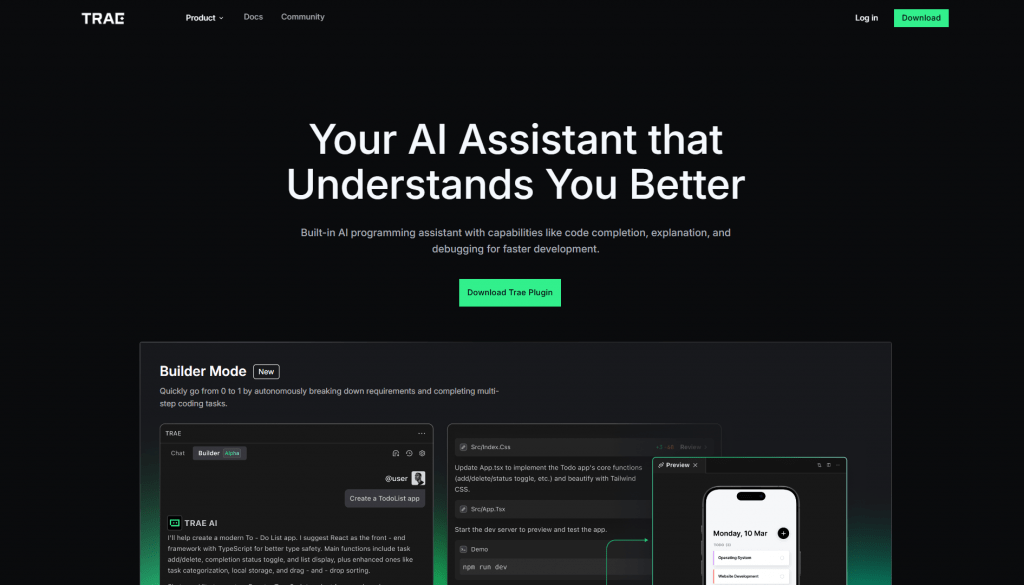
Trae Plugin, previously known as MarsCode, is an AI programming assistant from ByteDance that integrates into popular IDEs as a plugin. Its primary targets are VS Code and the entire JetBrains suite, including IntelliJ IDEA, PyCharm, WebStorm, and others. The tool is designed to boost developer productivity without requiring a switch to an entirely new editor.
While intelligent code autocompletion serves as its core function, the feature set extends considerably further to include code explanation, generation, bug fixing, and more. The plugin supports over 100 programming languages, with particularly strong support for Python, Go, JavaScript/TypeScript, C++, Java, Kotlin, and Rust.
Rebranding From MarsCode & Trae IDE
The rebranding from MarsCode to Trae Plugin occurred in 2025 as part of ByteDance’s effort to unify its AI tools under the Trae brand.
Also, a crucial distinction exists between two products: Trae Plugin serves as a lightweight addition to familiar development environments, while Trae IDE is a full-fledged AI-native editor — a fork of VS Code with expanded capabilities.
How Trae Plugin (MarsCode) Works
Technically, Trae Plugin operates through deep integration with the IDE. Installation occurs via the VS Code Marketplace or JetBrains Marketplace, after which the plugin runs in the background, continuously analyzing code context — open files, projects, and the entire workspace.
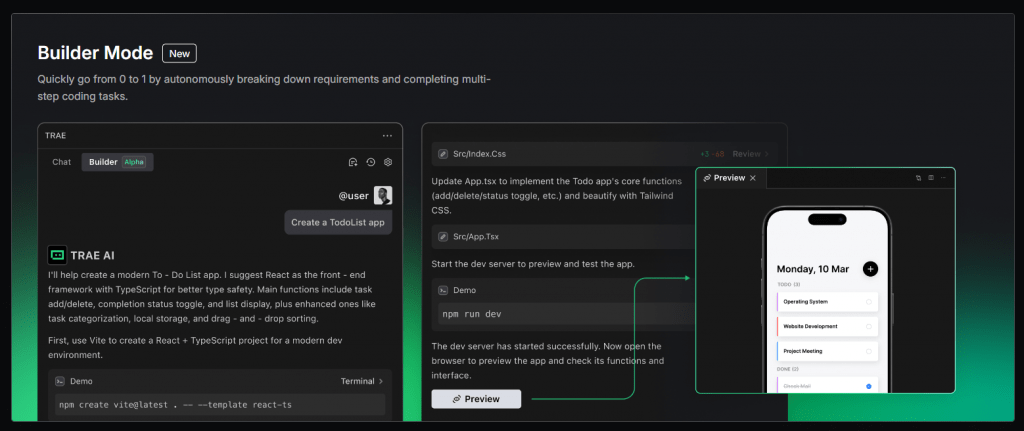
Interaction with the developer happens through multiple channels: inline autocomplete suggestions, a chat interface for questions and answers, commands triggered via comments, and selected code fragments. A “Fast Apply” feature enables one-click application of generated code with a diff view showing all changes.
Under the hood, Trae Plugin leverages proprietary ByteDance models alongside integration with top-tier models including Claude and GPT-4o. The free tier maintains access to these powerful models.
A standout feature is the workspace function — global understanding of the entire repository for navigation across large-scale projects. This capability allows the AI to deliver more precise recommendations informed by the complete codebase.
Important: ByteDance is a Chinese company, and data may be transmitted to servers in China, creating risks for enterprise projects and sensitive code. Many recommend using the plugin only for non-sensitive projects. Corporate security systems have reportedly flagged active data transmission from the plugin.
Key Features of Trae Plugin
Trae Plugin offers a comprehensive toolkit covering virtually every aspect of software development.
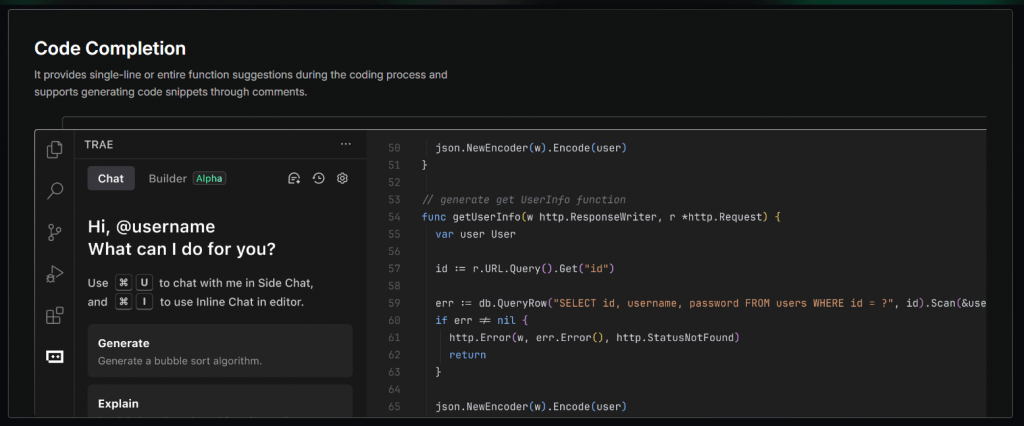
- Code Completion — single-line and multi-line code suggestions, including generation of entire functions based on comments. The system analyzes context and predicts upcoming changes, dramatically accelerating typing speed.
- Code Generation — creates code from natural language descriptions. Simply describe what you need, and the AI generates the appropriate code fragment.
- Code Explanation — provides detailed explanations of code or entire projects. This proves especially valuable when working with unfamiliar codebases. Activation occurs through the /explain command.
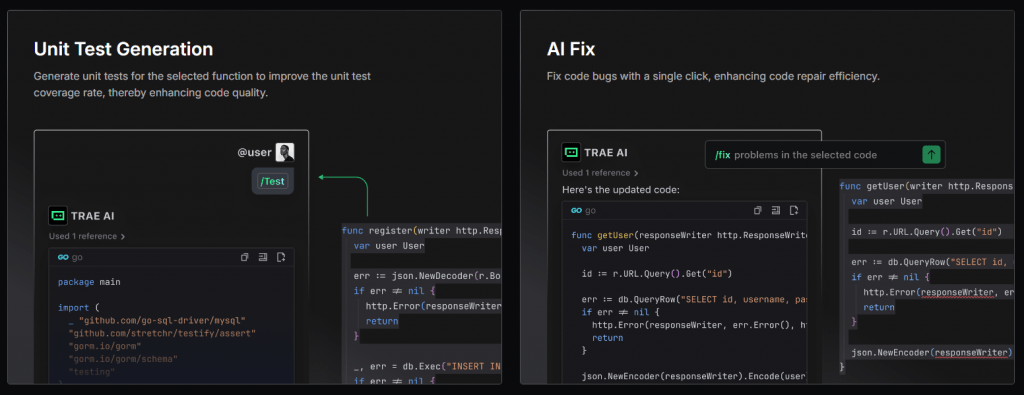
- Unit Test Generation — automatically generates unit tests for selected functions. Accessible via the /test command or corresponding menu items.
- AI Fix / Bug Fix — detects and resolves errors directly within the editor, including lint errors and debug errors. The plugin highlights problematic areas and offers ready-to-apply fixes.
- AI Q&A — delivers intelligent responses to technical questions optimized for development contexts. Available through the side panel or an embedded dialogue within the code.
- Documentation Generation — creates comments for functions and individual lines. The /doc command generates documentation at any desired level of detail.
- Workspace / Project Context — comprehends the entire codebase for more accurate recommendations.
- Builder Mode / SOLO — an autonomous agentic mode that enables delegation of complex tasks to AI, ranging from requirements analysis to module generation and deployment. This significantly expands the plugin’s utility beyond conventional autocompletion.
Additional ecosystem capabilities include multimodality, workflow hooks, and MCP integration for expanded connectivity.
Pricing
Trae Plugin’s pricing model ranks among the most generous in the market. The following structure was current at the time of this review:
|
Tier |
Price |
Key Features |
|---|---|---|
|
Free |
$0 |
5,000 completions/month, access to premium models (GPT-4o, Claude 3.5/4), basic SOLO mode, all core features |
|
Lite |
~$3/month |
Unlimited autocomplete, additional usage allowance |
|
Pro / Pro+ |
~$10—30/month |
Increased usage limits, concurrent task support, priority processing |
|
Ultra |
~$100/month |
Maximum quotas for heavy users and teams |
Enterprise options are available through BytePlus. In China, separate regional pricing applies. Usage is calculated based on tokens, and plan availability may vary by region. Many users note that the free tier remains exceptionally generous compared to competitors.
Who Benefits from Trae Plugin
Trae Plugin serves a broad spectrum of users, from beginners to seasoned developers.
- Individual developers — web developers, backend engineers, data scientists, and AI/ML specialists. The plugin accelerates routine tasks, code and test generation, and helps developers ramp up on new projects more quickly.
- Full-stack and frontend/backend engineers — rapid code generation across multiple languages and abstraction levels saves substantial development time.
- Development teams — Trae Plugin accelerates onboarding for new team members and boosts overall productivity. It functions as an additional tool within existing IDEs without requiring workflow overhauls.
- Beginner developers — access to powerful AI with a low barrier to entry accelerates learning, facilitates code comprehension, and provides real-time explanations.
Primary use cases:
- Accelerating code writing and refactoring
- Navigating unfamiliar codebases
- Generating tests, documentation, and bug fixes
- Prototyping and agentic AI programming
- Developing AI plugins and GPT-like solutions
The ideal scenario for Trae Plugin is powerful AI assistance without leaving familiar development environments and with minimal entry barriers.
Public Reviews and User Experience
Public opinion on Trae Plugin is mixed but generally positive.
- Positive reviews describe the plugin as a “game-changer,” “the best free option,” and a “beautiful tool.” Users praise free access to Claude and GPT, high productivity gains, and the SOLO mode. Total installations across marketplaces exceed 1.7 million, reflecting strong popularity.
Some developers note that Tab completions cover up to 70% of what Cursor delivers, while the pleasant interface and fast response times make for comfortable coding sessions.
- Mixed and negative reviews primarily address privacy concerns and instability. Trustpilot shows ratings around 2.2/5 in some samples, with complaints about billing issues, inconsistency, and occasional “scam” allegations following product changes. On Reddit and Hacker News, consensus holds that the tool offers excellent value for money, especially in the free version, but production use warrants careful attention to privacy.
Users also note that for small tasks, the plugin sometimes feels unnecessarily heavy, and agent mode interaction can appear unintuitive.
Competitors
The AI developer tool market is crowded, with several strong alternatives to Trae Plugin:
- GitHub Copilot — the industry classic, with deep GitHub and Microsoft ecosystem integration. Priced around $10/month. Better suited for simple autocompletion but lags in project-wide context and agentic capabilities.
- Cursor — a full AI-native IDE and fork of VS Code. Strong in agentic and multi-file scenarios but more expensive at approximately $20/month. The primary competitor to Trae IDE.
- Tabnine, Amazon Q, Claude Code, Windsurf — each with different focuses: privacy, enterprise, or speed.
- VS Code with extensions — more flexible open setups requiring self-assembly.
Trae Plugin wins on price and integration simplicity but trails in privacy and sometimes polish compared to market leaders.
Comparison Table
|
Parameter |
Trae Plugin |
GitHub Copilot |
Cursor |
|---|---|---|---|
|
Integration |
VS Code, JetBrains |
VS Code, JetBrains, Vim, Neovim |
VS Code (fork) |
|
Autocomplete |
Good |
Excellent |
Excellent |
|
Agentic Mode |
SOLO/Builder |
Available (weaker) |
Strong |
|
Free Tier |
Yes, generous |
Limited (educational) |
Limited |
|
Pro Price |
~$10/month |
~$10/month |
~$20/month |
|
Privacy |
Risks (ByteDance/China) |
High (Microsoft/GitHub) |
High |
|
Language Support |
Chinese, English |
Multilingual |
Multilingual |
|
Multimodality |
Available |
Limited |
Available |
- Free or very affordable access to top-tier models — access to GPT-4o and Claude in the free version makes this a uniquely compelling offering.
- Seamless integration with VS Code and JetBrains — no need to abandon familiar tooling or learn new workflows.
- Strong contextual awareness — workspace understanding across the entire repository improves recommendation quality significantly.
- Fast and responsive interface — the plugin does not slow down IDE performance, and the embedded dialogue keeps developers in flow.
- Additional deployment and AI plugin tools — expands capabilities beyond conventional autocompletion.
- Part of the ByteDance ecosystem — benefits from the growth potential and regular updates of a major technology company.
- Privacy concerns — your data may be transmitted to servers in China, creating risks for enterprise projects and sensitive code.
- Instability and inconsistency — like many AI tools, occasional failures, generation errors, or incorrect suggestions occur.
- Cloud dependency — no fully functional offline mode exists.
- Lagging behind leaders in complex multi-file workflows.
- High resource consumption — some complaints about significant system load during extended sessions.
Conclusion
Trae Plugin represents an accessible and powerful entry point into AI-assisted development, offering western developers access to cutting-edge models at highly attractive pricing. Individual developers, startups, and anyone reluctant to pay $20+ monthly for alternatives will find it especially appealing.
The primary strengths include a generous free tier, integration with popular IDEs, and access to premium models. For projects where privacy concerns are not paramount, Trae Plugin serves as an excellent daily companion.
For enterprise development and sensitive projects, careful review of data handling policies is essential, and alternatives like GitHub Copilot or Cursor may be more appropriate. Starting with the free version in VS Code is recommended — it provides sufficient exposure to evaluate all capabilities. Currently, Trae Plugin offers one of the best price-to-functionality ratios in the AI developer tools market.
❓ Frequently Asked Questions
Answers to relevant questions about this AI tool
Sources
-
Trae Plugin — marscode.com
-
Trae Plugin — marscode.com
-
Trae Plugin (@MarsCode_Team) / X — x.com
-
TRAE official — github.com