Liner AI: A No-Code ML Platform
On this page
Introduction to Liner AI
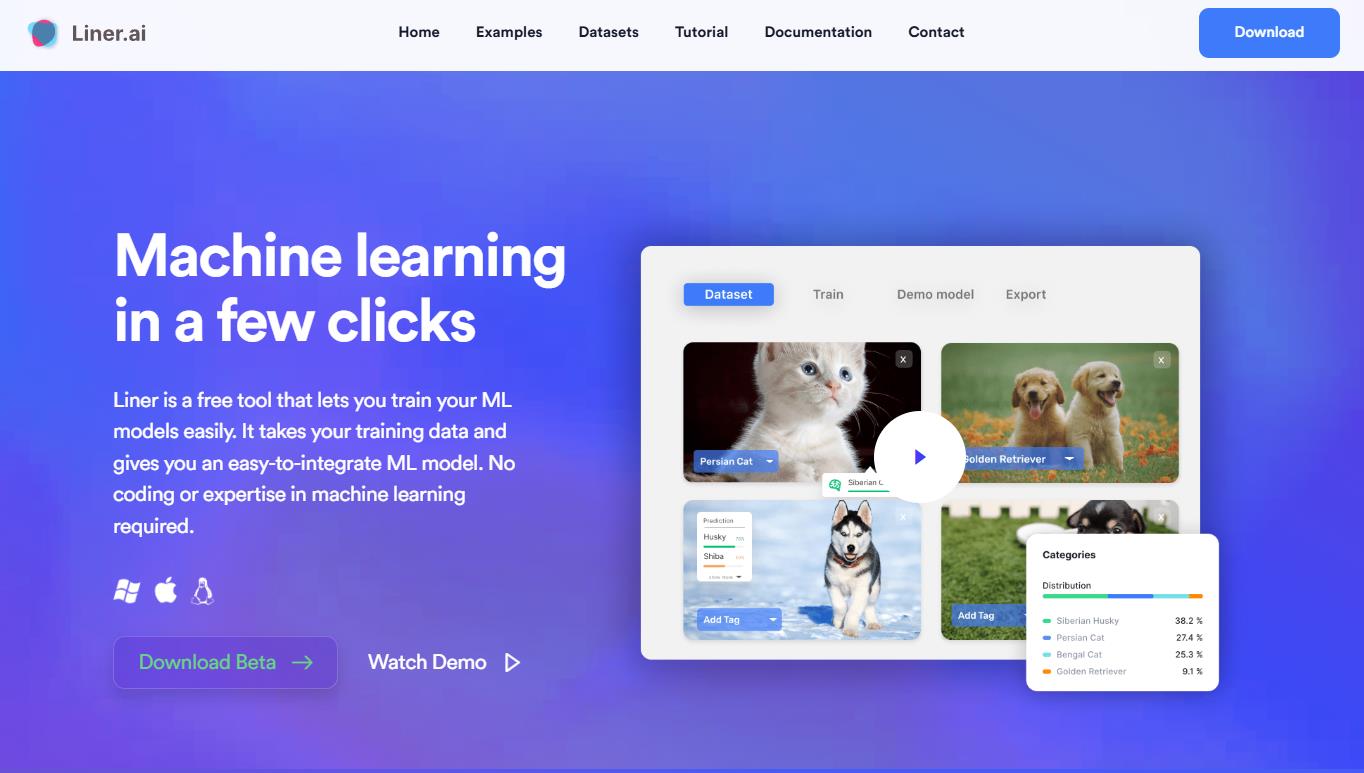
Liner AI is an open-source tool that allows you to train machine learning models without coding knowledge. It generates an ML model you can easily integrate into your app. The software is perfect for makers, students, data scientists, and business professionals who want to quickly test new models without getting bogged down in complex ML processes.What Liner AI Can Do
It simplifies machine learning significantly. Model training happens automatically: just import your data and pick a model, and the app handles the rest. The tool trains and runs the model for you automatically. The platform supports several classification types, including image, text, audio, and video. The tool can perform object detection and pose estimation. After training your model, you can deploy the system to different locations and integrate it directly into your apps. This is especially helpful for teams and individuals who want to use machine learning without deep technical knowledge or costly cloud services.How to Start Using Liner AI
Getting started with Liner AI is straightforward and requires minimal setup. The platform simplifies machine learning into five easy steps:- Download the software for Windows or Mac from the official website.
- Install the app and import your data, or use pre-labeled datasets.
- Pick your project template, and the app will automatically select and train the right model for you.
- Review your trained model and export it to your preferred platform.
- Integrate the exported model into your application.
Who Can Use Liner AI?
The platform works for anyone who needs machine learning tools; you don’t require extensive training or expertise to use it. Different users find value in this tool:- Developers: Build ML-powered applications without mastering deep learning frameworks or model training.
- Data Scientists: Release models for different types of classification and detection.
- Business Professionals: Create AI solutions to improve operational efficiency and automate tasks.
- Researchers: Run ML model training and tests for academic and experimental purposes.
- Students: Learn ML without needing to be a coding or math expert.
- Teams: Collaborate on machine learning projects with team tools and file sharing.
Liner AI Pricing
The platform gives you free access to its machine learning tools, meaning it requires no premium tiers, hidden costs, or licensing fees. You can create unlimited projects, manage teams, and share files at no cost. Training happens directly on your computer. Models can be exported to multiple platforms, including TensorFlow, Keras, TensorFlow Lite, CoreML, and ONNX. You may use ready-made data or your own to start training immediately.Final Thoughts
Liner AI is an effective tool for training machine learning models without technical expertise. The platform guides you from data import to creating a packaged model, allowing you to organize photos, analyze text, and more. The app works best when you have clean data and clear project goals. Liner AI makes machine learning accessible without costly setups, complex configurations, or programming knowledge, while protecting your data through local processing.
Pros
-
-
- Completely free with no premium tiers or hidden fees.
- Works fine on regular computers, no fancy graphics card needed.
- Your training info never leaves your machine, so it stays private.
- Supports seven different ML model types and tasks.
- In most cases, models train within minutes.
- Export to multiple platforms (TensorFlow, CoreML, TensorFlow Lite, ONNX).
- Pre-labeled dataset library available for quick starts.
- Intuitive interface requires no machine learning experience.
-
Cons
-
- Desktop application only, no cloud or web-based interface.
- Limited to specific model types (classification, detection, segmentation, pose).
- Requests manual data preparation and labeling for best results.
- ML experts may find the customization options basic.
- Training performance depends on local computer specifications.
❓ Frequently Asked Questions
Answers to relevant questions about this AI tool
What kinds of machine learning models can I use with Liner AI?
It excels at identifying elements in images, text, audio, and videos. It can also detect objects, perform image segmentation, and estimate poses.
Does Liner AI require a GPU or special hardware?
This tool can train models efficiently on standard hardware. You do not need to invest in expensive GPUs.
Is my data secure when using Liner AI for training?
Yes, all training is done directly on your computer, so your data never leaves it. Since Liner handles everything on your device, your data remains fully private and secure.
Sources
-
Liner AI — liner.ai
-
Pricing — liner.com
-
Pricing - Liner Developers — liner.com
-
Liner Reviews (2026) - Product Hunt — producthunt.com
-
Liner AI Reviews - 2026 - Slashdot — slashdot.org