MuseGen AI is a browser studio that turns a text prompt into a finished song, built on Suno’s music models. We cover how generation works, what the cover and extension tools add, what the plans cost, and where the limits sit.
MuseGen AI Review: Full Songs From a Text Prompt
On this page
Describe a song out loud, the way you would to a friend: moody lo-fi, a tired female vocal, and lyrics about closing shifts. MuseGen AI asks for exactly that sentence. Type it into the box at musegen.org, wait a minute or two, and a finished track comes back with vocals, lyrics, and mastering already in place.
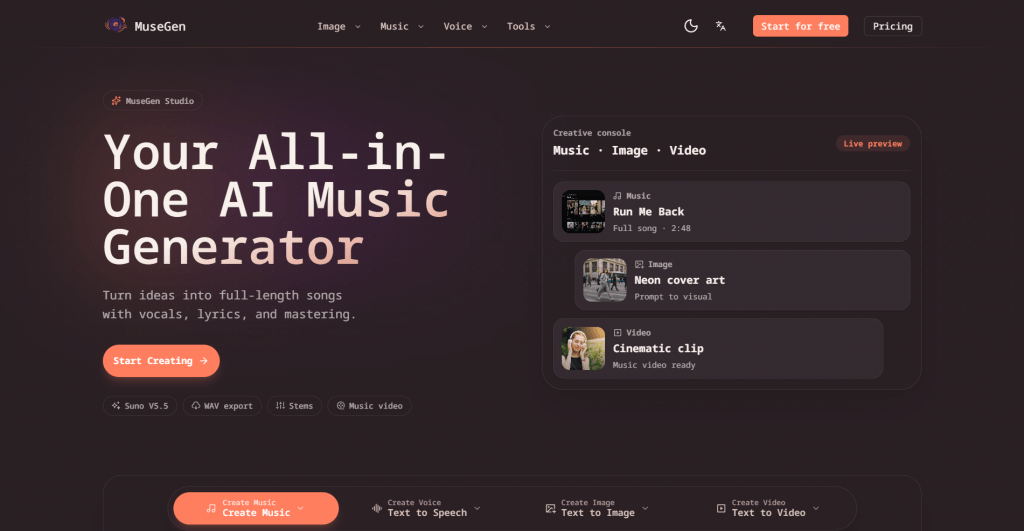
One thing to know before the details is MuseGen composes nothing on its own: Suno’s models write the music, with MiniMax Music 1.5 on the menu as an alternative; ElevenLabs supplies the speech voices; and engines like Sora 2, Veo 3.1, and Nano Banana sit behind the video and image credits. MuseGen wraps all of it in a single subscription with editing tools, a cover studio, and one shared credit pool. Whether that bundle earns its fee is the real question here. This review covers the workflow, the cover and extension tools, the plans, and the limits.
How a Prompt Becomes a Track
The generation flow takes three moves:
-
Describe the song. A one-line prompt is enough, or switch to custom mode to paste your own lyrics, pin down genre and mood, or request a pure instrumental.
-
Pick the engine. MuseGen runs Suno V5 and V5.5, with the newer model marked as recommended. A generation costs 10 credits and returns two takes of the song.
-
Edit what comes back. Regenerate a weak section, adjust the lyrics, or hand the track to the extender, which continues a song from any timestamp you choose while holding the original key and tempo.
Exports cover MP3, WAV, MIDI, and separated stems, and that last pair is the detail producers will notice: MIDI and stems mean the AI’s draft can move into a real DAW for proper work instead of staying a novelty file.
Suppose you type: “synthwave, male vocal, 110 BPM, a chorus about driving at night.” A couple of takes come back a few minutes long each. The verse works, the bridge drags, so you regenerate only the bridge, stretch the outro by thirty seconds with the extender, then pull the stems into your DAW to finish the mix properly.
The Cover Tool and the Mordecai Question
The AI voice cover tool takes a song you already have, an MP3, a WAV, or a pasted YouTube link, splits the vocal from the instrumental on its own, then re-sings the vocal line with a voice from a library you can filter by gender, genre, and popularity. Pitch shifting, key changes, and custom voice cloning sit alongside, so the same feature doubles as an AI voice changer for finished tracks.
Now for the search that brings many readers here. Plenty of people arrive at tools like this hunting a mordecai ai voice, hoping to hear the blue jay from Regular Show take on a pop chorus. Set expectations early: MuseGen is not a character voice generator, and no Mordecai model ships with the library. If mordecai ai voice singing is the goal, the workable route is cloning a suitable voice sample through the cover tool yourself, and keeping the result in fan territory, since a recognizable character voice is not yours to monetize. A dedicated mordecai ai voice generator lives on community model sites; MuseGen’s library sticks to original voices, which is precisely what lets it promise rights-safe output.
Text to Speech on the Side
The same subscription includes a spoken-audio tool with text-to-speech voices powered by ElevenLabs: scripts up to 5,000 characters, different voices on separate dialogue lines, a stability slider for delivery, and automatic language detection. For narration, ads, or video hooks it replaces a second subscription, which is the quiet theme of the whole platform.
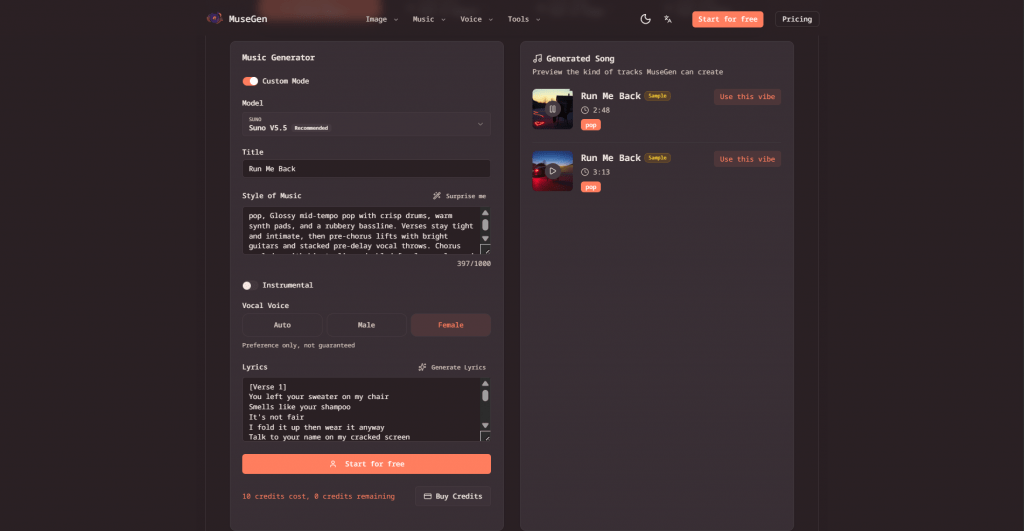
The music menu runs deeper than one prompt box: a rap generator, a lyrics writer, and a standalone vocal remover sit alongside the main tools, and a developer API lets studios embed generation into their own apps and games.
Who does all this serve? Mostly creators who need audio faster than they can commission it. YouTubers generate background tracks and voiceovers in one place, podcasters get an intro theme and episode narration from the same credit pool, indie game developers take the stems for adaptive soundtracks, and DJs feed half-finished demos to the extender to test where a track wants to go. None of them needs to read notation, which is the point.
Pros & Cons
- One credit pool covers music, covers, speech, images, and video, so a single fee replaces several tools.
- The cover studio accepts a plain YouTube link and handles vocal separation itself, no manual acapella required.
- MIDI and stem exports carry the output into any DAW.
- The extender continues a track from an exact second without an audible seam.
- Everything runs in a browser, with nothing to install.
- The engines are rented: if you only need music, a direct Suno subscription on annual billing costs about the same and removes the middle layer.
- Covers, extensions, stems, and WAV export all sit in the Pro tier, so Basic is prompt generation only.
- The platform launched in January 2026 with a single indie developer behind it, and support runs through email and Discord, thin footing for client work.
Pricing: What the Plans Cost
|
Plan |
Monthly |
Annual billing |
What you get |
|
Basic |
$19/month |
$9.50/month |
1,600 credits, up to 320 songs, standard queue |
|
Pro |
$29/month |
$14.50/month |
4,000 credits, up to 800 songs, Suno V5.5, covers, extensions, vocal remover, stems, audio-to-MIDI, music videos, WAV export |
|
Unlimited |
$69/month |
$34.50/month |
Unlimited generations under fair use, priority processing |
Allergic to subscriptions? One-time packs sell 1,000 credits for $39, 3,000 for $99, and 8,000 for $199. They never expire, stack with any plan, and carry no recurring billing. Otherwise, read the table this way: Basic exists to test the generator, Pro is the actual product, since the cover tool, stems, and extensions live there, and Unlimited is for studios pushing client volume through daily.
Languages and Access
Vocals generate in multiple languages, though the site publishes no official list, so spend one cheap prompt testing yours before committing a batch of credits. The interface loads in English and carries a language switcher in the header, without a published list of locales either. Access needs nothing beyond a browser and an account; for users in Russia the obstacle is payment rather than the site itself, since neither payment processor accepts Russian-issued cards.
Final Thoughts on MuseGen AI
As a pure music engine, MuseGen AI adds little that Suno does not already sell at a similar price. The case for it is the workspace built around the engine: covers from a YouTube link, MIDI and stems for the DAW, ElevenLabs speech, and image and video credits under one Pro-tier roof. The buyer it fits is a creator who needs a bit of everything and would rather manage one subscription than four. The songs arrive in minutes either way. Knowing which one is worth keeping still takes a musician.
❓ Frequently Asked Questions
Answers to relevant questions about this AI tool
Sources
-
MuseGen — musegen.org
-
AI Music Generator — musegen.org
-
AI Image Generator — musegen.org
-
AI Music Extender — musegen.org
-
Image to Video — musegen.org