DALL-E 3 Prompt Generator: Chrome Extension Review
On this page
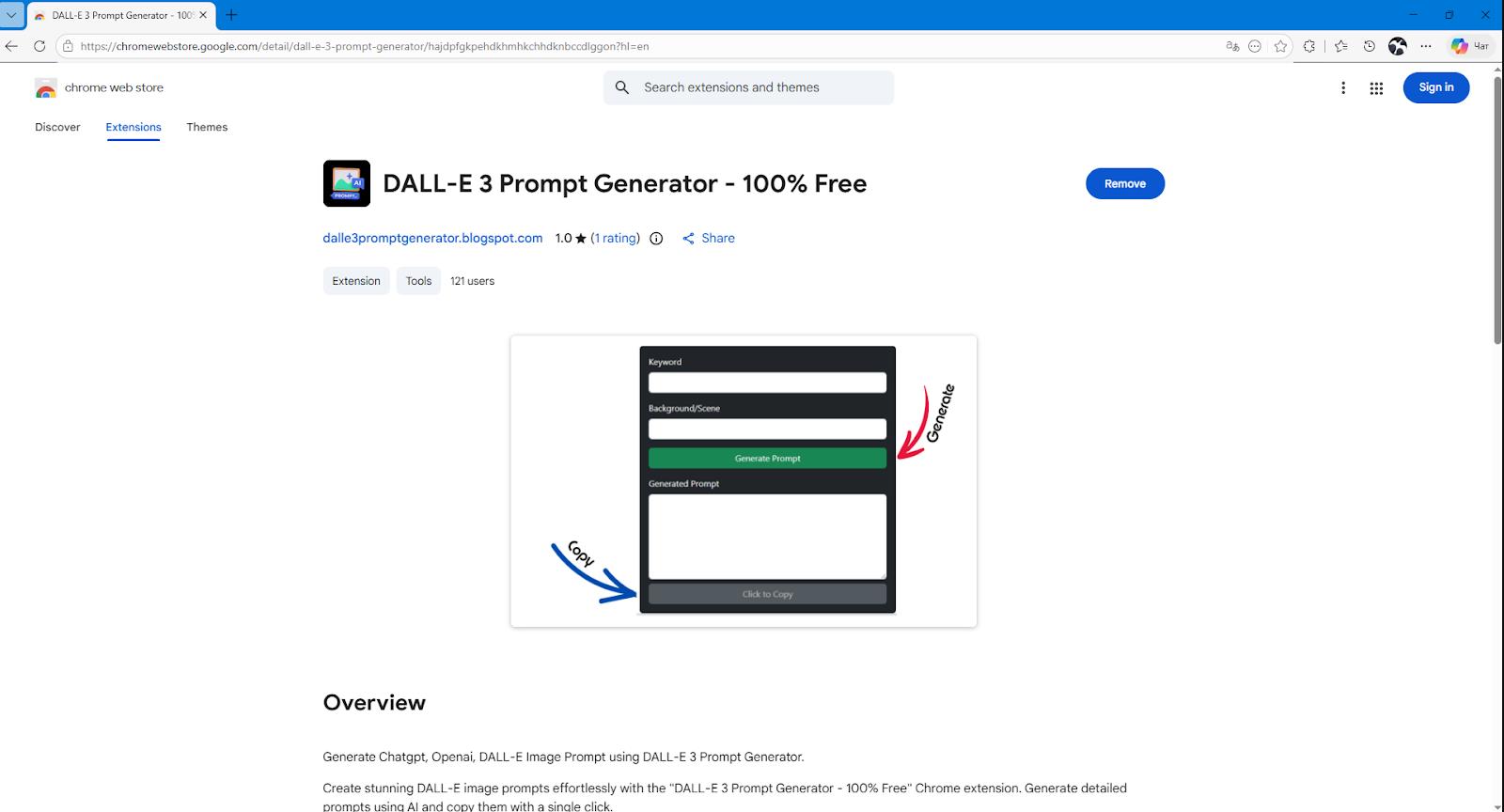
Have you ever asked DALL-E 3 to generate an image, only to get something beautiful but completely different from what you had in mind? If so, the issue is likely the prompt. The model understands human language well, but without clearly defined details, even the smartest AI can’t always figure out exactly what you’re picturing. The DALL-E 3 Prompt Generator browser extension for Google Chrome was created specifically to solve this problem. No registration, no subscriptions—just a small helper right inside your browser.
What is DALL-E 3 Prompt Generator?
The extension positions itself as a helper for users of DALL-E 3, ChatGPT, and compatible platforms. It does not generate images on its own but instead creates optimized, detailed text descriptions—prompts. You provide keywords, choose a scene, and the extension generates a ready-to-use script. All that’s left is to copy it and paste it into DALL-E 3.
The tool works only in Chrome and Chromium/Blink-based browsers (Edge, Opera, Brave, etc.). It requires no registration and is distributed for free. It’s a useful but narrowly focused solution for anyone working with visual content who doesn’t want to spend time on manual prompt engineering.
How it works in practice
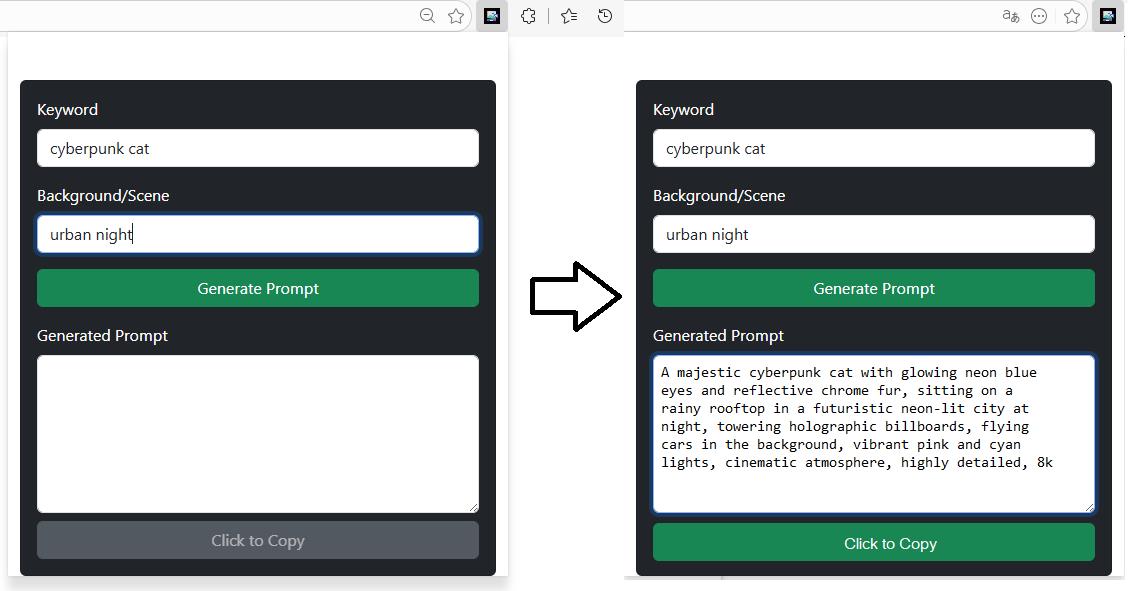
The extension installs in seconds from the Web Store—you don’t even need to sign in to the marketplace. Once installed, an icon appears in your browser toolbar. Click it, and a small window opens with two fields: one for keywords and one for selecting a scene.
The workflow consists of a few simple steps:
- Enter keywords—for example, “cyberpunk cat in a rainy city.”
- Choose a background scene from the provided list, such as “urban night.”
- Click the “Generate” button.
- The AI, powered by the OpenAI API, produces a detailed prompt in English—complete with details about lighting, textures, camera angle, and mood.
- Copy the generated text with a single click and paste it into DALL-E 3 via ChatGPT, Bing Image Creator, or Microsoft Designer.
Important: the extension does not generate images. It only writes instructions for an image generator. And it does exactly what you ask—no extra settings, no style libraries, no advanced options. The entire logic revolves around the combination of keywords and a background scene.
Who it’s for
The tool doesn’t try to be a universal solution, and in that sense it’s honest. It will appeal to anyone who regularly works with DALL-E 3 and is tired of manually writing phrases like “soft backlight, oil painting texture, shallow depth of field”:
- Digital artists and illustrators
- Graphic designers
- SMM specialists and content creators
- Marketers creating visuals for ad campaigns
- Educators and authors needing illustrations for educational materials
Instead of spending five minutes crafting a prompt for a presentation cover, you type “modern office, team, brainstorming” and get a ready-made description to send off for generation. It’s a small thing, but if you have a dozen such tasks a day, the time savings add up. The extension lets you focus on creative work:
- Quickly generating artwork for social media
- Creating visuals for presentations and marketing materials
- Prototyping ideas for graphic design
- Preparing illustrations for educational content
- Simple and intuitive interface
- High speed of photo analysis
- Extensive database of celebrities
- Availability across all platforms
- Regular updates
- Paid subscription required to view results
- High error rate with poor quality photos
- Technical glitches and app crashes
- Abundance of ads in the free version
- Questionable behavior on Android devices
User reviews and ratings
Public attention to DALL-E 3 Prompt Generator remains minimal. At the time of review, the extension had only 121 users. On its Chrome Web Store page, there is a single rating—1.0 out of 5—with no accompanying text. No mentions can be found on Creati.ai, Reddit, YouTube, or X.
While people generally view the concept of automated prompt generation positively, they tend to prefer other tools for the job. The core issue with DALL-E 3 Prompt Generator is simple: competitors offer more.
Comparison with alternatives
The market for DALL-E 3 prompt generators is quite saturated. The main competitors offer significantly broader functionality and are generally more comfortable to use:
- DALL-E Prompt Helper — 270+ styles, keywords, GPT-3-based autocomplete, dark theme.
- HyperWrite DALL-E 3 Image Prompter — a specialized generator for detailed prompts.
- PromptsGenii, PromptPal, AI Image Prompt Enhancer — extensions with extensive settings and presets.
- AIPRM — thousands of ready-made prompts for ChatGPT with an active community.
- Built-in ChatGPT Plus mechanism — automatically improves prompts for DALL-E 3 without requiring additional extensions.
Against this backdrop, DALL-E 3 Prompt Generator comes across as something “maximally minimalist.” Yes, it’s free and it handles a single function. If all you need is a button for quick prompts, it will work. But if you want flexibility, it’s worth looking at the alternatives listed above.
Conclusion
DALL-E 3 Prompt Generator is a tool built for one specific task: quickly turning short keywords into detailed prompts for DALL-E 3. It’s free, easy to use, and requires no registration. However, its basic functionality limits its appeal—something reflected in its lack of popularity and low rating.
❓ Frequently Asked Questions
Answers to relevant questions about this AI tool
Sources
-
DALL-E 3 Prompt Generator — chromewebstore.google.com
-
OpenAI DALL·E 3 — openai.com
-
DALL-E 3 Prompt Generator - 100% Free - Chrome Web Store — chromewebstore.google.com
-
DALL-E 3 review - PC Guide — pcguide.com