Main page » Chrome Update: Google Integrates Gemini into the Browser

Chrome Update: Google Integrates Gemini into the Browser

September 18, 2025 — Google announced a major Chrome update, integrating Gemini directly into the browser. This transforms Chrome from a passive viewing tool into an active AI assistant capable of processing information and completing tasks on your behalf.
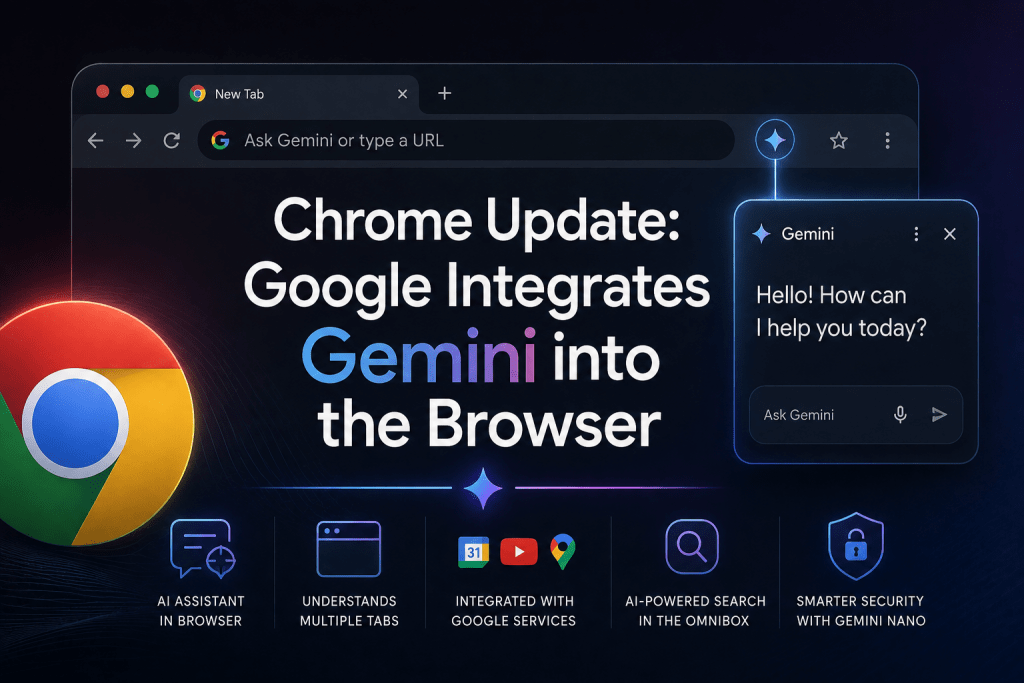
Promotional graphic announcing "Chrome Update: Google Integrates Gemini into the Browser", showing a Google Chrome browser window with an address bar prompt and a side-panel Gemini AI chat window, alongside feature icons for Google service integrations and Gemini Nano security.

Key Updates in Chrome

These new features are now available for macOS and Windows users in the United States using English. The functionality will roll out to Google Workspace and mobile versions of Chrome in the coming weeks.

Chrome now empowers you with AI:

  • Access Gemini directly from the browser interface: An assistant icon appears in the top-right corner of Chrome. You can ask for explanations of complex content on any webpage, leveraging the context of your open tabs.
  • Work across multiple tabs: Gemini can compare and synthesize information from several open web pages. For instance, it can create a unified travel itinerary by pulling together scattered details about flights, hotels, and attractions.
  • Deep integration with Google services: Seamless connection with Calendar, YouTube, and Maps lets you, for example, jump to a specific moment in a YouTube video or schedule a meeting — all without switching tabs.
  • AI-powered search in the Omnibox: The address bar now features an AI Mode. You can ask complex, multi-turn questions and receive answers powered by AI Overview.
  • “Agent” capabilities: In the coming months, Gemini will learn to perform multi-step tasks — like booking a restaurant reservation or filling your online shopping cart — by simulating user actions.

Security and Privacy

Google is expanding its use of the Gemini Nano model to enhance security in Enhanced Protection mode. Chrome with AI will better identify sophisticated phishing websites. Enterprise Workspace users will have dedicated controls for access management and data protection.

Some features, like automatically changing compromised passwords on supported websites, also leverage Chrome’s built-in AI.

Conclusion

This Gemini update marks Chrome’s transformation into a proactive, intelligent assistant. While some features are currently U.S.-only, global expansion is expected soon.

For a comprehensive overview of Gemini’s full capabilities, check out our detailed guide via the link.

❓ Frequently Asked Questions

Answers to relevant questions about this AI tool

What is Gemini in Google Chrome?
Gemini is an AI assistant built directly into Chrome. It can explain information on webpages, answer questions using the context of open tabs, and help with tasks without requiring users to leave the browser.
How do I access Gemini in Chrome?
Gemini appears as an assistant icon in the top-right corner of the browser. Selecting it opens the AI interface, where you can ask questions about the page or tabs you are viewing.
Is Gemini in Chrome available to everyone?
At launch, the integration was available in English to macOS and Windows users in the United States. Google said support for Workspace accounts, mobile devices, and additional markets would follow.
Can Gemini read information across multiple Chrome tabs?
Yes. Gemini can compare and summarize information from several open tabs. This is useful for researching products, planning a trip, or bringing details from multiple sources into one answer.
Which Google services work with Gemini in Chrome?
Gemini connects with services including Google Calendar, YouTube, and Maps. Depending on the task, it can help schedule events, find moments within videos, or work with location information.
Can Gemini complete tasks inside Chrome?
Google plans to give Gemini agent-like capabilities for multi-step tasks such as making restaurant reservations or adding products to a shopping cart. These features were announced for a later rollout rather than included in the initial release.
How does Gemini affect security and privacy in Chrome?
Chrome uses Gemini Nano to improve phishing detection in Enhanced Protection mode. Google has also announced administrative controls for Workspace customers, though users should still review their Chrome and Gemini data settings before enabling AI features.
Read more
OpenAI has launched GPT-6 Astra, calling it its most intelligent model yet and pointing to...
2 weeks ago
0 622
The week of August 24 to 30 turned on money and law rather than model...
3 weeks ago
0 115
Google Updates Gemini 3.5 with Live Translate Features The release of Gemini 3.5 Live Translate...
1 month ago
0 221

Leave a Reply

Your email address will not be published. Required fields are marked *