@AIMarketCap_bot is a multimodal AI assistant in Telegram powered by ChatGPT 5.5. Generate and edit images, analyze photos, solve text tasks, and work with documents — all in one messenger interface. First 2 generations are free. Pay with Telegram Stars.
AIMarketCap_Bot Review — Your AI Assistant in Telegram
On this page
Modern neural networks are no longer confined to complex APIs or cumbersome web interfaces. Artificial intelligence is confidently moving onto mobile devices. The team at AIMarketCap has developed its own AI assistant, @AIMarketCap_bot, which works directly in Telegram—no app installations, no extra registrations, just within the familiar messenger interface. Convenient, practical, and always at hand.
What It Is
@AIMarketCap_bot is an AI assistant operating in Telegram that combines multiple AI-powered scenarios within a single interface. The developers’ vision is an “all-in-one” helper for content generation, solving everyday tasks, and providing quick access to AI without the need to switch between different services or applications.
The bot serves as a practical extension of the AIMarketCap ecosystem: website readers can not only study reviews but also use AI technologies directly in the messenger.
How AIMarketCap_bot Works
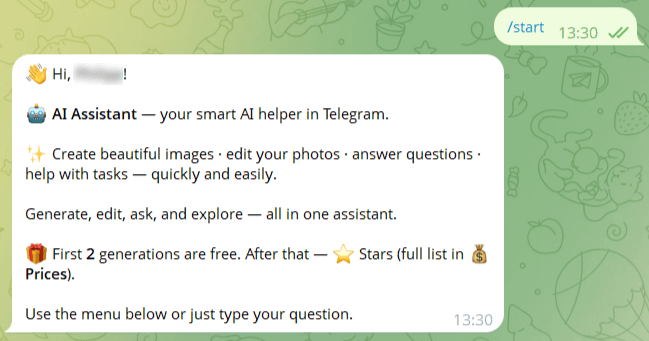
Launching the bot is straightforward: find @AIMarketCap_bot in Telegram and press Start—it’s ready to go immediately, without additional registrations or installations.
At its core, the bot uses ChatGPT 5.5. This is the only model integrated into the assistant. The developers did not aim to build a multi-platform service—rather, this is a fast and simple tool for quickly solving basic tasks that frequently arise in daily life.
Key usage scenarios include:
- Image Generation. Describe a prompt—the bot creates an image. This uses GPT Image 2, which is part of ChatGPT 5.
- Photo Editing. Upload an image and give instructions: remove background, change style, improve detail, and so on. You can also ask the bot in the prompt to insert your face when generating or modifying the main image (don’t forget to upload your photo to the chat).
- Chat and Task Solving. Ask questions, request text generation, ideas, translations, or code snippets—the bot processes requests in a conversational mode.
- Integration with the AIMarketCap Website. The bot can recommend tools from the catalog or reference reviews, turning it into a guide through the site’s ecosystem.
The bot works in private chats and maintains conversation context for extended dialogues.
Interface and Capabilities
You can use the bot in two ways: through the main menu buttons or by sending messages directly in the chat.
Main Menu: Core Operating Modes
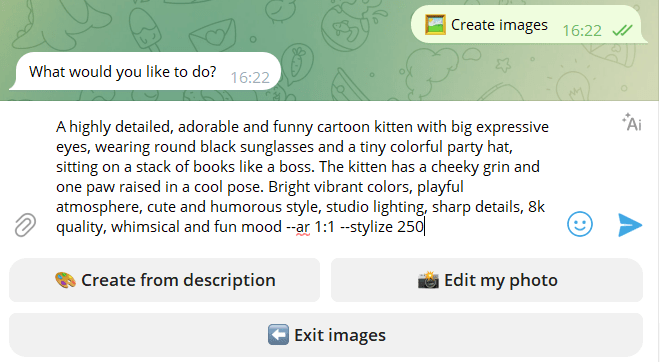
🖼 Create Images. Use this mode for creating or editing images.
- 🎨 Create from description — create a new image from text.
- 📸 Edit my photo — upload one or more photos and describe what you want to change.
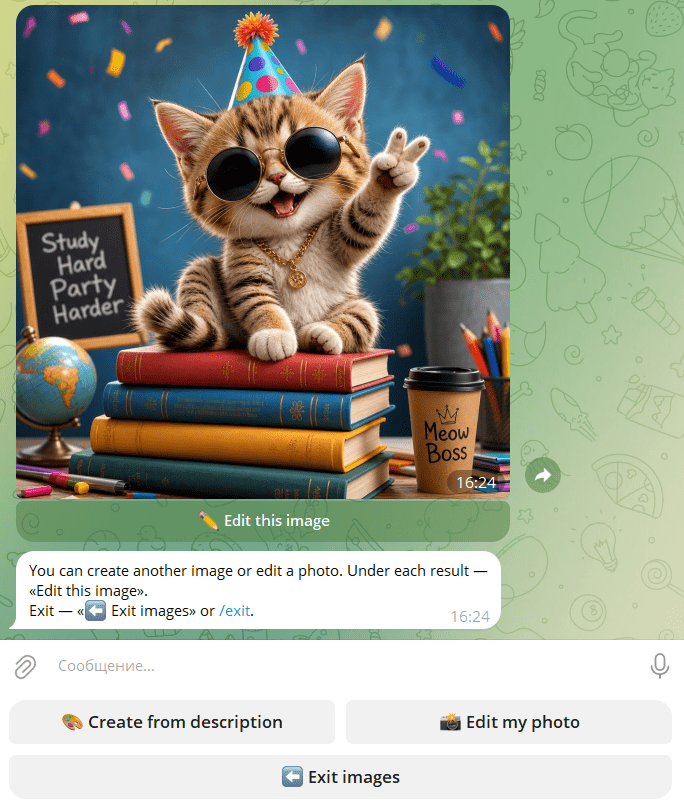
- ✏ Edit this image — appears in the “generated images” section and allows further modifications: background changes, style adjustments, quality improvements without using complex graphic editors.
To finish, press ⬅️ Exit image mode or send /exit in the chat window.
📝 Solve a Task. Useful for entrepreneurs, marketers, managers, and students. Use this mode for tasks, documents, and file analysis. You can send:
- photos and images in all major formats: .jpeg, .gif, .bmp, etc.;
- PDF files;
- Word files in .docx format;
- presentation files .pptx.
Maximum file size: 20 MB. You can add a caption with details to the file. Legacy .ppt / .doc files are not supported—save them as PDF instead.
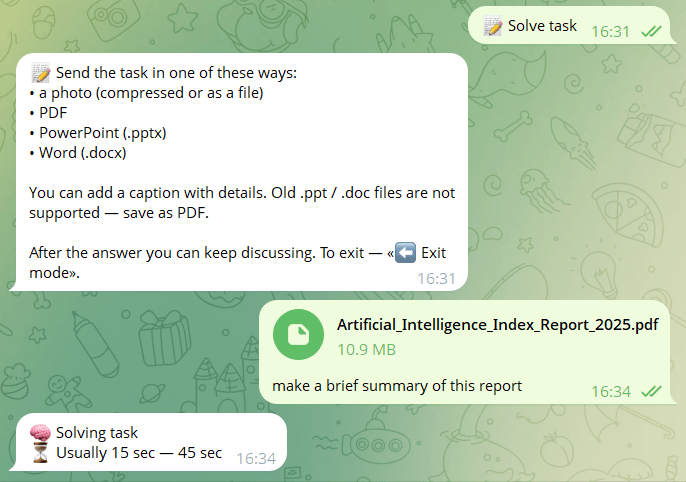
To exit this mode, press ⬅️ Exit mode.
👤 My Profile. Here you can check:
- your balance;
- usage statistics;
- top-up options.
💰 Prices. You can see:
- image creation cost;
- editing cost;
- top up your ⭐ Star balance.
Chat: Conversing with AI
The bot can also function as a text assistant: answering questions, helping with phrasing, generating ideas, solving simple tasks.
After the bot responds, you can continue the conversation in the same chat, asking follow-up questions just like in ChatGPT. Without using buttons, through the chat window you can:
💬 Send a text question. Simply type your question into the chat. The bot will respond with text and will use web search if necessary.
📷 Send a photo directly in the chat. The bot will analyze the photo, describe it, or answer questions about it. This is not the same as image editing mode.
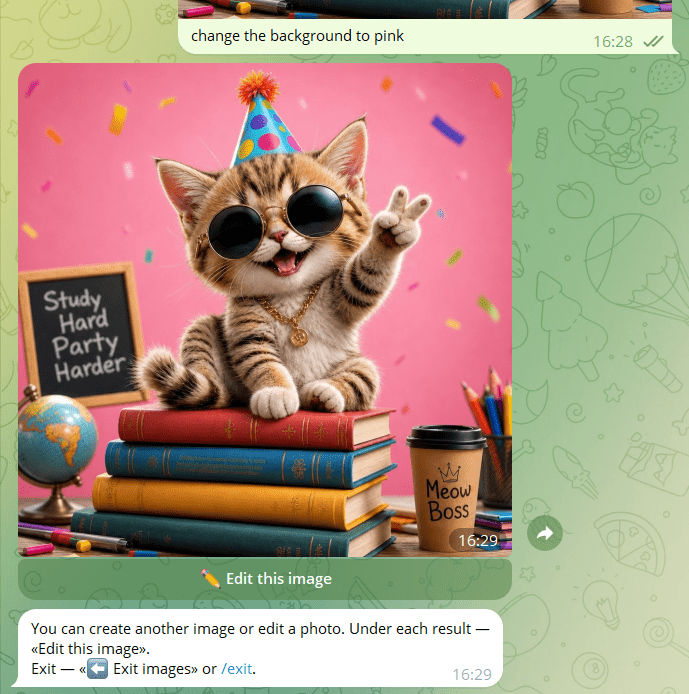
✏ Ask to edit the last image. If the last generated image is still available, you can type commands like:
- edit this;
- add or remove something;
- change the background or make it more realistic.
Free Generations and Balance
🎁 The first 2 generations are free. After that, the cost of each generation will be shown in ⭐ Stars. You can check all expenses in the 💰 Prices section.
The bot remembers the last 10 messages in the current conversation. Memory is automatically cleared after 30 minutes of inactivity. To manually reset the conversation, press the /reset button.
Pricing Policy
The pricing is based on a pay-as-you-go system. Initially, the bot offers 2 free generations. After that, you need to top up your balance with Telegram Stars. Rates:
- 5 Stars for a text request,
- 12 for image creation,
- 15 for editing,
- 10 for tasks,
- 8 for photo analysis.
The connection to Telegram’s local payment infrastructure is both an advantage (ease of payment) and a limitation (tied to the messenger’s internal currency).
Important: you can purchase Stars for payment directly in the bot, but only in the mobile version. Purchasing Stars in the desktop version of Telegram is not yet supported.
Our team plans to hold giveaways and contests in the future where you can win free Stars. Follow announcements and updates in our Telegram channel!
Who Will Benefit
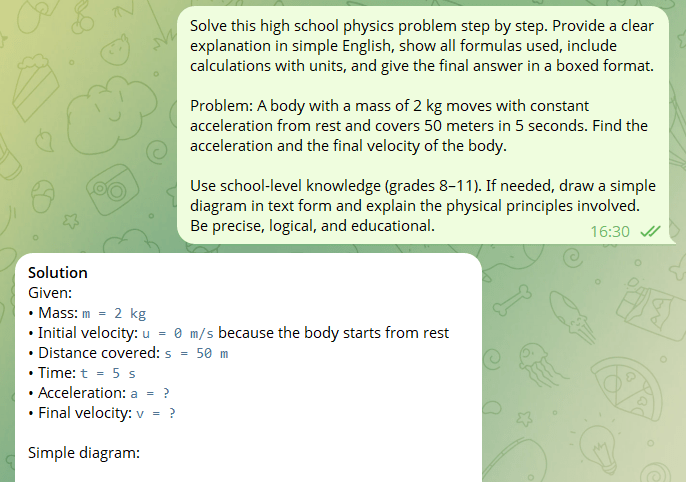
As you can see, right in Telegram, on your smartphone, you get everything that ChatGPT 5.5 offers. This will be especially useful for:
- Students, freelancers, researchers — for solving academic and work tasks, preparing materials, analyzing information.
- Marketers and SMM specialists — for quickly generating visuals and texts for posts, stories, advertising layouts.
- Designers and creators — to test ideas, create references, or edit images on the go.
- Anyone who wants AI “in their pocket” — mobile access without installing applications or registering on multiple sites.
Use Cases
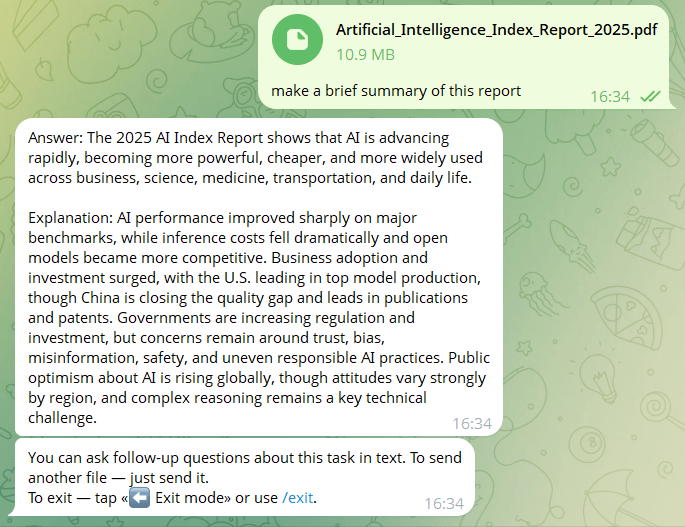
Here are some of the most in-demand scenarios where a pocket-sized multimodal AI can help you.
- For research: a student asks the bot a question about their thesis topic, receives a structured answer and additional ideas for reflection.
- For presentations: a designer uploads a product photo, asks to remove the background and change the style to minimalist—a ready-made element is inserted into the slide.
- For social media: a brand marketer describes a prompt for a visual for a product announcement, gets several options, chooses the right one, and edits it directly in the bot—all within 5 minutes in Telegram.
- For everyday tasks: a user asks the bot to translate text, generate a list of gift ideas, or write a brief summary of an article.
- Gift for new users — 2 free generations.
- Everything in one Telegram interface — no need to install separate apps.
- Quick access to AI in mobile format, always at hand.
- Minimal entry barrier — launches in seconds, understandable for beginners.
- Payment via Telegram Stars — familiar and local for messenger users.
- Not suitable for complex professional tasks compared to web platforms.
- Image generation can sometimes take a significant amount of time.
- Tied to the Telegram ecosystem and its internal currency.
Conclusion
@AIMarketCap_bot is a practical and accessible way to have a universal AI assistant in Telegram. It doesn’t replace professional tools for complex tasks, but it covers 80% of everyday needs in image generation, photo editing, solving academic tasks, and working with text.
It’s worth seeing as a mobile AI hub for quick tasks and experiments. We recommend starting with the free generations to evaluate the quality and convenience, and then moving on to full-fledged work by topping up your Star balance. Given the dynamic development of AI services, the bot’s functionality may expand—follow announcements on our website and in the bot itself!
❓ Frequently Asked Questions
Answers to relevant questions about this AI tool