A complete overview of the Krea AI neural network. Learn how to create and edit images using text and conduct AI photo sessions. Explore Krea AI pricing plans, and how to get started on the official website. Learn all about Krea AI’s features and pricing.
Krea AI: Create and Enhance Images
On this page
What Can Krea AI Do?
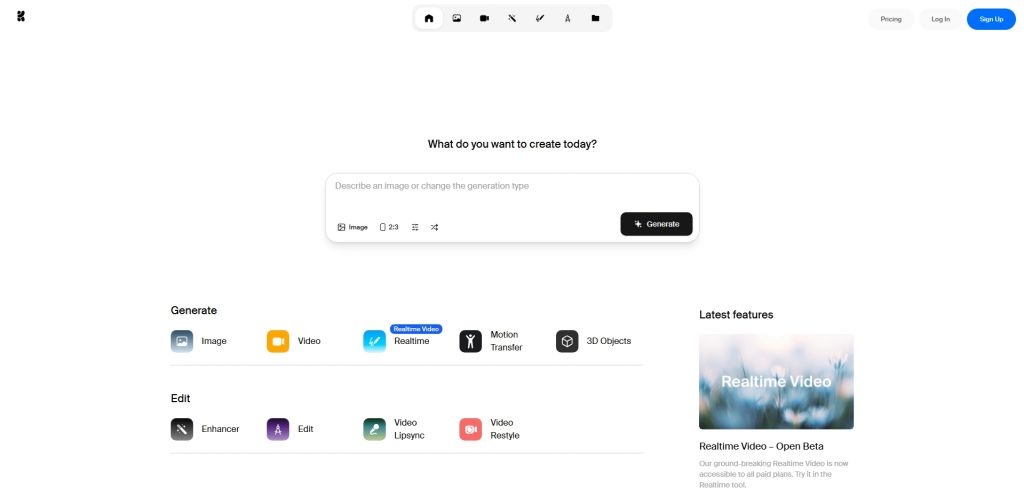
Krea AI is a versatile set of tools for working with images that understand your creative needs.- The most straightforward feature in Krea is text-to-image creation. You type a prompt in English, like “sunset over the ocean in a watercolor style.” Hit enter, and within seconds, the AI delivers several options. It’s the fastest way to create visuals from scratch.
- Sometimes, an image is good but not quite perfect. That’s where editing tools come in. For example, you can remove an object from a photo or add something new. Just highlight the area and describe what you want. The AI integrates the new element, matching the lighting and style of the original.
- Another lifesaver is the image enhancement feature. Got a great image that’s too small or slightly blurry? Upload it, and the AI will upscale it without losing sharpness. This is a must for large formats, like prints.
- What’s really cool is the Krea photoshoot feature. Imagine you’ve created a character you love. Now you want to see how they’d look in different settings or outfits. Krea AI lets you generate a whole series of images featuring the same character in various scenarios.
- For those who aren’t great at drawing, there’s a neat option. You can create a rough, even messy sketch, and the AI will “bring it to life” by adding details, refining textures, and enhancing colors, turning your doodles into a polished image.
How It Works
Picture a blank canvas covered in uniform “noise”—like static on an old TV. Krea AI uses technology that gradually removes this noise, step by step, to reveal an image. But not just any image—the one you described in your text prompt. The AI has analyzed millions of images, each paired with text descriptions. Over time, it learned to connect words with visuals. When you submit a prompt in English, it doesn’t search the web for an existing image. Instead, it… imagines one from scratch, guided by your words. Using it is a breeze. Visit the Krea AI website. You’ve got two main options: either upload an image to edit or type a text prompt in a dedicated field. For example, “a cat in a suit reading a book in a library.” Wait a few seconds, and the AI presents several options. Pick the one you like best. If it’s close but needs tweaks, no problem. You can ask the AI to refine it—say, make it sharper by upscaling or add details to the background for a richer look. It’s all pretty flexible. Essentially, you don’t control the process manually; you just set the direction, and the AI handles all the technical work. That’s the core idea—you describe your vision, and Krea AI brings it to life.
Pros
- Intuitive interface: You can master the core features in minutes.
- Fast processing: Image generation takes just seconds.
- Powerful retouching tools: Features for adding or editing elements work seamlessly.
Cons
- Free version limitations: The number of daily generations without a subscription is limited.
- English prompts required: Accurate results depend on writing prompts in English.
- Internet required: The service is only available online.
Who Can Benefit from Krea AI?
Krea AI is useful for a wide range of people, not just professionals. Here’s who it can really help.- If you’re in marketing or social media, you can quickly create visuals for posts, stories, or ad banners. No need to wait for a designer—just describe your idea and get multiple image options.
- Designers will find it a great tool too. It’s perfect for brainstorming ideas, finding the right image for a project, or refining a mockup by adding elements that would take hours to draw manually.
- For bloggers or content creators, it’s a lifesaver. You can make custom illustrations for articles, presentations, or videos, eliminating the hassle of finding royalty-free images or worrying about copyright issues.
Krea AI Pricing Plans and Payment
The pricing is straightforward. Krea AI operates on a “free with limitations” model. You can visit the Krea AI website and start generating images without paying a dime. It’s a great way to test the service and see if it fits your needs. The only downside is that you’re limited to a few generations per day. Once you realize you’re using the AI regularly and need more, it’s worth looking into a Krea subscription. The paid version removes all limits, offers faster image creation, and lets you generate higher-quality images. A common question is how to pay for Krea AI. The website accepts most international payment methods, so you can subscribe using standard credit or debit cards through trusted platforms.Subscribe via ggsel
Click the 'go' button to review terms on the partner’s website
Conclusion
Krea AI requires no special skills. None at all. You don’t need to be an artist or know complex software. Just say what you want to see, and it creates the image. And it often turns out pretty impressive. After using it for a bit, you’ll appreciate two things: speed and versatility. It shines when you need to quickly turn an idea into a visual. Say you need to illustrate a concept for a project, find an image for a task, or explore how your idea looks in different styles. In one sentence: it’s like a smart, fast assistant. It handles all the tedious technical work, leaving you with the fun part—coming up with ideas and finding the perfect image. A truly handy tool.❓ Frequently Asked Questions
Answers to relevant questions about this AI tool
What language should prompts be written in?
For the best results, write text prompts in English.
What does a paid Krea subscription offer?
It removes generation limits, speeds up image creation, and unlocks high-resolution features and priority processing.
Can I pay for a subscription with a standard credit card?
Yes, Krea AI accepts payments via Visa or Mastercard, as long as the card supports international online transactions.
Sources
-
Krea AI — krea.ai
-
Krea Pricing — krea.ai
-
Krea API Pricing — krea.ai
-
Security and trust at Krea — krea.ai
-
Krea Reviews (2026) - Product Hunt — producthunt.com
-
Krea: Design tool with AI inside - Product Hunt — producthunt.com