Glitch Image Generator is a free browser tool that turns any photo into glitch art with blend modes, intensity, and opacity sliders. We cover how it works, who it suits, what it costs, and where its limits sit.
Glitch Texture Generator: Create Glitch Art
On this page
Glitch Image Generator, a glitch texture generator built by software engineer and visual artist Adam Fuhrer, compresses the process into three controls and one button. Upload a photo, pick a blend mode, and press Generate, and the tool layers glitch textures and digital artifacts over the image, ready to save as PNG. No account, no watermark, no price tag.
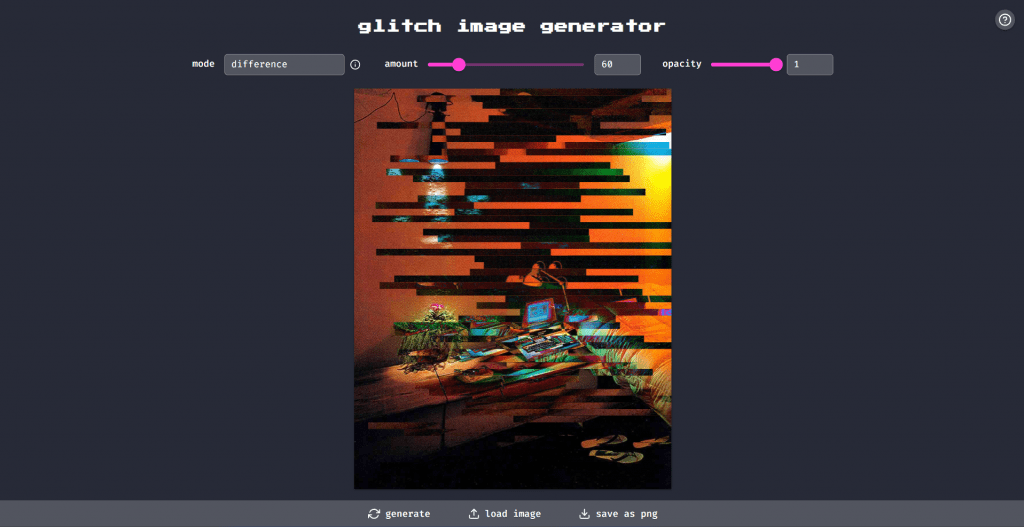
One honest note before the walkthrough: despite where the tool usually gets filed, there is no neural network inside. The generator is algorithmic, meaning that it draws randomized bands, shifted color channels, and digital noise onto a canvas, then blends the result with your picture. In practice, the difference barely matters, since the output is unpredictable in exactly the way glitch art should be. But if you expect prompt-driven image generation, this is a different instrument.
How the Glitch Texture Generator Works
The workflow takes under a minute, and the interface holds nothing back for a paid tier:
- Load an image. Click Load Image and pick a file from your device. Common formats work; nothing uploads to a server, since processing happens in the browser.
- Set three parameters. Mode selects the blend mode, amount controls how much of the canvas the glitch covers, and opacity controls how strongly it sits over the original.
- Generate until it clicks. Every press of generate produces a new random pattern. Two identical results are practically impossible, so the button doubles as a slot machine.
- Save as PNG. One click exports the full-resolution result with no compression artifacts added on top of the artificial ones.
Skip step one, and the tool still works: without a photo, it produces abstract glitch textures on a blank canvas—usable as overlays, album backgrounds, or raw material for further editing.
Blend Modes: Where the Character Comes From
The Mode dropdown is the real control panel. It exposes standard canvas blend modes, and each reacts differently to the same source image:
|
Mode |
What it does to the picture |
|
Screen / Lighten |
Bright, washed-out artifacts; neon and vaporwave territory |
|
Multiply / Darken |
Dark bands and shadow corruption; moodier, heavier results |
|
Overlay / Hard Light |
High contrast: the glitch and the photo fight for attention |
|
Difference / Exclusion |
Inverted colors and channel-shift look, the classic cyberpunk aesthetic |
|
Hue / Color |
Recolors the image along the glitch pattern without destroying detail |
A practical recipe: start with exclusion at a medium amount and full opacity, then regenerate five or six times. It is the fastest route to the corrupted-VHS look most people mean when they say glitch art.
[Screenshot: the same portrait processed in Screen, Multiply, and Exclusion modes side by side]
Who It’s For
- Social media creators. Distorted covers and story backgrounds stand out in a feed, and producing digital glitch effects here is faster than opening an editor.
- Musicians and podcasters. Single artwork and episode covers in the glitch style are a two-minute job at the right resolution for streaming platforms.
- Designers. Generated glitch textures work as overlay layers in Photoshop or Figma; PNG export keeps them clean.
- Developers and tinkerers. The project is open source on GitHub, so the generation logic can be studied, forked, or embedded.
What it will not do: animation, batch processing, video, or precise manual control over where artifacts land. This is a generator, not an editor. You are more likely to curate random results rather than paint them.
Pricing
There is nothing to compare in a table, and that is the finding: the tool is entirely free. No tiers, no daily credits, no watermark on export, no email gate. Most competing glitch effects and art online services either cap free generations or charge for HD export; here, the full feature set is the free plan.
- Completely free, with no registration, ads, or watermarks
- Runs in any modern browser on any OS; nothing to install
- Random generation makes every result one of a kind
- Blend modes plus two sliders give real variety despite the minimal interface
- Open source, so the tool is transparent and forkable
- No fine control: you cannot place or edit individual artifacts
- English-only interface, with no localization
- No animation or video support, still images only
- No built-in gallery or history; unsaved results are gone after regeneration
Languages and Access
The interface exists only in English, but it consists of roughly five labels, so the language barrier is close to zero. The site is a lightweight static page: it loads without VPN issues in most regions, including Russia. The platform also requires no account and works in mobile browsers as well, though sliders are easier to handle with a mouse.
Final Thoughts
Glitchyimage.com does one thing, does it instantly, and asks for nothing in return, which is rarer than it should be. As a glitch texture generator, it will not replace an editor for controlled work, but as a way to create glitch art in the time it takes to read this paragraph, it earns a bookmark. The honest framing matters too: this is generative code, not AI, and for once the result is better for it. If you’re after true prompt-based image generation instead, SeeDream is built for that.
❓ Frequently Asked Questions
Answers to relevant questions about this AI tool
Sources
-
Glitch Generator — glitchgenerator.com
-
Choose your plan — glitchgenerator.com
-
Site Updates — glitchgenerator.com
-
Glitch Blog — blog.glitch.com
-
G2 Reviews for Glitch — g2.com