Google Translate is a widely used machine translation service from Google. It supports multiple languages and provides high-quality translations of text, documents, and web pages.
Google Translate: AI Text And Document Translator
On this page
Need to translate something fast? Google Translate is the go-to free tool millions of people use every day. It couldn’t be easier: just open translate.google.com in any browser—no download required. Paste your text, pick the source and target languages, and the translation appears almost instantly. With support for over 130 languages (including many less-common ones), it’s perfect for travel, quickly understanding foreign websites, or reading documents in another language. Best of all—it’s completely free with no subscriptions or hidden fees. Here’s a closer look at everything Google Translate can do. 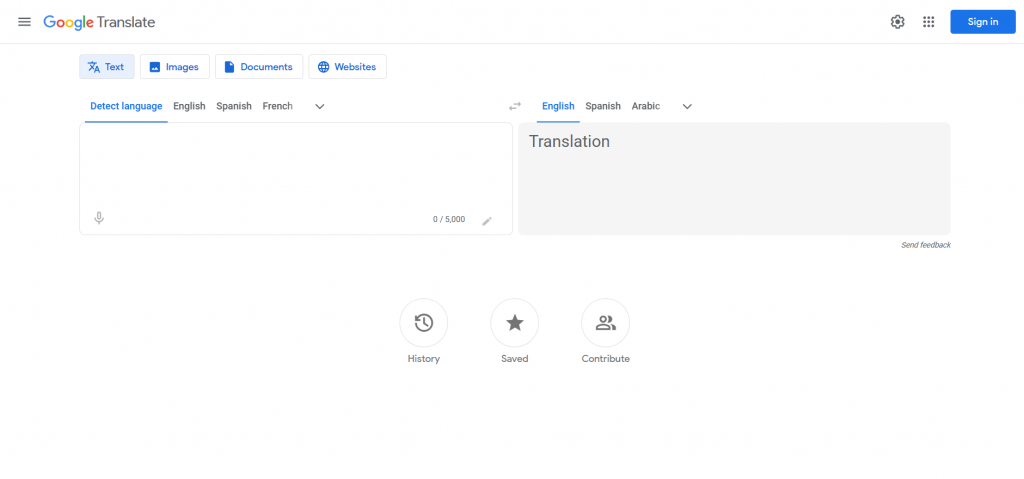
What can Google Translate do?
Google Translate has come a long way from simple word-for-word swaps. Today it’s a full-featured AI translator powered by advanced neural networks that understand context across entire sentences. That power lets it handle everything from near-perfect website translations to reading text in photos and even real-time voice conversations—super handy when you’re traveling.
- Text translation – paste or type anything and get it instantly in your chosen language.
- Document translation – upload .docx, .pdf, .pptx, or .xlsx files and get the same layout back in another language.
- Live camera translation – point your phone at a sign, menu, or label and see the translation overlaid in real time.
- Conversation mode – have a back-and-forth chat where each person hears the other in their own language.
- Handwriting input.
- Offline translation – download language packs ahead of time and use the app without internet.
- Saved translations – build your own personal phrasebook for quick access later.
How it works
At its core, modern Google Translate uses neural machine translation. Instead of swapping words using a dictionary, the AI reads and understands whole sentences like a human would. That’s why it produces much more natural results. It works the same way whether you’re translating a PDF (layout preserved), pointing your camera at a restaurant menu, or speaking aloud—the translation feels smart and contextual. The conversation mode is especially impressive: you speak in your language, the other person hears theirs, and vice versa, all in real time.
Who is it for?
Google Translate is one of those everyday tools that’s fast, free, and always in your pocket. Here are the situations where it really shines:
- Travel – instantly read signs, menus, and directions without typing anything.
- School & studying – grasp the main ideas of articles, textbooks, or research papers in another language.
- Work – quickly understand emails from international colleagues or draft replies when speed matters more than perfection.
- Social media & messaging – follow comments and chats with people who speak other languages.
In short, it’s perfect whenever you just need to break through a language barrier fast—no need for perfect, publish-ready prose.
- Blazing-fast processing of any amount of text.
- 100% free for personal and most non-commercial use.
- Works with text, speech, documents, and images.
- Works worldwide and supports dozens of languages.
- Offline mode available in the mobile app.
- Still makes contextual mistakes and literal translations of idioms.
- Quality drops with rare languages or complex pairs.
- No fine control over tone, style, or specialized terminology.
Pricing and availability
The best part? The core service is completely free—no limits, no subscriptions. You can translate entire books if you want. Google keeps it free because every translation helps train and improve their AI. There is a paid enterprise version (Google Cloud Translation API) for businesses that need advanced features or integration, but for everyday users everything remains free. Open it in any browser, use the app, or even translate whole websites by pasting a URL—Google Translate is always ready when you need it.
Conclusion
It’s not perfect. Sometimes translations are too literal, idioms get lost, and complex sentences can come out awkward. Accuracy varies by language pair, and you can’t tweak style or terminology. That’s why it’s best for casual, everyday needs—getting the gist of something quickly. For anything important (legal documents, publications, etc.), have a human editor review the result or hire a professional translator from the start.
❓ Frequently Asked Questions
Answers to relevant questions about this AI tool
Sources
-
Google Translate — translate.google.com
-
Google Translate Help — support.google.com
-
Google Translate Help Community — support.google.com
-
Google Translate Data Usage FAQ — docs.cloud.google.com
-
Translate - Google Blog — blog.google