Turn flat-lay clothing photos into AI model images with Modelfy. Explore no-prompt fashion photography, virtual try-on, custom AI models, pricing, and e-commerce features.
Modelfy AI Review: Create Fashion Model Photos in One Click
On this page
Imagine launching a new clothing collection without booking a photographer, renting a studio, or arranging a model shoot. You upload a flat-lay image of a garment, select a model, and receive a polished fashion photo in just a few clicks.
That is the idea behind Modelfy, an AI fashion photography platform designed for clothing brands, online boutiques, and e-commerce businesses. Instead of requiring users to write detailed prompts, the tool handles the photoshoot process through a simplified interface.
Modelfy can transform flat-lay clothing photos, hanger shots, and ghost mannequin images into AI-generated model photos. It also offers virtual try-on features, custom AI models, multiple camera angles, and tools for creating consistent visual content.
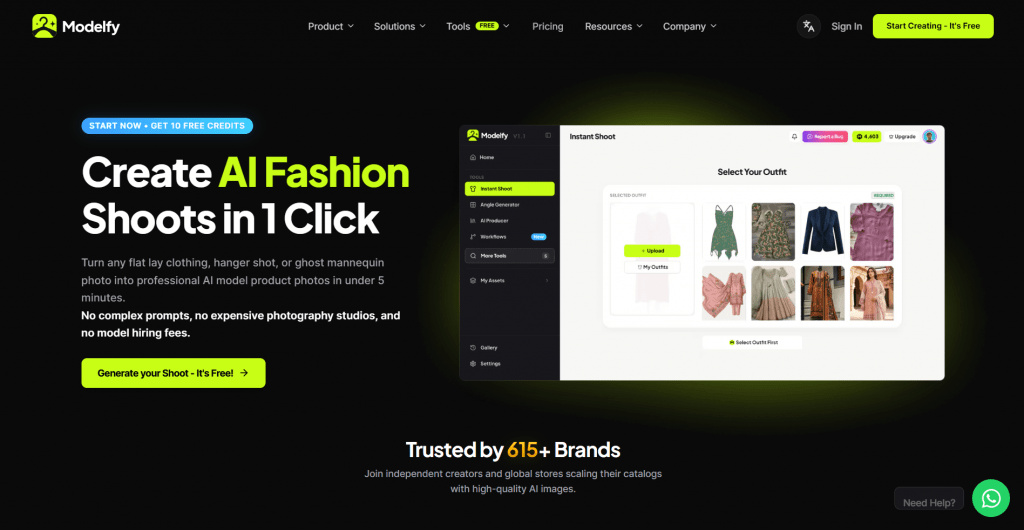
In this Modelfy review, we explore its key features, pricing plans, potential use cases, and limitations.
What Can Modelfy Do?
Modelfy focuses specifically on AI-powered fashion photography rather than general image generation. Its main features include:
-
AI fashion photoshoots: Convert garment photos into on-model product images.
-
No-prompt generation: Select options and generate images without writing text prompts.
-
Virtual try-on: Place clothing on selected AI fashion models.
-
Custom AI models: Create personalized models for brand consistency.
-
Multiple camera angles: Generate front, back, side, and other views of a garment.
-
Fabric close-ups: Create detailed images showing stitching, material, and texture.
-
Scene generation: Place garments in studio environments, urban settings, and other backgrounds.
-
Shopify integration: Connect a Shopify store to retrieve products and synchronize generated images.
The platform states that users can generate fashion photos in seconds, although actual processing times may depend on the selected workflow and system conditions.
How Does Modelfy Work?
Modelfy is designed to make AI fashion photography accessible to users without technical knowledge or prompt-writing experience.
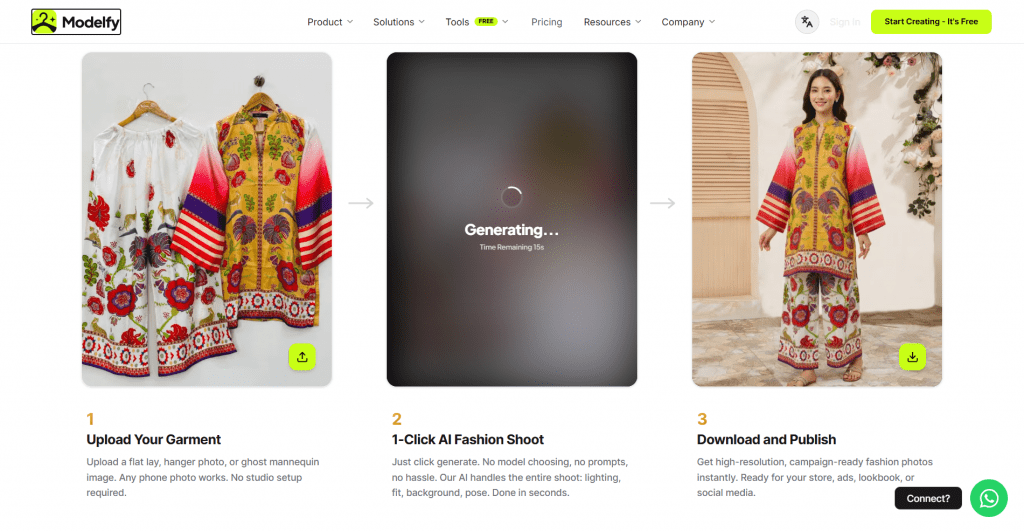
1. Upload a Clothing Image
First, upload a photo of the garment you want to use. Modelfy supports several input types, including:
-
Flat-lay clothing photos
-
Hanger shots
-
Ghost mannequin images
-
Basic product photos
The platform states that users can start with ordinary phone photos and do not need professional studio equipment. However, clear images with visible garment details are likely to provide a better starting point for generation.
2. Choose a Model and Scene
After uploading the garment, select an AI fashion model and the desired scene. Depending on the available features, you can choose different body types, sizes, poses, and backgrounds.
Modelfy handles elements such as lighting, fit, and composition automatically, reducing the need for manual instructions.
3. Generate the Fashion Photo
Click the generation button to create an AI model photo. The platform is designed to produce campaign-style visuals that can be used for product pages, advertisements, lookbooks, and social media.
Generated images should be checked carefully, particularly for garment proportions, stitching, logos, and other details that need to match the original product.
4. Download and Publish
Once the image is ready, you can use it in your e-commerce catalog or marketing materials. Paid plans include commercial rights according to the features and conditions listed by Modelfy.
Users should review the current subscription terms before publishing AI-generated images in commercial campaigns.
Key Features of Modelfy
No-Prompt AI Fashion Photography
One of Modelfy’s main differences from general AI image generators is its no-prompt workflow. Users do not need to describe lighting, poses, camera angles, or backgrounds in text.
Instead, they upload a garment, choose available options, and generate the image. This approach can be helpful for small businesses and fashion creators who want faster results without learning prompt engineering.
The trade-off is that users may have less detailed control than they would with a system that supports extensive text instructions.
AI Fashion Models
Modelfy offers a library of AI-generated fashion models with different appearances, body types, and sizes. Brands can use these models to present the same garment to different audiences.
The platform also promotes consistency across poses and camera angles. This can be useful when creating a catalog in which products need to maintain a recognizable visual style.
AI model images should nevertheless be reviewed for unnatural anatomy, inconsistent facial features, and variations between generated photos.
Virtual Try-On
The platform’s virtual try-on feature places uploaded garments onto selected AI models.
This can help fashion brands demonstrate how a product might look when worn instead of relying only on flat-lay or mannequin photography. It may also allow brands to create different model and size variations without arranging separate photoshoots.
However, AI-generated try-on images should not automatically be treated as exact representations of how a garment fits every body type. Product dimensions, fabric behavior, and real-world fit may differ from the generated result.
Multiple Angles and Poses
Modelfy supports the creation of different garment views, including front, back, side, and detail images.
Multiple angles can make e-commerce listings more informative. They also help brands build consistent product galleries and campaign materials.
The platform advertises the ability to attach several garment views to improve the representation of the clothing item.
Fabric Close-Ups
Fashion customers often want to inspect material texture, stitching, and other construction details before purchasing. Modelfy offers an AI feature for generating fabric close-up images.
This can be useful for premium clothing listings and lookbooks. Still, AI-generated details should be compared with the actual garment because the system may invent or alter small elements.
Background and Scene Generation
Modelfy allows users to place garments in different visual environments, including studio backgrounds, urban locations, and outdoor scenes.
This feature can help brands create campaign imagery without organizing physical location shoots. It may also make it easier to produce several visual styles for different marketing channels.
For e-commerce product pages, brands should consider using backgrounds that keep the clothing clearly visible and avoid distracting compositions.
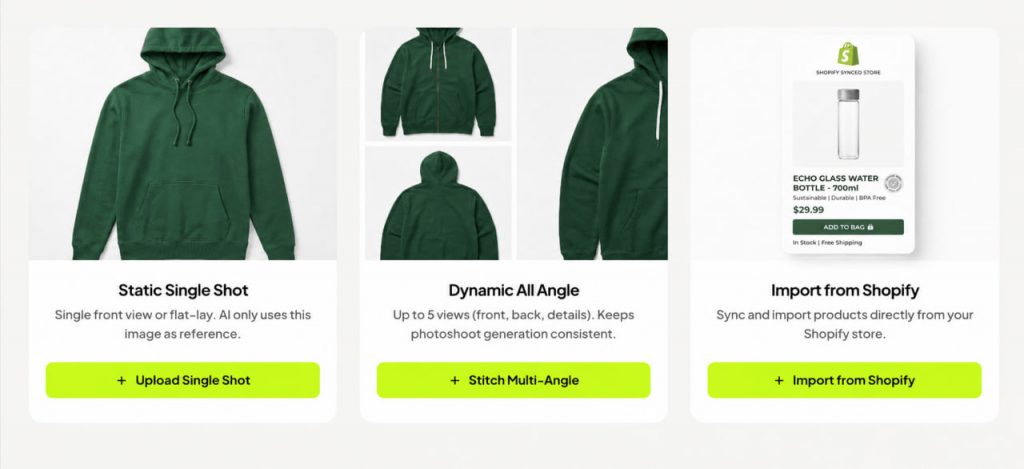
Shopify Integration
Modelfy promotes a Shopify integration that allows users to retrieve products from their store and synchronize generated images.
This feature may be particularly useful for businesses managing larger clothing catalogs. Instead of uploading every product manually, store owners can connect their catalog and use the platform’s generation workflow.
The exact synchronization features and availability should be confirmed within the current Modelfy dashboard.
Who Can Benefit from Modelfy?
Fashion Brands
Clothing brands can use Modelfy to create campaign imagery without arranging a traditional photoshoot for every collection.
The tool may be useful for:
-
Seasonal product launches
-
Lookbooks
-
Social media campaigns
-
Paid advertising
-
Model variations
-
Product page photography
Brands should maintain a consistent model selection, background style, and image composition to create a recognizable visual identity.
Online Boutiques
Small boutiques often have limited photography budgets. Modelfy can provide an alternative to photographing every item on a professional model.
A basic flat-lay or hanger photo can serve as the starting point for an on-model image. This may help smaller stores create more varied product visuals while keeping production costs predictable.
Shopify Sellers
The Shopify integration makes Modelfy relevant to merchants who manage clothing products through Shopify.
The ability to retrieve products and synchronize generated images could reduce repetitive catalog work, especially for businesses with many items.
Social Media Managers
Fashion brands need a steady supply of visuals for Instagram, TikTok, Pinterest, and other platforms. Modelfy can help create different model poses, settings, and product presentations from the same garment.
The generated images may still need resizing, copy overlays, or additional editing before publication.
Modelfy Pricing Plans
Modelfy offers free, silver, and gold subscription plans. The following details are based on the pricing information displayed on the official website.
|
Feature |
Free |
Silver |
Gold |
|
Monthly price |
$0 |
$19 |
$49 |
|
Welcome credits |
10 |
Not specified |
Not specified |
|
Estimated generations |
About 2 |
About 100 |
About 200 |
|
Quick Shoot |
Yes |
Yes |
Yes |
|
Model library |
Yes |
Yes |
Yes |
|
Custom AI models |
No |
Yes |
Yes |
|
Virtual Shoot |
No |
Yes |
Yes |
|
Multiple camera angles |
No |
Yes |
Yes |
|
Campaign shoot video |
No |
No |
Yes |
|
Commercial rights |
Public generation rights |
Private copyright and rights |
Private commercial IP rights |
|
Resolution |
2K |
2K |
2K |
|
Support |
Community Discord |
Email priority support |
Dedicated 24/7 support |
Free Plan
Price: $0 per month
The Free plan includes:
-
10 welcome credits
-
Quick Shoot access
-
Model library access
-
Public generation rights
-
2K image resolution
-
Community Discord support
The plan is suitable for testing the platform, although it offers limited generation capacity and does not include some advanced tools.
Silver Plan
Price: $19 per month
The Silver plan includes:
-
500 monthly credits
-
Approximately 100 generations
-
Custom AI model creation
-
Virtual Shoot access
-
Multiple camera angles
-
Private copyright and rights
-
2K resolution
-
Priority email support
This plan is aimed at growing fashion brands that need more than basic image generation.
Gold Plan
Price: $49 per month
The Gold plan includes:
-
1,000 monthly credits
-
Approximately 200 generations
-
Campaign shoot video
-
Custom AI model creation
-
Private commercial IP rights
-
Dedicated 24/7 support
-
Advanced studio tools
-
Priority rendering
-
2K resolution
The Gold plan may be more relevant to businesses producing content at higher volumes or requiring additional campaign features.
Important: Pricing, credits, licensing terms, and feature availability can change. Review the official pricing page before subscribing.
Modelfy Pros and Cons
-
Designed specifically for fashion photography.
-
No prompt writing required.
-
Converts flat-lay and hanger images into model photos.
-
Includes virtual try-on and multiple-angle tools.
-
Offers custom AI model generation on paid plans.
-
Provides a free plan for testing.
-
Supports Shopify integration.
-
AI-generated images may contain inaccuracies in garment details.
-
Advanced features require a paid subscription.
-
Generated model photos may not perfectly represent real-world garment fit.
-
Commercial rights differ between plans.
-
Users have less direct creative control than with prompt-based image tools.
Is Modelfy Worth Trying?
Modelfy is designed for a specific purpose: helping clothing brands create model photography without organizing a traditional photoshoot.
Its no-prompt workflow makes the platform approachable, particularly for boutique owners, Shopify sellers, and marketers who want to produce product visuals quickly. Features such as custom AI models, multiple angles, and fabric close-ups can also help brands create more varied catalogs.
The main limitation is that AI-generated fashion photography still requires quality control. Garment proportions, textures, logos, and fit should be checked before using images in commercial listings. The images can support product presentation, but they should not misrepresent the actual item.
The Free plan provides an opportunity to test the workflow, while the Silver and Gold plans add features for brands with higher content requirements.
Overall, Modelfy is worth exploring for fashion businesses seeking a simplified AI alternative to traditional product photography, especially when speed and content volume are important.
❓ Frequently Asked Questions
Answers to relevant questions about this AI tool