How to Create a Viral «Last Call for Love» AI Dance
On this page
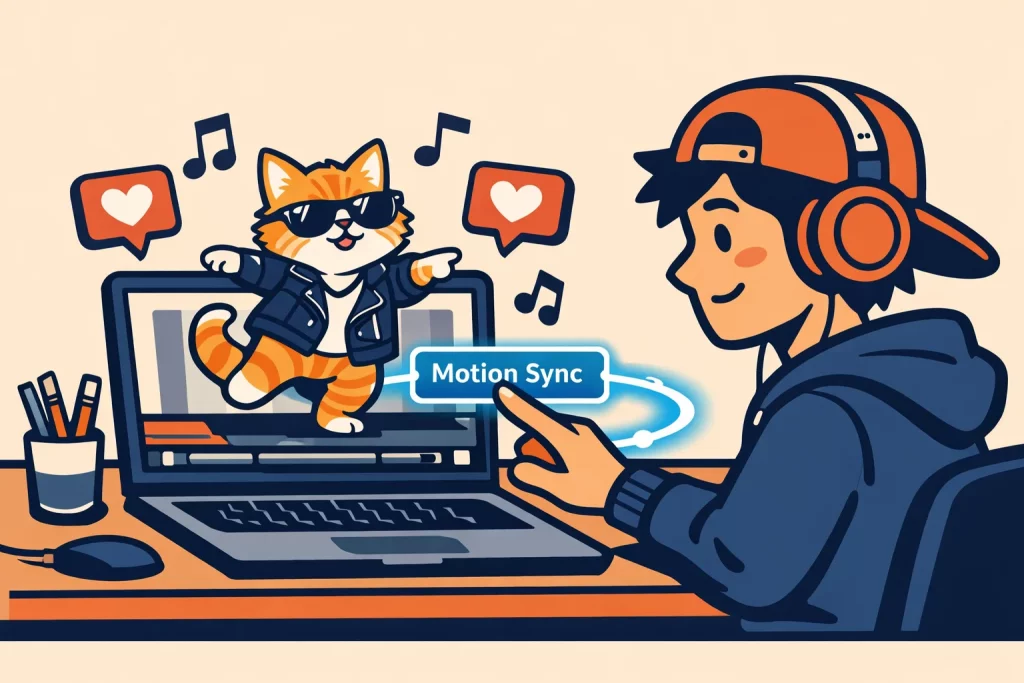
Step-by-Step: From Static Image to Viral Video
To start, navigate to OpenArt AI. Their latest platform update allows for precise rhythmic alignment, which is critical for the «Last Call for Love» beat.Step 1: Character Selection or Generation
You have two options: upload a photo or generate a new character directly on the platform. We have designed several ready-to-use prompts for character generation. Simply copy and paste them to guarantee professional results.Option 1: The «Viral Meme» Character
- Category: Animal.
- Target Goal: High shareability and humor-driven engagement.
- Master Prompt: A fluffy ginger cat standing on two legs, wearing oversized silver sunglasses and a tiny leather jacket, hip-hop style, 3D render, Unreal Engine 5 style, vibrant studio lighting, solid blue background, high detail, 8k.
Option 2: The «Hyper-Realistic» Character
- Category: Human.
- Target Goal: «Shock value» and realism that blurs the line between AI and reality.
- Master Prompt: Photorealistic portrait of a cute toddler girl wearing a sparkly rainbow hoodie, hyper-realistic, 8k UHD, highly detailed skin texture, natural eye reflections, soft cinematic lighting, shot on 85mm lens, f/1.8, bokeh background, high-resolution photography, authentic look.
Option 3: The «Aesthetic» Character
- Category: Pixar-style.
- Target Goal: Visual appeal and high retention rates (watch time).
- Master Prompt: A cute toddler girl with big expressive eyes, wearing a sparkly rainbow hoodie, Pixar animation style, soft cinematic lighting, simple blurred background, masterpiece, ultra-detailed, 3D character design.
Option 4: The «Ironic Artifact»
- Category: Statue.
- Target Goal: Stopping the scroll through visual contrast (Surprise effect).
- Master Prompt: A realistic marble bust of an ancient Greek philosopher, highly detailed stone texture with slight cracks, professional museum spot lighting, dark minimalist background, photorealistic, 8k, majestic look.
Step 2: Access the Motion Sync Feature
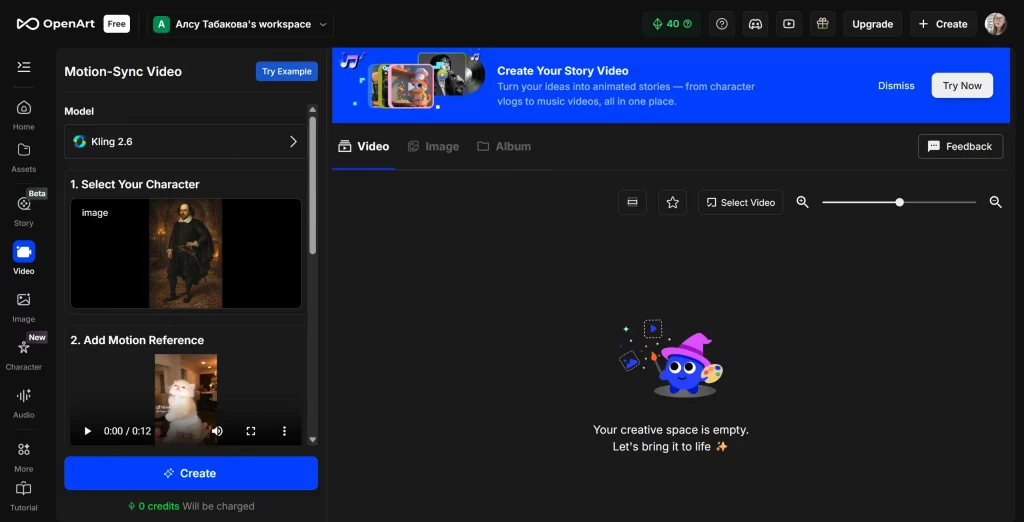
Once your image is ready, navigate to the «Video» tab on the OpenArt dashboard and select «Motion Sync». This will launch the video generation interface specifically designed for motion capture.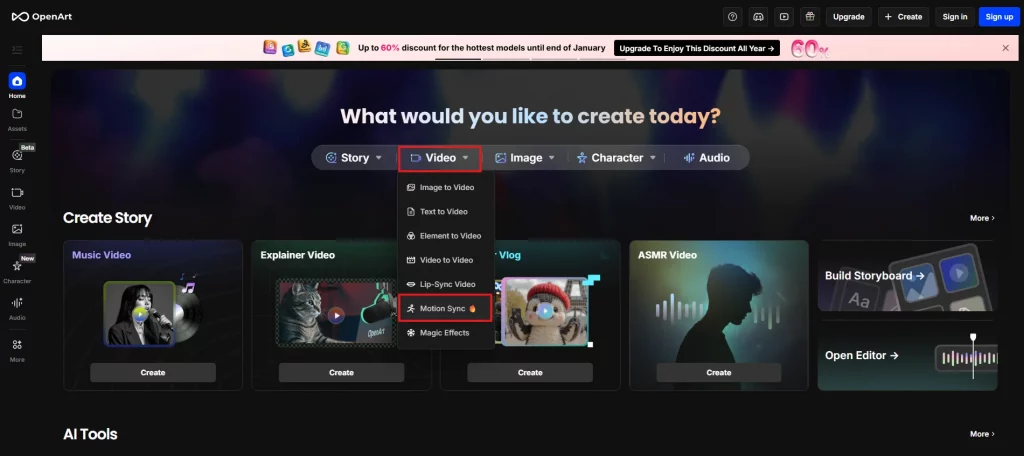
Step 3: Setting Up Motion Reference and Parameters
This is the most critical phase where your static image comes to life:- Upload the Base Image: Use the left-hand panel to upload your prepared character or photo.
- Add Motion Reference: This is the «soul» of your video. You have two professional options:
- Upload Video: Import a pre-recorded clip of the «Last Call for Love» dance.
- Record a Video: Record your own movements in real-time directly through the browser.
- Fine-Tune the Settings: Before generating, adjust the key sliders to ensure a polished look:
- Keep Original Sound: Ensures the movement hits every beat of the track.
- Motion Reference Control: Determines how closely the AI follows the reference video.
- Video Mode: Select the output quality and style that fits your vision.
- Add Details: If you need to change the background or add specific effects, use the text prompt window to describe these extra details.
Pro-Tips for Maximum Virality in 2026
Creating the video is only 50% of the work. The rest is how you package it for the global audience.The «Uncanny» Factor
Data shows that videos featuring non-human characters (robots, statues, animals) performing human dances have a 40% higher share rate. The irony of a stone bust of Julius Caesar dancing to «Last Call for Love» is what triggers the «Wait for it» reaction in viewers.Perfect Audio Syncing (The CapCut Method)
While OpenArt generates the video, the final «audio-to-pixel» sync should happen in an editor like CapCut or directly in TikTok.- Export your video from OpenArt.
- Import it into TikTok and select the official «Last Call for Love» audio.
- Use the «Adjust Clips» tool to ensure the first «drop» in the song aligns perfectly with the character’s first major movement.
Use «Engagement Hooks» in Captions
It’s better to use short and engaging subtitles:- «I didn’t expect the cat to hit that move… 💀»
- «POV: Your AI learned how to dance to Last Call for Love.»
- «Which character should I make dance next?» — This drives comments.
Technical Troubleshooting: Fixing Common AI Glitches
If your AI dance looks «melted» or blurry, check these three factors that affect how the model interprets input:- Background Complexity: Use a simple, solid, or blurred background. Complex backgrounds confuse the AI during the animation process, leading to «background bleeding» where the character merges with the scenery.
- Limbs Positioning: Ensure your starting image shows the character with clear, visible arms and legs. If the legs are hidden or crossed in the static image, the AI will struggle to «guess» where they should move.
- Aspect Ratio: Always generate in 9:16. Stretching a 1:1 square video to fit a phone screen will destroy the resolution and trigger the «low quality» flag in social algorithms.
The Strategic Advantage of OpenArt AI
Why use the OpenArt platform to access generative models like Kling for this specific trend?- All-in-One Versatility: OpenArt is a comprehensive ecosystem that integrates multiple AI engines and models. It serves as a unified workspace where you can generate images, audio, and videos simultaneously, streamlining your entire content production pipeline.
- Accessibility: The interface is designed for creators, not data scientists. You don’t need to write complex code or long «control strings».