Kling AI is a neural network for generating videos based on a text description. We tell you how to work with the service: creating videos for up to 2 minutes, animating photos, and customizing them.
Kling AI: Powerful AI Video Generator
On this page
Kling is an AI model developed by Kuaishou, a leading video-sharing platform, that creates videos directly from text prompts. Imagine typing a sentence like “a cat in space playing a guitar,” and Kling AI turns it into a short, high-quality video clip. The results are impressively convincing.
Who is it for? Primarily marketers, designers, and content creators. Instead of spending weeks filming and editing, you can quickly generate videos for social media, ad previews, or engaging educational content.
The service supports multiple languages and offers a wide range of customization options to achieve exactly what you need. Everything is accessible through the official Kling AI website. However, access may vary by region, and the service is widely available across the world. In this review, we’ll explore the key features and limitations of this AI model.
What Can Kling AI Do?
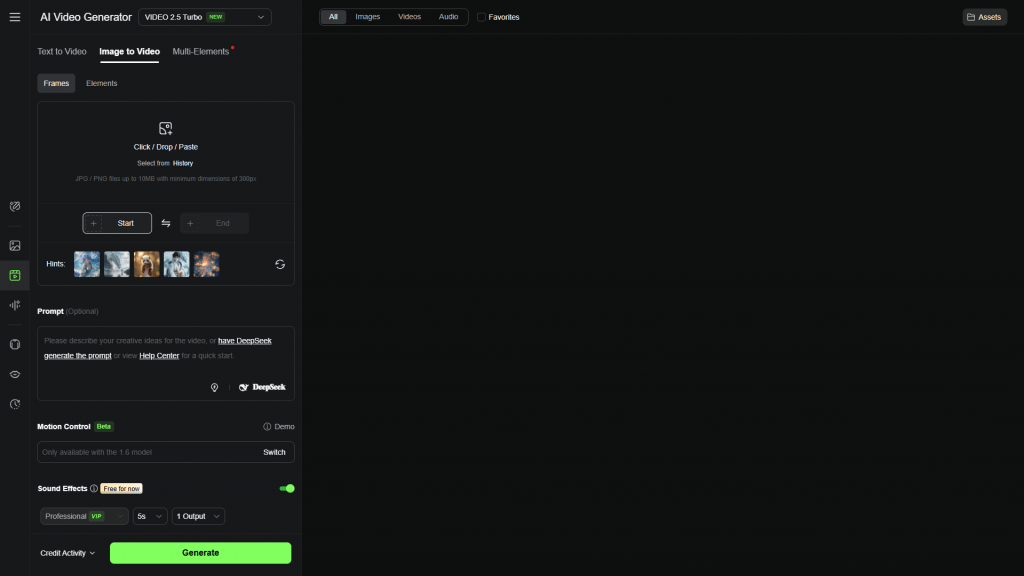
The core feature is simple: you write a text prompt, and Kling creates a video based on it. These aren’t just short clips—videos can be up to two minutes long and look highly professional. You can request anything from realistic scenes to cartoon-style animations or polished ad-like visuals.
- Flexible customization. Before generating, you can specify details like frame aspect ratio (vertical for stories or wide for YouTube), camera movement, or how much creative freedom the AI should take with your prompt.
- A standout feature is image-to-video animation. Upload a static photo, and Kling turns it into a dynamic video. For example, you can make water flow or leaves rustle in the wind.
- It handles complex scenes well, with multiple characters or objects. The algorithms (built on advanced diffusion models, though the tech details aren’t critical) deliver detailed, realistic results.
- Good news: the official Kling AI website provides daily free credits. You can test all these features without paying, making it a great way to see if it fits your needs. Overall, it’s a significant step forward in generative AI technology.
How It Works
Kling AI is a fascinating tool. Its technology is cutting-edge, and the results show it. The videos it creates are vibrant and detailed, with smooth, natural movements that avoid the robotic feel common in similar services.
On the technical side, it uses something called a Diffusion Transformer (DiT). In simple terms, this allows the model to closely track objects in a video from start to finish. As a result, Kling AI excels at complex scenes, like fast-moving objects or sudden camera changes, while keeping everything cohesive and realistic.
You start by writing a text prompt describing your video idea. Visit the official Kling AI website, sign up, and gain access to all features. Then, you input your prompt, and the AI transforms it into a video.
Before generating, you can fine-tune settings like video length (up to a few seconds for stories or longer for YouTube) or aspect ratio. There’s even a “creativity level” setting that adjusts how freely the AI interprets your idea.
Click the button, and the system processes your request, which takes a bit of time. Once done, you get your Kling video, ready to download. If it’s not quite right, you can regenerate it with the same settings.
The image-to-video animation feature is also promising. Overall, Kling AI feels like a serious tool for professional and creative work. To try it, visit the Kling AI website, where you can also find details on subscribing to premium features.
- Videos are high-quality and lifelike, indistinguishable from real footage.
- Plenty of customization options let you tailor results to your needs, rather than relying on chance.
- The paid version supports longer videos—up to two minutes, which is impressive.
- The free version is limited in video length and access to advanced features.
- Access may vary by region, but the service is widely available globally.
Who Can Benefit from Kling AI?
Kling AI has a wide range of practical applications, moving beyond mere entertainment to become a valuable tool.
- For social media or marketing. Need regular content for Instagram or TikTok? Instead of arranging complex shoots, just write an idea in Kling AI, and within minutes, you have a vibrant video. It’s perfect for showcasing products in action without renting a studio.
- It’s also great for education. Teachers or trainers can create engaging instructional videos. Complex topics are easier to explain with short animations generated from text prompts, making lessons more dynamic than static images or plain text.
- For creative projects, the possibilities are vast. Kling AI acts like a personal mini-studio, letting you craft short stories, dynamic sketches, or even drafts for future videos. It’s incredibly convenient.
One standout feature is image-to-video animation. Upload a static image, and it transforms into a short, lifelike video, as if the picture came to life. The effect is genuinely impressive.
Whether for work, education, or just creating something fun to share with friends, the Kling AI website offers a powerful yet accessible tool. Full subscription details are available on their official site.
Pricing Plans and Paid Services
Like many platforms, Kling AI offers a free plan. Each day, you get 66 credits to spend on generating videos or animating photos.
This is enough to test the service and decide if it suits your needs—a trial period based on usage rather than time.
For more features, there are paid subscriptions:
- Standard (from $6.99/month). Includes 660 credits per month, faster generation, and access to a professional mode for video creation. Ideal for regular users.
- Pro (from $25.99/month). Offers 3000 credits, priority processing, and enhanced video quality. Perfect for serious projects.
To subscribe, visit the Kling AI website, where payment options are clearly outlined.
Kling AI Subscription Options
Check the official website for details on payment methods and subscription terms.
Conclusion
Overall, Kling AI is one of the most impressive video generation tools I’ve come across. The video quality is outstanding—movements are smooth and natural, with excellent detail. The technology is clearly advanced.
The interface on the Kling website is user-friendly and intuitive. You describe what you want, tweak the settings, and the AI does the rest. The image-to-video animation feature is particularly striking, delivering vibrant results.
A big plus is the ability to try it for free. Daily credits let you explore the tool at your own pace before committing financially.
On the downside, free credits run out quickly if you’re working on larger projects. Still, Kling AI is a modern, high-quality tool that deserves attention for anyone needing professional-grade video generation.
❓ Frequently Asked Questions
Answers to relevant questions about this AI tool
Sources
-
Kling AI — app.klingai.com
-
Kling AI Terms of Paid Service — kling.ai
-
Kling AI Privacy Policy — kling.ai
-
Kling AI Terms of Service — kling.ai
-
Kling AI on X — x.com