RoomGPT: AI Interior Design Generator
On this page
RoomGPT is an AI tool that takes a photo of your room and reimagines it in a fresh way. Upload a snapshot, select a style, and in just a few seconds, you’ll get a new image. The furniture, finishes, and lighting change, making the space look completely different. You can experiment with options all day until you find the one that feels just right.
It’s incredibly handy if you’re planning a refresh or tackling a renovation. You get to see your own ideas visualized right away, not just generic pictures from the web. Even professional designers use it to quickly show clients sketches on the spot. It’s fun and straightforward for personal use—try seeing how your actual room would look in minimalism or another style.
It won’t be perfect every time—the furniture might look a bit off, and some elements could seem guessed. It’s more of an inspiration piece than a precise blueprint for building. But it definitely sparks ideas.
You can process a few photos for free, which is plenty for initial brainstorming. The app runs directly in your browser, so no downloads are needed.
If you just want to explore different options, RoomGPT is a great fit. It doesn’t replace a full-fledged designer, but it helps you figure out your direction and what catches your eye.
What Can RoomGPT Do?
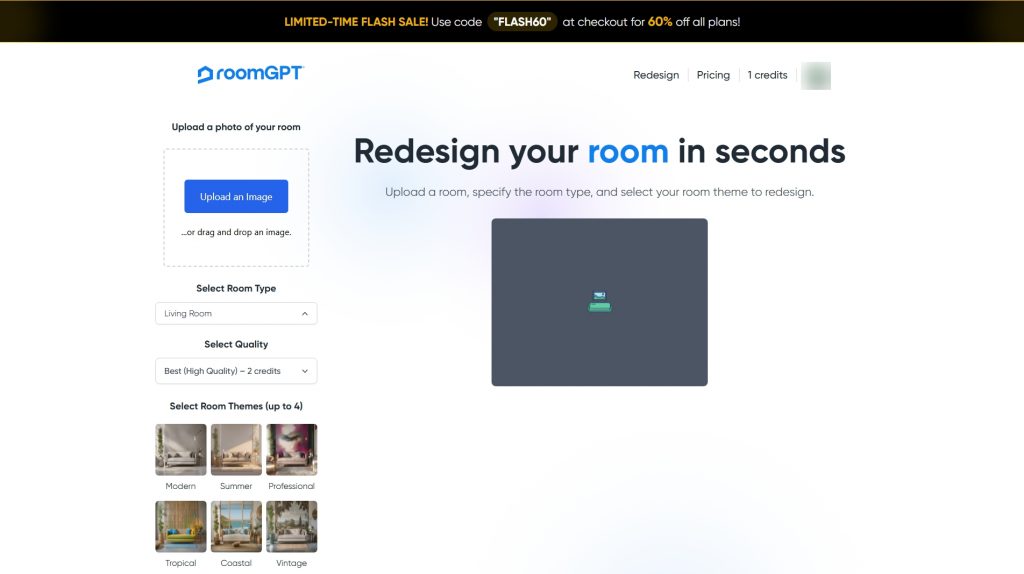
RoomGPT AI is a tool that lets you transform the look of your room without leaving home. Upload a photo, and it turns it into a new image with different items, colors, and vibes. Everything happens automatically, with no complicated settings.
- It’s especially convenient that you can pick any style—from classic to minimalist, or even something bold and adventurous. Like one version? Switch to another, and your room changes on screen like magic.
- Getting started is a breeze. Even if you’ve never used AI tools before, it’s all intuitive. Buttons are right where you expect them, no steep learning curve.
- RoomGPT works smoothly on laptops and phones alike. Create your mood boards anywhere, anytime.
- Best of all, there’s no waiting around. Your image is ready in seconds, so you can see the result instantly and tweak it on the fly if you want more.
- Everything runs right in your browser. Upload a photo, tweak settings, choose a style—and view the result. No app installations required.
- A variety of styles to choose from, like industrial loft to Scandinavian
- Processes photos in just a few seconds
- Free version comes with limitations
- Results depend heavily on the quality of your original photo
- No advanced settings for professional-level work
How It Works
Everything operates directly in your browser—no downloads or installations needed. Just head to the RoomGPT website and upload a photo of your room.
From there, the AI analyzes the image on its own. It identifies walls, floors, and furniture. Then, like a digital artist, it reimagines your room in the style you select. Pick from a list, say “modern” or “vintage,” and hit the button.
The result pops up quickly, usually in under a minute. Not thrilled? Switch styles and try again right away. You can save the finished image to your device.
Essentially, it’s the fastest way to preview how your room could look with a new design. No fancy software or time-consuming hassle.
Who Can Benefit from RoomGPT?
RoomGPT is a tool for creating custom images, and it adapts to all sorts of needs.
For marketing, for instance. If you’re selling furniture or working in real estate, you often need eye-catching interior photos. Professional shoots aren’t always feasible. Take a plain room photo and turn it into a stylish visual for ads or social media posts.
It’s perfect for design websites and blogs. Search engines favor sites with unique visuals. Instead of hunting for stock images, generate your own quickly. Write an article on Scandinavian style and pair it with custom examples on the spot.
Designers love it as a speedy sketch alternative. Skip hours building 3D models—show clients several distinct concepts in a minute. “Here’s how your living room could look in classic style; here’s the modern take.” It clarifies direction fast.
For social media, it’s a game-changer. Need fresh content regularly but short on ideas? Start with a photo and whip up a series: “5 Bedroom Refresh Ideas.” It’s visual and engaging.
One underrated perk: it’s universally clear without words. Working with international clients? Skip the explanations—a picture says it all.
Pricing Plans
The service offers a basic free version with limits on the number and quality of generations. For more features, there’s a paid subscription that includes:
- Unlimited interior creations.
- Higher-quality images.
- Priority processing queue.
- Extra styles and customization options.
Payments are accepted via major credit cards like Visa and MasterCard, PayPal, and cryptocurrencies. The service is widely available across the US and most countries.
Conclusion
This is a handy tool for quickly envisioning how a room might look in a new style. No need to master complex software. Upload a photo, and get options in moments.
Pros include its ease of use, solid style variety, and expanded features with a paid plan.
That said, there are drawbacks. The free version has restrictions, and outcomes hinge on your source photo’s quality. A blurry or dimly lit shot might lead to underwhelming results.
What to do? If you’ll use it often, consider the paid subscription. Always upload clear, well-lit room photos for the best outcomes.
Overall, it’s a valuable aid for quick concepts, but don’t expect flawless detail work. Think of it as an inspiration generator, not a full project builder.
❓ Frequently Asked Questions
Answers to relevant questions about this AI tool
Sources
-
RoomGPT — roomgpt.io
-
RoomGPT - Redesign your room in seconds — roomgpt.io
-
RoomGPT on GitHub — github.com
-
RoomGPT on Trustpilot — trustpilot.com
-
RoomGPT review by Apartment Therapy — apartmenttherapy.com