Art

Main page » Art » Page 3

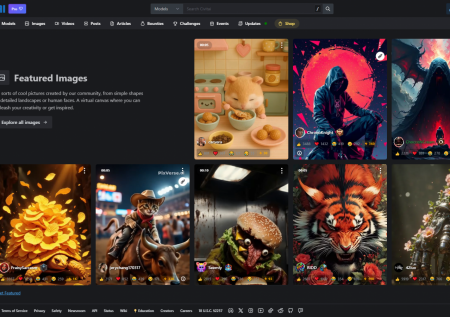
Imagine a giant creative laboratory. That's what Civitai is.
T&Cs Apply
Find the perfect model, whether it's for creating stunning AI-powered Instagram content or charismatic Civitai videos for TikTok. Share your own work – maybe your unique style will become a new trend?

OpenAI's Big Language Model That Can Conversation and More

T&Cs Apply
Pricing model: Freemium (free access to GPT-3.5, paid subscription ChatGPT Plus for $20/month for GPT-4). Developer company: OpenAI (founders: Sam Altman, Ilya Sutskever).

Understanding AI Art: The Convergence of Machine Learning and Creative Expression

The integration of artificial intelligence into the visual arts has fundamentally altered how images, illustrations, and digital assets are produced. The AI Art category at AI Market Cap serves as a curated directory for tools that leverage deep learning models—primarily Generative Adversarial Networks (GANs) and Diffusion Models—to translate human intent into visual media.
At its core, AI art technology allows users to generate, edit, and enhance visual content using natural language prompts or existing image data. Unlike traditional graphic design software that requires manual manipulation of pixels or vectors, these tools interpret semantic instructions to build compositions from scratch. This shift moves the creative bottleneck from technical execution (the ability to draw or use complex software) to conceptual ideation (the ability to describe a vision)

[spoiler title="Read More"]

Core Functions of AI Art Tools

AI art tools are not monolithic; they perform a variety of specialized tasks that cater to different stages of the creative workflow. The primary functionalities found within this category include:

  1. Text-to-Image Generation: This is the most prominent feature of the category. Users input a descriptive text prompt, and the AI generates a unique image based on that description. Models like DALL-E and Midjourney have set the standard for this, capable of producing everything from hyper-realistic photography to abstract expressionism.
  2. Image-to-Image Transformation: These tools use an initial image as a structural or stylistic reference. A user might upload a rough sketch and ask the AI to turn it into a finished oil painting or a 3D render.
  3. Inpainting and Outpainting: These functions allow for the modification of specific parts of an image. Inpainting replaces or fixes elements within a frame (e.g., changing a person’s clothing), while outpainting extends the canvas beyond its original borders, maintaining the style and context of the source material.
  4. Neural Style Transfer: This process involves taking the stylistic elements of one image (like the brushwork of Van Gogh) and applying them to the content of another (like a personal photograph).
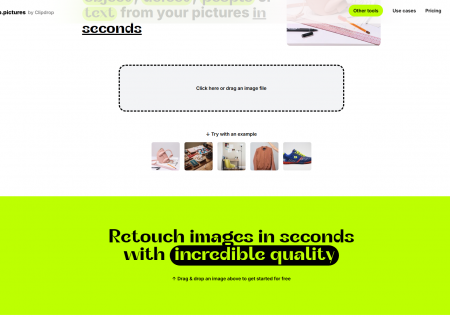
  5. AI Enhancement and Restoration: Tools such as Cleanup pictures focus on refining existing images by removing unwanted objects, upscaling resolution, or correcting lighting and color balance through intelligent predictive algorithms.

Target Audience and Practical Use Cases

The democratization of high-end visual production benefits a wide spectrum of users, ranging from hobbyists to enterprise-level professionals.

  1. Marketing and Social Media Managers: Speed is essential in digital marketing. Tools like Canva AI or Seedream enable the rapid creation of branded content, ad banners, and social media posts without the lead time typically required for professional photoshoots.
  2. Concept Artists and Designers: For those in the gaming or film industries, AI acts as a "mood boarding" assistant. Platforms like Civitai, which hosts various specialized models, allow artists to iterate on character designs or environments in seconds, providing a foundation for manual refinement.
  3. Content Creators and Bloggers: Visuals are critical for engagement. AI generators provide a cost-effective way to create unique blog headers and article illustrations that are not restricted by traditional stock photo licenses.
  4. Small Business Owners: For those without the budget for a full-time design team, AI tools provide the ability to generate product mockups and promotional materials that maintain a professional aesthetic.

Classifications of AI Art Software

To navigate this category effectively, it is helpful to classify tools based on their architecture and accessibility:

  1. General-Purpose Generators: These are "all-in-one" platforms like DALL-E or Midjourney designed to handle a vast range of styles and subjects. They are trained on massive, diverse datasets.
  2. Integrated Creative Suites: These are traditional design platforms that have added AI layers. Canva AI is a prime example, where AI generation is just one feature within a broader layout and publishing ecosystem.
  3. Specialized Editing Tools: Rather than generating new images, these focus on modifying existing ones. Cleanup pictures uses AI to understand the background of a photo to seamlessly fill in gaps when objects are removed.
  4. Community and Model Repositories: Platforms like Civitai represent a more technical sub-niche where users share specific "checkpoints" or "LoRAs"—custom-trained versions of models like Stable Diffusion—tailored for specific art styles or characters.
  5. Multimodal Platforms: Some tools, such as ChandlerAI, integrate art generation alongside other AI capabilities like text and code generation, positioning themselves as comprehensive workstations for digital creators.

Key Features to Evaluate

When selecting an AI art tool from the catalog, users should consider several technical and functional factors:

  1. Model Depth and Versatility: Does the tool use a proprietary model, or is it a wrapper for an open-source model? Tools using Midjourney often produce more "artistic" results, while those based on DALL-E are frequently praised for their strict adherence to complex prompt logic.
  2. Control Mechanisms: High-end tools offer more than just a text box. Look for "Negative Prompts" (telling the AI what not to include), "Seed" control (for consistent results), and "Aspect Ratio" settings.
  3. Commercial Rights: This is a critical nuance. Users must verify whether the images generated are cleared for commercial use. Most paid tiers for tools like Midjourney or DALL-E grant these rights, but free tiers may have restrictions.
  4. User Interface (UI): Some tools operate via Discord (Midjourney), while others offer sleek web interfaces (Krea AI). The choice depends on whether the user prefers a community-driven chat environment or a private, dashboard-style workflow.

The Role of AI in the Modern Creative Workflow

The tools listed in this category, from the animation capabilities of Unlucid AI to the presentation-focused AI of Beautiful AI, represent a move toward "augmented creativity." These systems are not intended to replace the human artist but to remove the "grunt work" of digital production. By automating the technical aspects of rendering, lighting, and composition, AI allows the user to focus on the higher-level aspects of storytelling and visual communication.
As the technology evolves, the distinction between "AI Art" and "Digital Art" continues to blur. Whether you are seeking a tool for minor photo corrections or a powerful engine to generate an entire digital world, the AI art ecosystem offers a solution tailored to virtually every level of technical expertise and creative ambition.

[/spoiler]