Cleanup.pictures: A simple AI tool for removing unwanted objects, people, text, or defects from any photo in seconds
Cleanup Pictures: Remove Objects With AI
On this page
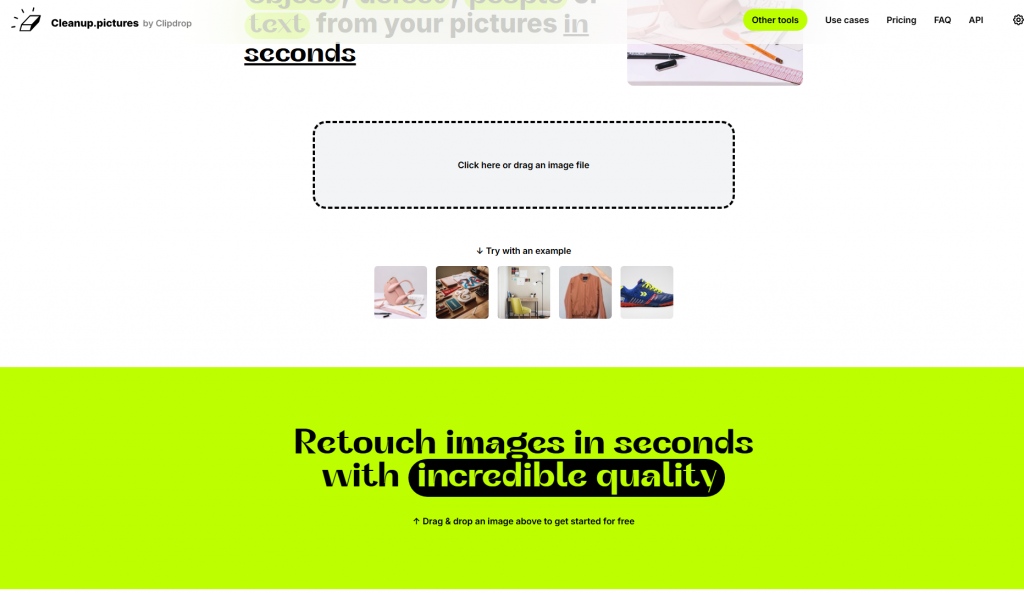 Imagine: you’ve captured the perfect shot on your vacation, but there’s a random passerby or litter in the background. In the past, you’d spend hours editing the photo online for free in complex editors. Now there’s a solution: Cleanup.pictures — your social media photo editor that works like a smart eraser. Simply upload the image to the website, brush over the unwanted object, and in seconds, it’s gone. It’s especially handy when you need to:
- Remove crowds from a beach sunset,
- Erase a car that photobombed the frame,
- Prepare AI-enhanced content for Instagram without any retouching traces.
Cleanup.pictures online for free isn’t just a tool for visual content. It works precisely, without “eraser marks,” unlike many other services. Looking for AI photo filters? They’re not here, but you get accurate removal of unwanted elements. Cleanup.pictures effects for free — it’s primarily about the magical disappearance of objects. Use it daily! But remember: the service isn’t for forging documents or removing others’ logos. Tired of extra details in your photos? The Cleanup.pictures service uses AI to remove objects, people, text, or imperfections from your images in just seconds. Need AI photo retouching to erase a random pedestrian or an old road sign? Or perhaps AI face retouching for a portrait? With its help, you can easily remove AI watermarks or any other unwanted element (removing signs from photos, removing objects from photos). Essentially, it’s a powerful AI tool for editing that performs AI retouching and image enhancement, perfectly restoring the background thanks to inpainting technology. A popular tool among photographers and designers (AI for Photoshop or standalone), Cleanup.pictures processes over 1.3 million images monthly, proving its effectiveness as an all-in-one AI retouching and AI object removal solution.
Key Features
- Object Removal: People, trash, text, watermarks, timestamps.
- Defect Retouching: Eliminating scratches, dust, spots on old photos.
- Skin Correction: Removing acne, wrinkles, scars.
- HD Support: For Pro subscription — export in 4K without watermarks.
- API for Developers: Integration with Node.js, SwiftUI, Kotlin.
How It Works
The Cleanup.pictures AI algorithm is based on machine learning. After uploading the photo, the user selects the area with a brush (adjustable size). The AI erases the object, reconstructing the background based on surrounding pixels. Tip: For the best results, select the object with some margin — this helps the algorithm more accurately restore the texture. Processing happens on the developer’s servers, files are stored temporarily and deleted after the session.
Practical Use Cases
💼 For Business and Creative Industries:
- Photographers: Removing tourists from landscape shots or retouching portraits.
- E-commerce: Cleaning product photos of shadows, dust, random objects.
- Real Estate: Eliminating personal items, trash, wall defects in property photos.
- Social Media Managers: Quick content prep for Instagram, Facebook without Photoshop.
👨💻 For Individual Users:
- Removing photobombers from event photos.
- Cleaning memes of text/watermarks.
- Restoring old family photographs.
- Simple Interface: Object removal in 3 steps (upload, select, download).
- High Processing Speed (5–30 seconds).
- Free Basic Features Without Registration.
- Supports JPG, PNG, HEIC Formats (including from iPhone).
- Free Version Limited to 720p Resolution.
- Complex Backgrounds (foliage, patterns) May Leave Artifacts.
- No Batch Processing or Bulk Uploads.
Pricing Plans
| Plan | Price | Features |
| Free | $0 | 720p Resolution, Watermarks |
| Pro | $3/month | 4K Export, Priority Processing |
| ClipDrop Pro | $11/month | Suite of Tools: Background Replacement, Generative Fill |
| Payment: Available with major credit cards (Visa/Mastercard), PayPal |
Cleanup.pictures – your quick savior for those moments. Not Photoshop, but more like a magic eraser in your browser. What’s the deal: Couldn’t be simpler:
- Upload the photo to the site.
- Brush over (or outline) what’s in the way – a person, text, pimple, stain.
- Hit the button (like “Remove!”).
- In 5-20 seconds – voila! The trash is gone. No fuss, no software installs. Right in the browser.
Pro – for those who mean business:
- Free? It’s enough for Instagram or casual shares, but the image gets compressed, and the service logo might show (not very professional).
- Subscription (Pro): Now we’re talking: download photos in full size (even 4K), no logos – perfect for printing, marketplaces, or portfolios. Maybe even upload multiple photos at once (check the site). For business – a must-have.
Where it shines and where it stumbles:
- King of simple backgrounds: Remove a cat from the couch, a person from the beach, a pimple from the forehead, text from a white wall? Easy! It works cleanly and quickly.
- Complex backgrounds – a challenge: If you need to extract an object from bushes, patterned wallpaper, or when everything’s intertwined (hair, branches) – it’s a bit of a gamble. The AI might:
- Leave a blurry spot or weird pattern repeat (artifacts).
- Not remove everything or grab too much.
- Tip: Try selecting more precisely (with a small brush), remove the object in parts, or be ready to tweak the result in another editor. Sometimes a few attempts help.
Cleanup.pictures – a must-have when you need to quickly erase something from a photo. Super simple, works in the browser in seconds. For social media and personal use, the free version is plenty. If you’re making money with photos (printing, marketplaces, commissions) – you can’t skip the Pro subscription: you need full size and no logos. Remember: it’s not a magic wand. On complex scenes, it might require some patience or minor touch-ups. But for everyday photo “cleanup” tasks – it’s an incredibly convenient tool that saves tons of time.
❓ Frequently Asked Questions
Answers to relevant questions about this AI tool
Sources
-
Cleanup.pictures — cleanup.pictures
-
Cleanup.pictures Pricing — cleanup.pictures
-
Cleanup.pictures FAQ — cleanup.pictures
-
Cleanup.pictures Reviews on Trustpilot — trustpilot.com
-
Cleanup Pictures Reviews on G2 — g2.com