

Grok Imagine Photorealistic Prompts: 2026 Tips & Examples
On this page
For professionals seeking absolute photorealism, the legacy approach of stacking qualitative adjectives has been entirely superseded by the necessity for precise, optically grounded art direction. This comprehensive analysis details the structural mechanics of composing professional-grade photorealistic prompts for Grok Imagine, providing an exhaustive, categorized compendium of the most effective aesthetic methodologies currently utilized by digital artists, commercial photographers, and prompt engineering professionals.

The Architecture of a Photorealistic Grok Prompt
To operate the Grok Imagine model effectively, one must discard the habits developed on older generative platforms. The 2026 Grok architecture is tuned to interpret natural language semantics, explicit spatial relationships, and simulated optical physics rather than disjointed tag stacks. The most successful outputs are generated when the prompt reads like a detailed briefing provided to a human commercial photographer or cinematographer.
| Prompt Component |
Function and Definition |
Example Implementation |
|
1. Subject |
The primary focal point, described with explicit physical characteristics, demographics, poses, and wardrobe details. |
“A 45-year-old male architect in a charcoal wool suit, leaning against a drafting table.” |
|
2. Environment |
The specific geographical or spatial context, grounded in physical reality, including secondary background elements. |
“In a sunlit artisan workshop, sawdust floating in the air, tools scattered authentically.” |
|
3. Lighting and Time |
The directional behavior, temperature, and quality of the light source, including the specific time of day or weather condition. |
“Warm late-afternoon window light from the left, deep shadows, subtle hair rim light.” |
|
4. Style and Mood |
The visual idiom, emotional resonance, color grading tradition, or reference to a specific photographic genre. |
“Annie Leibovitz documentary style, melancholic atmosphere, Kodak Tri-X 400 black-and-white.” |
|
5. Technical Specifications |
The simulated optical parameters, including focal length, aperture, and camera formats. |
“Shot on a 35mm lens, f/1.8, shallow depth of field, natural skin texture with visible pores.” |
Negative Prompts
Unlike earlier diffusion models that relied heavily on negative prompting to instruct the model on what to omit from a scene, the 2026 Grok Imagine architecture ignores negative phrasing entirely. The model’s natural language processor does not effectively compute prohibitive modifiers such as “no,” “without,” or “avoid.” If an operator writes “no blemishes” or “no crowds,” the model often locks its attention mechanism onto the words “blemishes” and “crowds,” inadvertently generating the exact elements the operator sought to eliminate. Therefore, all constraints must be phrased affirmatively. To remove blemishes, the prompt must demand “smooth, clear skin.” To empty a scene of crowds, the prompt must specify an “empty, deserted location”.
Technical Lexicon Versus Qualitative Adjectives
The pursuit of photorealism is actively hindered by the use of vague, hyperbolic quality descriptors. Cliché buzzwords such as “stunning,” “breathtaking,” “masterpiece,” “ultra-detailed,” or “8K” consume valuable token space without providing the model with actionable visual data. Grok translates these words into an artificial, over-polished “AI sheen” that immediately reveals the image’s synthetic origins. True photorealism is triggered by utilizing the actual technical lexicon of commercial photography and cinematography.
| Qualitative Adjective (Avoid) |
Technical Lexicon Equivalent (Use) |
Optical Simulation Achieved |
|
“Blurry background” |
“Shot on 85mm f/1.2 lens, shallow depth of field” |
Compresses facial features, isolates the subject, and renders background elements into soft, natural bokeh. |
|
“Wide view” |
“Wide-angle 24mm perspective, f/11 aperture” |
Creates a deep spatial field, distorts edge perspective slightly, and keeps both foreground and background in sharp focus. |
|
“Cinematic lighting” |
“Rembrandt lighting, single softbox key light, deep shadows” |
Provides specific directional lighting, creating realistic shadow fall-off across human geometry. |
|
“Vintage look” |
“Kodak Portra 400 film stock, visible grain, warm shadows” |
Simulates specific silver-halide grain structures and precise chemical color science traditions. |
|
“Realistic skin” |
“Natural skin texture, visible pores, fine character lines” |
Overrides the model’s default skin-smoothing algorithms, forcing the rendering of microscopic human imperfections. |
Aggressive Realism
A major theoretical breakthrough in 2026 prompt engineering is the implementation of “Aggressive Realism.” Real photographs are inherently imperfect. They suffer from blown highlights, crushed shadows, awkward framing, chromatic aberration, and mixed color temperatures. When a prompt requests a perfect, symmetrically lit setup, Grok defaults to generating an idealized illustration that masquerades as a photograph. To force absolute, visceral photorealism, operators must prompt for failure modes, physical inconsistencies, and casual capture conditions.
By requesting “uneven exposure,” “rushed framing,” “smartphone mirror selfie,” or “harsh overhead fluorescent lighting,” the operator actively tricks the model into abandoning its polished defaults. Human skin is semi-specular, interacting with light in complex ways; without explicit instructions detailing how light falls across the subject, models overcompensate by smoothing and boosting reflections, resulting in a plastic appearance. Describing real-world capture limitations forces the model into believable realism, yielding images that are virtually indistinguishable from authentic photography.
Advanced JSON Prompt Structuring
For the most complex executions of Aggressive Realism, highly advanced operators utilize strict JSON formatting to force the Grok Aurora model to adhere to multi-layered constraints. This programmatic approach is particularly effective when dictating highly specific human poses, material interactions, and micro-expressions, as it prevents the model from conflating adjectives across different elements of the scene.
A standard JSON prompt for a casual, realistic capture typically utilizes strict key-value pairs to separate the subject, wardrobe, pose, lighting, environment, and technical parameters. By specifying precise environmental storytelling details—such as an unmade bed, sports posters, or discarded clothing—the prompt grounds the image in a recognizable, imperfect reality. The inclusion of specific camera limitations, such as digital noise, slight optical distortion, and smartphone sensor simulation, acts as the final catalyst for overriding the AI’s tendency toward cosmetic perfection.
Categorized Compendium of Professional Grok Prompts
The following section transitions from theoretical formulation into practical application. Below is a structured, copy-paste ready compilation of the most popular and highly effective Grok Imagine prompts for 2026, separated into key commercial and artistic categories.
Category 1: Documentary and Editorial Portraiture
- The Corporate Executive Headshot:
"Professional headshot of a 30 year old entrepreneur, confident smile, neutral gray background, soft studio lighting, shot on Canon EOS R5, 85mm lens, shallow depth of field" - The Environmental Tradesman Documentary:
"Close up portrait of an elderly fisherman with weathered skin and kind eyes, golden hour natural lighting, shallow depth of field, National Geographic style photography" - The Golden-Hour Candid Lifestyle:
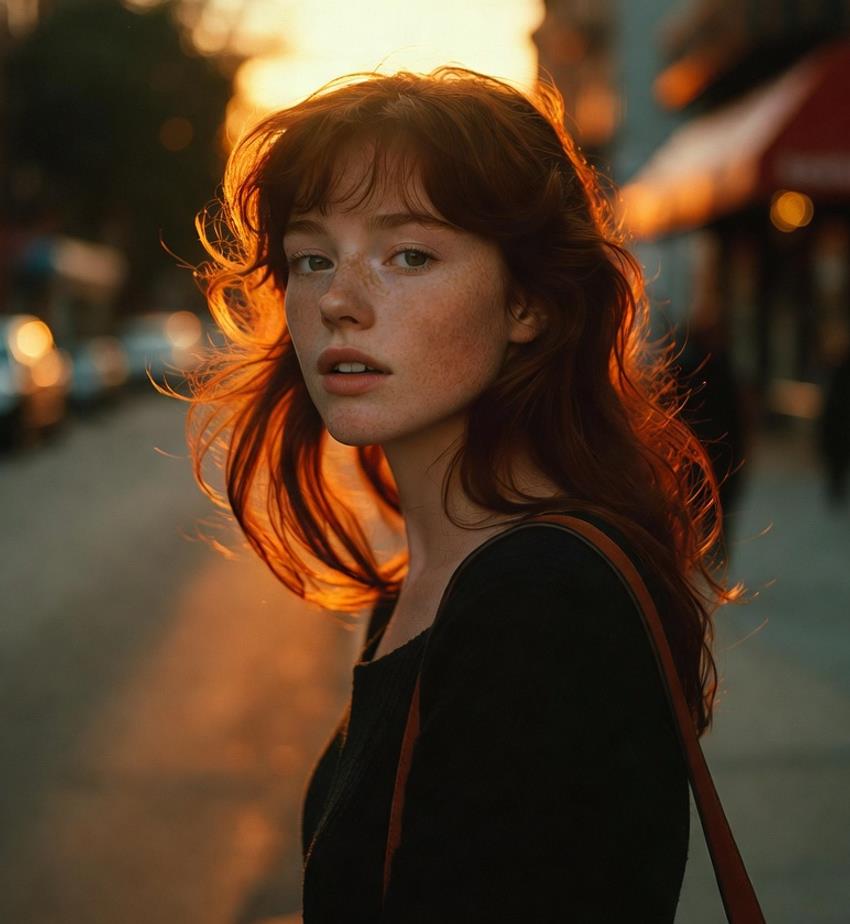
"A young woman with freckles and copper hair, walking through a Brooklyn street at golden hour, warm sunset rim light, candid expression, shallow depth of field, Fujifilm 35mm look, kodachrome color grading, ultra-detailed"
Category 2: Cinematic, Fashion, and Neon Aesthetics

- High-Fashion Editorial Glamour:
"Fashion editorial photo of a model wearing avant garde haute couture, dramatic side lighting, Vogue magazine style, shot by Annie Leibovitz" - Latex Material Rendering and Texture Mapping:
"1girl, solo, beautiful young woman with very long straight platinum blonde hair, blunt bangs, striking icy blue eyes, perfect facial features, vivid red lipstick, flawless skin, crouching pose on the floor, looking at camera, glossy black latex bodysuit, dramatic rim lighting, fashion photography" - Cinematic Street Photography:
"Candid street portrait of a jazz musician holding a saxophone, rainy New York City night, neon reflections, 35mm film grain, Henri Cartier Bresson inspired"
Category 3: Commercial Product and Still Life Visualisation
- The Luxury Fragrance Brief:
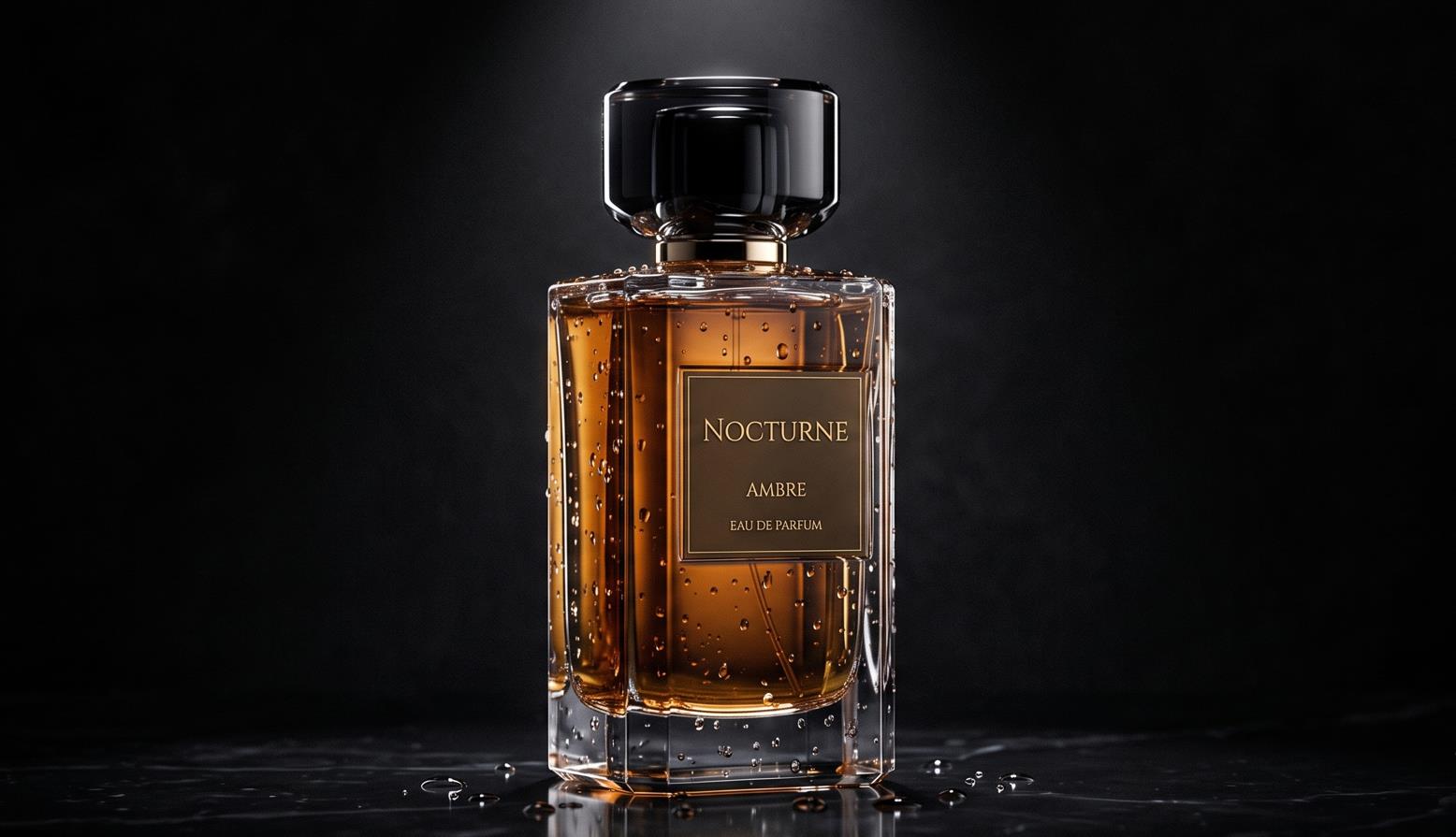
"Luxury perfume bottle with water droplets, dramatic black background, single spotlight creating rim lighting, high end fragrance advertisement, glass reflections" - Tech Product Layout:
"Premium wireless headphones floating on gradient background, soft studio lighting, product photography, Apple style minimalist aesthetic, reflection on surface, 4K commercial quality" - The Lifestyle Beverage Shot:
"A matte ceramic coffee mug on a slate countertop, steam curling from the surface, diffused morning light from a nearby window catching the glaze, subtle reflection on the slate, shot straight-on at 45 degrees, clean negative space on the left for copy"
Category 4: Architectural Visualisation and Interior Spatial Design

- Modern Minimalist Interior:
"Modern minimalist living room, floor to ceiling windows overlooking ocean, warm neutral tones, designer furniture, golden hour lighting, Architectural Digest feature photo" - The Surreal Interdimensional Vista:
"A photorealistic interior shot of a cozy, mid-century modern living room with a fireplace and a record player. However, the large floor-to-ceiling windows look out onto a swirling, violet-colored nebula and a ringed planet instead of a street. The room is dimly lit by the orange glow of the fire, which competes with the soft purple light coming from the galaxy outside. The depth of field is sharp across the whole room"
Category 5: Sweeping Landscapes and Environmental Narratives
- The Specificity of Location and Time:
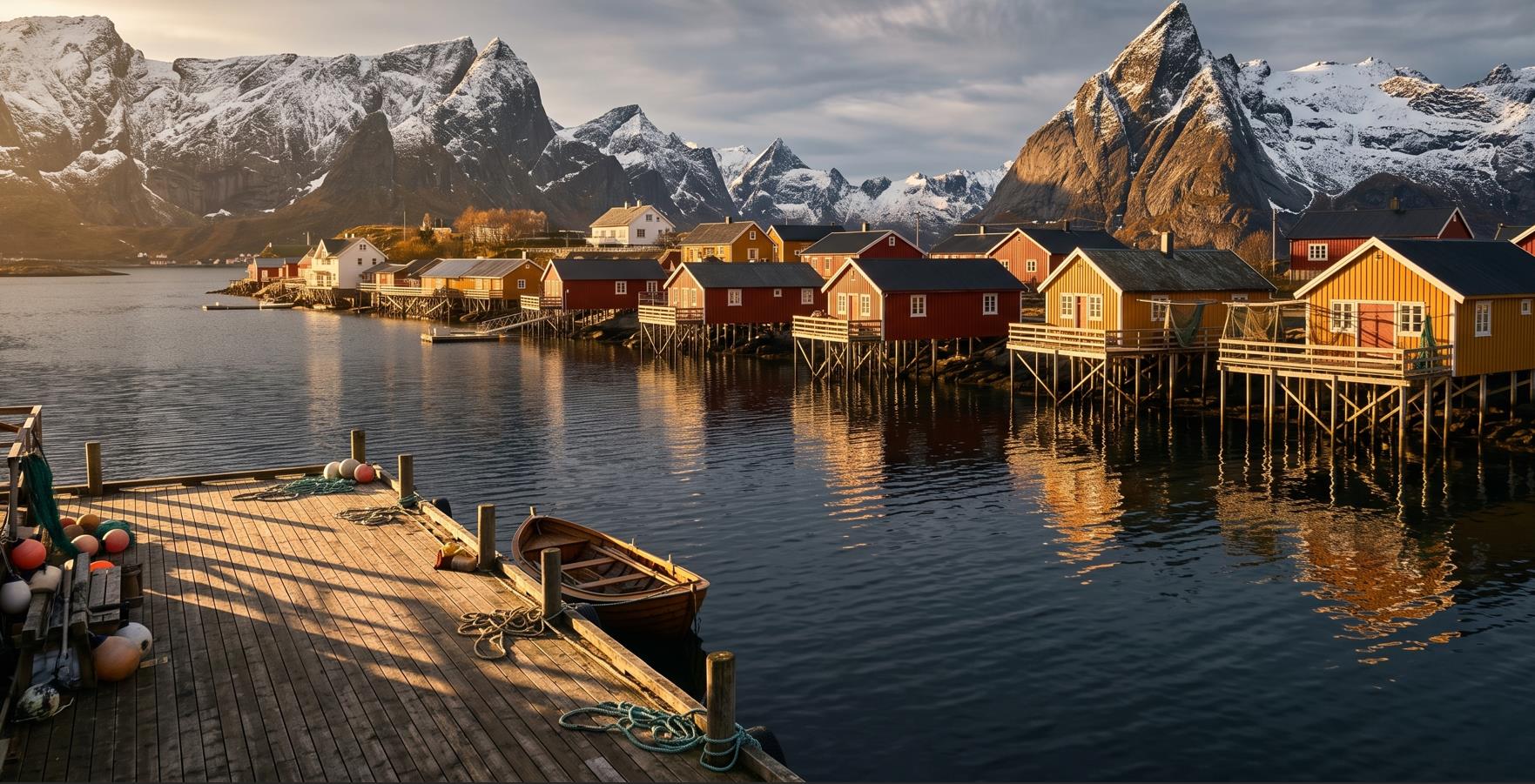
"The Lofoten Islands in northern Norway, mid-October, 3 pm when the sun is already low on the horizon, red and yellow wooden fishing huts (rorbuer) on stilts above dark steel-blue water, snow visible on the mountain peaks, no tourists in frame, golden side light casting long shadows across the dock, medium format" - The Atmospheric Forest Narrative:
"Morning mist hanging low over a pine forest in the Pacific Northwest, shafts of cool sunlight breaking through the canopy, moss-covered boulders in the foreground, wide-angle 24mm perspective, Kodak Portra 400 color tones"
Category 6: Street, Vintage, and Emulated Film Formats

- Candid Morning Market:
"A vendor setting up a flower stall on a cobblestone street in Lisbon at sunrise, warm low light raking across buckets of eucalyptus and roses, candid composition, Kodak Portra 400 film grain, 35mm lens" - The 1970s Candid Festival Observation:
"Vintage film photograph, 1970s aesthetic, a young couple at an outdoor music festival, dancing, genuinely happy, shot from slightly too far away suggesting candid observation rather than posed photography. Slightly overexposed, sun-washed look. Kodak Portra 400 film stock aesthetic: warm orange-shifted shadows, slightly faded highlights, visible grain, colours that do not quite reach full saturation"
Advanced Post-Generation Workflows: Image Editing and Video
Grok Imagine’s capabilities in 2026 extend far beyond static text-to-image generation. The ecosystem features a robust suite of native image editing tools and cinematic video generation capabilities integrated directly into the platform architecture.
Inpainting and Natural Language Image Editing
When utilizing Grok’s image editing interface, users can upload existing high-resolution images (JPEG, PNG, WebP) and execute targeted changes using conversational prompts. The optimal methodology for image editing follows the “one edit per pass” rule. Stacking multiple instructions in a single sentence (e.g., “remove the car, change the sky to night, and make the building red”) frequently overwhelms the model’s semantic parser. Edits must be executed sequentially.
- Seamless Object Removal: The operator uploads the source file and prompts: “Remove the passerby on the left side of the photo. Reconstruct the pavement and background texture to match the surrounding environment seamlessly. Keep lighting, perspective, and background texture consistent. Do not alter the primary subject.”
- Background Swapping and Isolation: To alter the environment while maintaining the subject, the prompt dictates: “Replace the background entirely with a soft gray studio seamless paper backdrop. Preserve the subject’s edges, hair detail, original resolution, and original lighting direction.”
- Typographic Manipulation: Grok possesses advanced text rendering capabilities, reliably placing exact phrasing where directed. The operator commands: “Remove the text from the wooden sign and replace it with the exact words ‘Open Early’ in a weathered, hand-painted serif font, matching the existing surface perspective.”
Transitioning to Cinematic Text-to-Video Generation
The 2026 Grok Imagine platform includes powerful text-to-video capabilities, allowing operators to generate 10-15 second dynamic clips in 720p+ resolution within 20 seconds. A highly effective video prompt requires the operator to augment the standard static image prompt formula with explicit vectors of motion, pacing, and camera language.
The architecture of a professional Grok video prompt comprises five distinct layers: Scene, Camera, Style, Motion, and Audio. Static scenes translated directly to video often feel artificial; therefore, intentional, subtle motion must be explicitly injected into the prompt.
Platform Infrastructure, API Ecosystem, and Regulatory Compliance
To operate Grok Imagine professionally, one must understand the commercial, technical, and regulatory boundaries established by xAI in 2026.
The Model Lineup and Computational Context
As of mid-2026, xAI operates a tiered family of models to serve different computational needs. The flagship model is Grok 4.3, processing a massive 1 million token context window, allowing operators to input entire brand guidelines or extensive reference documentation prior to generating images. For intensive, multi-step logical operations, the Grok 4.20 and Grok 4.1 Fast variants offer an expanded 2 million token context window. Visual generation is specifically handled by the grok-imagine-image and grok-imagine-video models.
The Free Tier and the January Deepfake Controversy
During late 2025, Grok Imagine was highly celebrated for its minimal filtering, high processing speed, and free accessibility, positioning it as a primary competitor to Midjourney and OpenAI’s DALL-E. However, this unrestricted access precipitated a highly publicized crisis in January 2026. The platform was utilized at an industrial scale to generate nonconsensual, sexually explicit deepfakes of public figures, celebrities, and private individuals, generating thousands of explicit images per hour.
In response to immediate international regulatory pressure and widespread media condemnation, xAI implemented aggressive operational restrictions. On March 19, 2026, the free tier for Grok image generation was permanently eliminated. Currently, users on the free tier receive zero image generation capabilities.
Current Subscription and Moderation Structures
Access to Grok Imagine is now strictly gated behind the SuperGrok subscription tier (approximately $30/month) or the SuperGrok Heavy tier ($300/month) designed for enterprise teams requiring higher volumetric throughput. Furthermore, developers and enterprise platforms can access the grok-imagine-image model via the xAI API at a flat rate of $0.02 per generated image.
However, paid access does not circumvent the new safety guardrails. To prevent a recurrence of the January 2026 incidents, xAI instituted a rigorous dual-layer moderation system.
- The Prompt Guard: The system actively scans text inputs for explicit keywords, sensitive contexts, and requests to manipulate the likeness of real, non-consenting individuals.
- Post-Generation Image Classifier: Even if a meticulously engineered prompt bypasses the initial text guard using metaphorical language, the resulting image is analyzed by a secondary algorithmic classifier before being presented to the user. If the visual output violates terms regarding explicit content, CSAM, or restricted public figures, the generation is blocked and flagged.
While these filters heavily restrict the generation of real-world figures in compromising or sensitive scenarios, the model remains highly flexible and robust for architectural, commercial, landscape, and generic portrait photography. For users requiring entirely uncensored local generation free from corporate moderation, open-weight models like Stable Diffusion 3 or localized iterations of the FLUX architecture remain the industry alternatives, though they lack the integrated real-time data synthesis unique to the Grok ecosystem.
Through the mastery of semantic weighting, structural adherence, and optical simulation, professionals utilizing Grok Imagine in 2026 can consistently architect visual assets of unparalleled photorealism, effectively bridging the gap between artificial generation and genuine photographic capture.
❓ Frequently Asked Questions
Answers to relevant questions about this AI tool



Great guide, thanks!
Do you have any negative prompts recommendation for Grok Imagine?