


Unlucid AI turns a still photo into a short animated video in a few clicks, no timelines, no editing skills, just upload and pick an effect. We cover how it works, what its Gem-based pricing really costs, and where it fits your content.
Unlucid AI: Creative Studio for Photo & Video
On this page
Turning a still photo into a moving clip used to mean hours in animation software that most people never bother to learn. Unlucid AI skips all of that. Upload an image, pick from more than 15 ready-made effects, and watch the photo animate into a short video in a few clicks—no timelines, no keyframes, and no editing skills required.
Below, we take a closer look at how it works, what it costs, and where it fits.
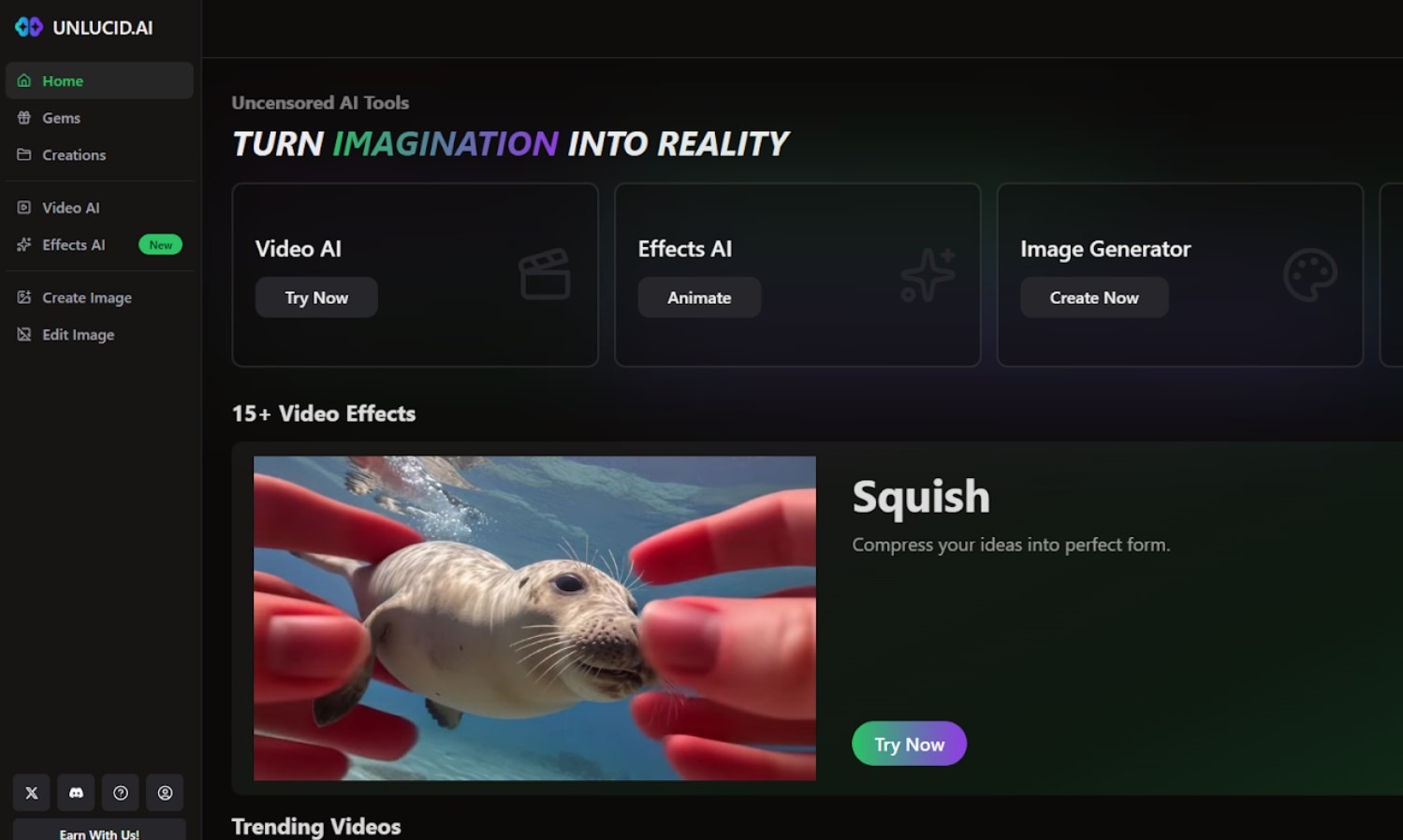
The Core Specifics of Unlucid AI
The platform is relatively young. It was developed by a group of dedicated software engineers. Nowadays, it’s a fully fledged platform for image animation. It was lastly updated on November 26, 2025. The platform uses machine learning algorithms to analyze the uploaded image and apply the selected effect. The main purpose of the platform is to animate photos and images. Its core features include:
- Video AI. Users can animate videos using different modes, such as Fly, Dance, Squish, and Transform. Each effect is configured to preserve the naturalness of movement without spoiling the original image quality.
- Image Generation. The platform offers 5 style modes for image generation (Realistic, Pencil, Cartoon, Anime, and 3D). Image reference and seed control & upscaling are provided.
- Image Editing. The program allows for editing photos and images, removing objects, retouching images, and changing outfits.
- Freemium Access. Free Gems are provided daily for free processing of photos.
The Unlucid AI library contains over 15 animation patterns. The “Crush” effect simulates the crushing of objects, “Reveal” creates a fade-in effect, and “Cakify” transforms any image into a cake texture. There are also more traditional options, such as a 360-degree rotation or a flying effect.
Each effect works differently, depending on the image content. A portrait of a person will animate differently than a landscape or object. The algorithm recognizes key elements and applies motion accordingly.
The principle of work is simple. The creation process takes just a few minutes. Upload the file, choose an effect, start processing, and you’ve got a finished video. No timelines, keyframes, or other complexities of classic animation.
- 4 different features are available.
- A free mode is provided daily.
- A high quality of generated videos and photos.
- The use of advanced algorithms and tools.
- Fast processing and result generation.
- Unlimited access to features requires buying a subscription.
- The platform is restricted in some countries.
Who is It For?
The specifics of its features make it popular among specialists and users from different domains and spheres of activities. Thus, the target audience embraces the following categories of users:
- social media creators;
- digital artists;
- marketers;
- designers;
- animators;
- bloggers;
- news writers;
- students.
The platform is widely used for professional purposes and rarely for personal use. It allows for improving the quality of photos and generating content. The most typical use cases include the creation of unique visuals for social networks, testing reference-based content, and the use of interpolation to bring still images to life.
How Does Unlucid AI Work?
To access the platform, users should register accounts. It’s possible to pass fast registration via a Google account.
Once you register on the platform, you get a pack of free Gems (a virtual currency for buying photo processing features). Users get a bunch of new Gems daily, but their amount is limited. Gems come as an analogue for a premium subscription since they provide access to advanced features locked in a free version. The following pricing models are available for clients:
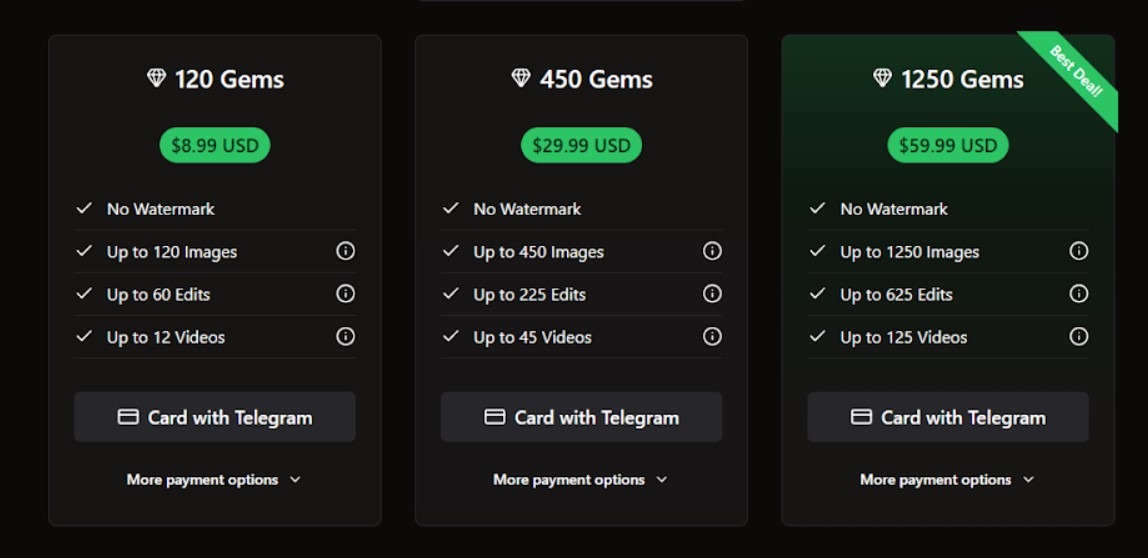
Gems unlock access to such functionalities as video tips, high-quality renders, and batch processing.
This service solves the main problem that content creators face: a lack of time to produce videos. Instead of spending hours in a video editor, you can create animated content for social media in just a few clicks. It’s especially convenient for creating short videos where dynamics are key, not complex editing.
The finished videos are suitable for Instagram Stories, TikTok, or YouTube Shorts. The quality is sufficient for publishing, and the unique effects help you stand out from the crowd. You can experiment with different variations of a single image, creating a series of related videos.
Sources
-
Unlucid AI — unlucid.ai
-
Unlucid AI About — unlucid.ai
-
Unlucid AI Tutorials — unlucid.ai
-
Unlucid AI Review - PicLumen — piclumen.com
-
Unlucid AI Review - TechLinos — techlinos.com
-
Unlucid AI Review 2026 - RankUp4u — rankup4u.com
❓ Frequently Asked Questions
Answers to relevant questions about this AI tool
Sources
-
Unlucid AI — unlucid.ai
-
Unlucid AI About — unlucid.ai
-
Unlucid AI Tutorials — unlucid.ai
-
Unlucid AI Review - PicLumen — piclumen.com
-
Unlucid AI Review - TechLinos — techlinos.com
-
Unlucid AI Review 2026 - RankUp4u — rankup4u.com






Too many restrictions.
This looks like a total game-changer for my content calendar! ⚡️ The ability to retouch images and change outfits instantly will save me so much time on my Instagram reels. Can’t wait to test out the Fly and Transform video effects! 🔥
That’s the part that worries me too. My sister teaches high school art and she’s already caught students submitting AI-generated pieces as their own. The tools themselves aren’t the problem — it’s the lack of any built-in disclosure or watermarking. Schools are going to need entirely new rubrics to deal with this.
Pretty solid interface for beginners.
Glad you liked it! I agree.