
We break down Miocreate, an online platform with a focus on AI Face Swap. Free start, photo and video support, and simple mechanics. We evaluated quality, examined pricing tiers, and compared with competitors. Who is this service for and how realistic are the results?
Miocreate: The Ultimate AI Face Swap Tool
On this page
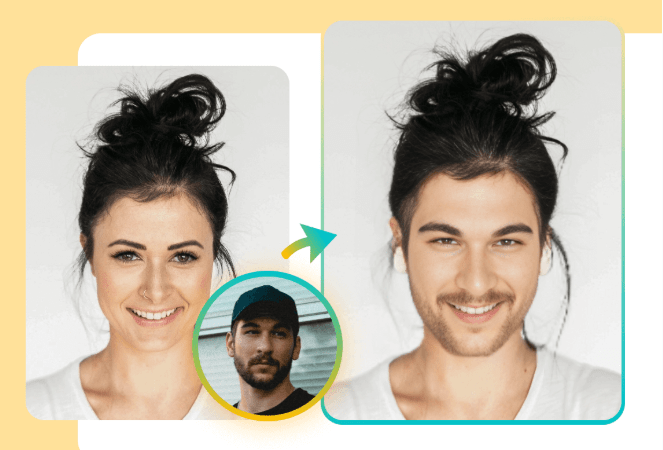
Have you noticed face swapping is everywhere lately? Of course it is. A few years back, a believable swap took a good computer, pricey software, and real editing skills. Today you can slap your grandmother’s face onto Dwayne Johnson’s body from your phone at the bus stop, and it actually looks right, not like some clumsy Photoshop cut-and-paste. Neural networks did that.

Miocreate is one of those services that has turned deepfake technology into everyday fun. The thing isn’t flawless, but it’s terribly entertaining. Let’s break it down piece by piece: what it can do, where it stumbles, and whether a subscription is worth paying for.
Update: Miocreate is currently unavailable. As of our latest check, the service is no longer reachable—the site does not load, and face swaps cannot be created. It’s unclear whether this is a temporary outage or a permanent shutdown, so we’d advise against relying on it for now.
If you need a working face swap tool in the meantime, we recommend OpenArt’s Face Swap as an alternative. It handles both photos and videos in one place, runs entirely in the browser, and is actively maintained. You can try OpenArt’s face swap here.
What Miocreate Is and What It’s For
Miocreate is not just a utility for swapping faces but a whole ecosystem of more than a dozen AI tools. In addition to face swap, there is voice generation, dance generation, text-to-video, and even an attractiveness test. However, the core of the audience comes specifically for fast face swapping in photos and videos without fluff and complex editing.
The tool is geared toward viral content, memes, jokes with friends, and quick creatives for social media. Professional color correction and frame-by-frame work remain out of scope, but for the average user, the capabilities are more than sufficient.
The creators position Miocreate as “Top-Tier Face Swap Online Free,” and in some ways they are right. The numbers look impressive: over 100,000 users and more than a million generated results. The interface is translated into several languages, including Russian, which already sets it apart from many competitors. However, the bold claim of “Top-Tier” is worth testing in practice — and we will do that further along in the text.
How the Technology Works
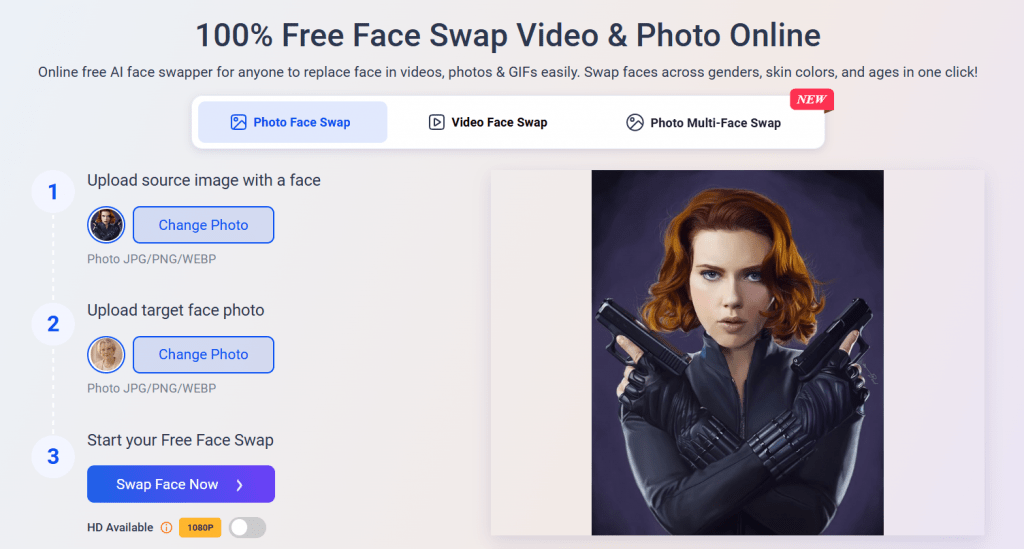
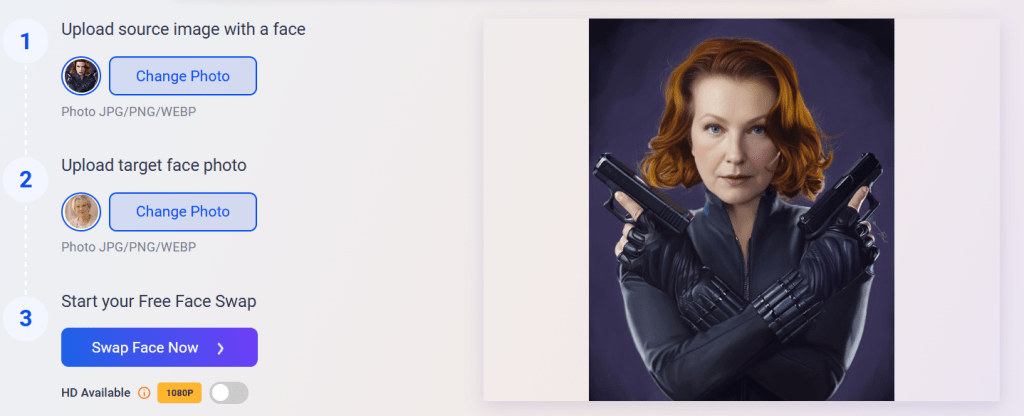
The mechanics are broken down into three steps.
- First, you upload the source file with the face you want to replace.
- Then you provide a reference, i.e., whose face to overlay.
- The artificial intelligence automatically detects facial features, analyzes lighting, skin tone, and angle of rotation, and then performs seamless blending.
Under the hood, the system uses facial recognition, key point mapping, and blending with texture awareness. The result is realistic, with accurate transmission of tone, lighting, and facial expressions. Not a “Hollywood special effect,” but for casual use, it’s more than decent.
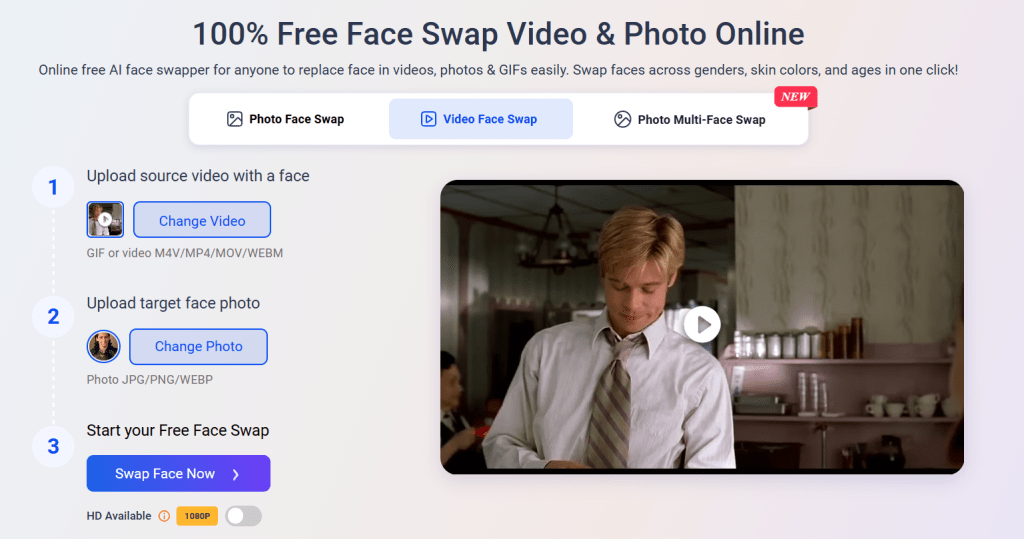
Photo processing takes only seconds. The system works a bit longer with video. The platform understands JPG and PNG and WEBP formats for static images and standard video formats for dynamic content.
Tip: For best results, we recommend using frontal portraits with even lighting. If you need to replace faces for multiple people at once, there is a batch mode for up to 10 people in a single frame. Inside the service, there are preset templates like family, memes, movie characters, and classical paintings. You don’t need to search for source materials on the internet; you can use ready-made scenes from the Miocreate library.
Platform
Miocreate is fully web-oriented. There is nothing to install: it works on PCs with any modern browser, on iPhone and Android.
There is no standalone app in the App Store or Google Play, but the site performs confidently on mobile devices. The mobile version of the interface is adapted for touch control, which is convenient for creating content on the go.
Pricing and Credit System
The service operates on a credit model. A free start allows you to try basic face swapping, but the final image will have a watermark, and downloading will require registration.
Credit deductions depend on task complexity. The cost breaks down as follows:
- Photo with 1–6 faces — 1 credit
- Photo with 7–10 faces — 2 credits
- Video/GIF 10 sec, 1–3 faces — approximately 5 credits
- Video with a large number of faces — formula: faces × 2 for 15 seconds
Miocreate’s own materials still advertise video and multi-face credit costs (historically around 5 credits for a 10-second clip, scaling with the number of faces), but as noted above, those features now redirect to a paywalled third party rather than running on Miocreate itself, so treat that part of the pricing as no longer reliable.
The pricing grid at the time of writing this review looks as follows:
|
Plan |
Price |
Credits |
What You Get |
|---|---|---|---|
|
Free |
$0 |
Minimum |
Watermark, limits on length and quality |
|
Monthly |
$4.99* |
80 |
No watermark, HD quality, priority processing |
|
Half-yearly |
$12.99* |
350 |
All from Monthly + credit accumulation |
|
Yearly |
$19.99–29.99* |
1000 |
Maximum volume, PRO processing model |
* Prices may change. Check the website for current information.
Credits accumulate and do not expire while your subscription is active. Subscribers have the option to purchase additional credit packs if the standard limit is not enough.
Who Will Find It Useful: Real-World Use Cases
The tool easily adapts to both personal mischief and small business commercial tasks.
For Personal Use
Everything here hinges on the wow effect and emotions. You can try on the look of a favorite movie hero, place a friend’s face in a historical painting, or create a meme in a few taps.
A popular scenario is generating family greeting cards where all family members swap roles or eras. Social networks like TikTok and Reels are filled with such videos, and Miocreate allows you to make them without editing on your phone.
Business Use Cases
The tool is too casual to be used seriously for professional work. However, as a quick, inexpensive “crutch,” it can come in handy if you are not too concerned about quality and premium results.
- Small businesses and creators find an affordable production solution here. By using face swapping, you can create custom avatars for mailings without hiring a designer.
- Local brands use the technology for targeted advertising, where the model’s face is replaced with the face of someone resembling the target audience.
- Influencers create collaborations with celebrities without the actual participation of the latter, in order to boost reach.
User Reviews and Ratings
In open sources, positive assessments prevail for speed and simplicity. Users note that the tool handles even old black-and-white photos well. On thematic forums, the opinion surfaces that for a free product, the quality of facial detail pleasantly surprises.
However, in detailed reviews on YouTube and Reddit, more restrained verdicts are encountered. With complex side lighting or sharp head turns, the algorithm sometimes makes mistakes, and seams may be visible. The average user rating hovers around 3.5–4 out of 5: this is a solid mid-range product for fun content, but not a replacement for professional software.
Comparison with Competitors
Actually, the online swap market is already getting crowded. Each service is looking for its niche: some bet on quality, others on privacy, others on price. Miocreate in this company tries to sit on several chairs at once. Let’s compare key players:
|
Service |
Quality |
Price |
Ease of Use |
Strengths |
|---|---|---|---|---|
|
Miocreate |
Medium-High |
Low |
Very High |
Ecosystem of tools, credit accumulation |
|
Remaker AI |
High |
Medium |
High |
Skin detail, minimal watermark |
|
DeepSwap |
High |
Medium-High |
Medium |
High-resolution video |
|
Pica AI |
Medium-High |
Low |
High |
Speed, GIF support |
|
HitPaw |
High |
High |
Medium |
Desktop software, offline processing |
Miocreate’s main advantage over competitors is its low barrier to entry and price. It wins over desktop alternatives when you need to make a swap on the fly in a minute. At the same time, it loses in scenarios that require ideal realism, working with poor source material, or real-time batch swapping.
- Extremely simple interface that even a person far from design can understand.
- Fast request processing without cloud queues.
- Versatility: a single account for face swap, voiceover, and video generation.
- Decent quality of skin tone and lighting blending for the casual segment.
- Affordable subscription cost with a cumulative credit system.
- Watermarks and mandatory registration on the free tier.
- Unstable quality on complex source materials with harsh shadows and non-standard angles.
- Not suitable for professional film production or offline editing.
- Limited fine manual customization of results.
Conclusion
Miocreate is not a professional surgical instrument, but rather a nimble multi-tool. It covers a huge range of content creators’ needs, saving hours of work in complex editors. If your goal is to create wow-content, a meme, or a lively avatar without extra costs, the service’s capabilities are more than sufficient. For deep post-processing with perfect tracking, you will have to look toward heavier combos. However, in the segment of fast and cheap solutions, Miocreate feels confident.
Sources
-
MioCreate — miocreate.com
-
MioCreate Pricing — miocreate.com
-
MioCreate AI Tool Pricing — miocreate.com
-
MioCreate Privacy Policy — miocreate.com
-
MioCreate Terms of Service — miocreate.com
-
MioCreate Review - Conversion Gems — conversiongems.com
❓ Frequently Asked Questions
Answers to relevant questions about this AI tool
Sources
-
MioCreate — miocreate.com
-
MioCreate Pricing — miocreate.com
-
MioCreate AI Tool Pricing — miocreate.com
-
MioCreate Privacy Policy — miocreate.com
-
MioCreate Terms of Service — miocreate.com
-
MioCreate Review - Conversion Gems — conversiongems.com