Main page » Turn your photo into a paint by numbers

AI Paint By Numbers: Turn Photos Into Art

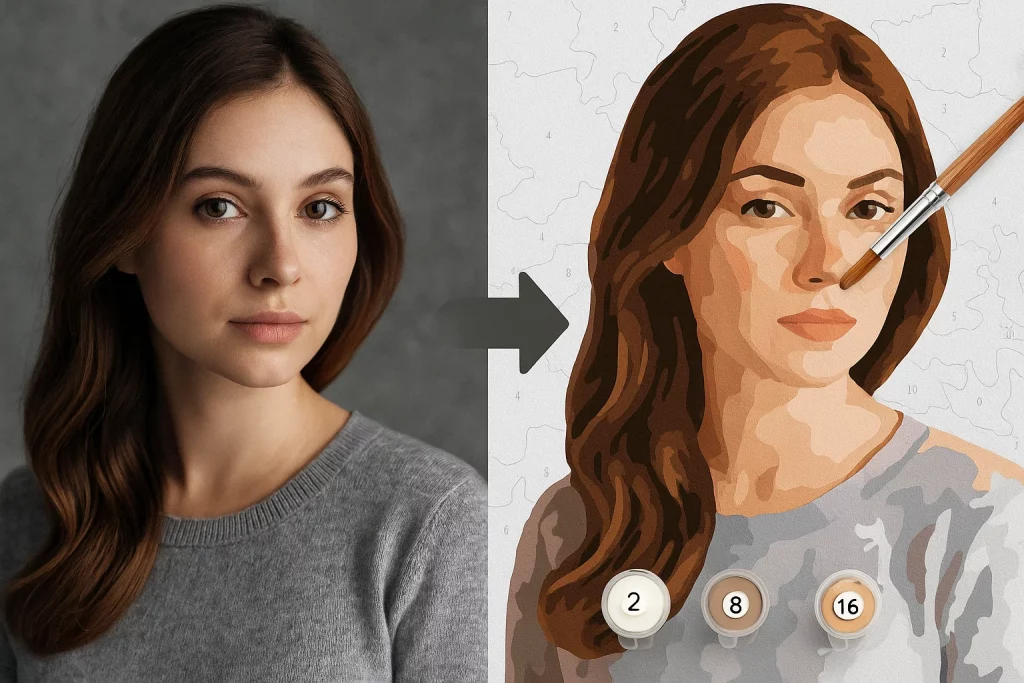
Many people dream of creating their own painting, but worry they lack the talent. Paint by numbers is the perfect solution. It lets you tackle complex scenes by simply filling numbered areas with color. And what if you could transfer your favorite photo onto canvas? That’s a fantastic idea, and we’ll show you exactly how to make it happen.

What Are Paint by Numbers Kits and How Do They Work?

Think of it as a coloring book for grown-ups. You get a canvas with outlines, and each section has a number. No guessing which color goes where—every number matches a specific paint pot. It’s straightforward: pick up your brush, find the areas marked “1” on the canvas, and fill them with paint #1. Move on to “2,” and keep going. At first, it might look like a colorful mess. But after a few relaxing evenings, those patches magically come together into recognizable shapes—a tree, a cloud, a smile. Step back, and you’ll be amazed: it’s a complete painting you created yourself. The best part? You can’t mess it up. Number 3 always pairs with paint #3. The question “Can I really do this?” never comes up. It’s like assembling a puzzle where every piece has its perfect spot. You’re guaranteed a beautiful result, even if you’ve never painted before. It’s also incredibly calming. Focusing on the numbers and careful strokes melts away the day’s stress. It’s like meditation—except at the end, you have a real work of art made by your own hands.

How to Create Your Custom Paint by Numbers Using AI

1. Sign Up

Getting started is easy. Just create a free account. It takes less than a minute and gives you access to your personal dashboard, where you can design and save all your projects.

2. Design Your Template — the Most Exciting Step

This is where the magic happens! Upload your photo and customize the settings:
  • Choose the size: Letter (8.5×11 in), Tabloid (11×17 in), or a custom dimension.
  • Crop the image to focus on what matters most.
  • Select difficulty: Decide how many colors to use. More colors = greater detail and a more realistic final painting.

3. Download Your Ready-to-Use Files

The AI processes your photo in 10 seconds to a minute. Then you can download everything you need:
  1. Original photo for reference.
  2. Preview of the finished painting.
  3. Numbered outline ready to print or transfer to canvas.
  4. Color palette with codes and names.

Best AI Tools to Turn Photos into Paint by Numbers

Several excellent online services make this process quick and easy. Here are some top options: Davincified – a super-simple international tool that processes your photo for free without registration. Choose canvas size, set the number of colors, and adjust complexity. Digitpaints – works very similarly, no sign-up required, fast results, and includes convenient Amazon links for purchasing the exact acrylic paints you’ll need. Vrame – instantly converts any uploaded image into a numbered template. The AI identifies dominant colors, simplifies them to your chosen palette, and assigns numbers to each section.

Conclusion

Turning a cherished photo into your very own paint by numbers kit is surprisingly simple and takes just minutes. It’s more than a craft project—it’s a heartfelt gift that carries emotion in every brushstroke. Imagine your mom’s delight when she realizes the portrait of her wall isn’t store-bought, but a loving creation featuring her grandkids, made especially for her. Or keep it for yourself and let your home tell a personal story. That special moment captured in the photo lives on, enriched by the peaceful hours you spent bringing it to life with your own hands. No artistic talent required—just your favorite photo and a little creativity.
Read more
Google Updates Gemini 3.5 with Live Translate Features The release of Gemini 3.5 Live Translate...
1 day ago
0 56
Gemini Spark is Google's 24/7 personal AI agent, unveiled at Google I/O 2026. It works...
2 weeks ago
0 29
Lua and Manifest Generators are free web tools that build Steam manifest and Lua files...
2 weeks ago
0 34

Leave a Reply

Your email address will not be published. Required fields are marked *