
An online photo editor with AI features including image enhancement, background removal, and effects.
Fotor: AI Photo Editor And Image Enhancer
On this page
Fotor is a simple, free online photo editor powered by advanced AI. Want to remove backgrounds for free? With Fotor, it’s just one click: the AI instantly and precisely cuts out your subject. Then, easily swap in a new AI-generated background—choose anything from a solid color to a scenic landscape, or create something entirely new with the built-in AI image generator. It’s perfect for polished portraits or product listings. But Fotor is also a top-tier photo editor with effects. You’ll find tons of filters and tools to give your shots a standout look. Best of all, it’s a browser-based photo editor. No downloads needed: every feature is available for free right in your browser. Beginner-friendly yet powerful, Fotor makes even advanced online photo retouching simple thanks to its smart AI. Blurry shot? AI image enhancement sharpens it with crisp detail. Old or damaged photo? AI restoration revives colors and removes imperfections. Want to add text? Choose from hundreds of fonts and styles. One of Fotor’s standout features is its AI image generator. Just describe what you envision (“cat in a spacesuit,” “fantasy castle”), and the AI creates a unique image in styles like anime, photorealism, or digital art. Upload your photo, and AI can transform it—think turning a selfie into a masterpiece in the style of a famous artist.
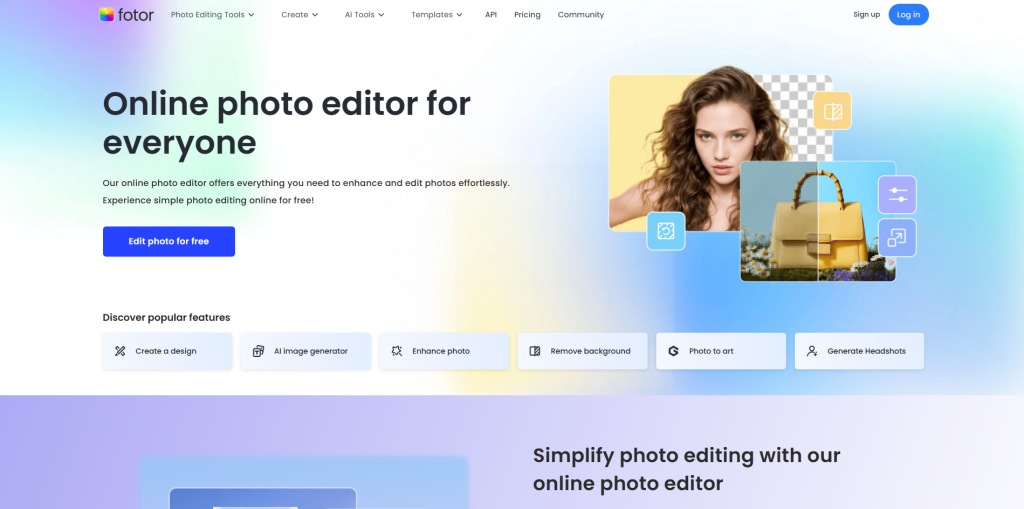
Key Features
- AI Photo Enhancement: Sharpening, noise reduction, upscaling to 8K. For example, turns blurry snapshots into HD-quality images.
- Background Removal: Automatically isolates subjects in 3 seconds, with easy background replacement.
- Image Generator: Creates visuals from text prompts in anime, photorealistic, or digital art styles.
- Portrait Retouching: Auto skin smoothing, lighting fixes, blemish removal.
- Design Tools: Over 2,000 ready-made templates for social media, posters, and collages.
- Photo Restoration: Repairs old images by removing scratches and adding color.
How It Works
Fotor leverages machine learning algorithms to analyze and process images. Here’s the flow:
- Upload your file directly in the browser (no registration required for basic tools).
- AI Processing: When you apply a tool (like background removal), the AI segments objects, predicts details, and fills in content.
- Editing: Fine-tune manually (brightness, contrast) or use text commands (“make the sky brighter”).
- Download: Save as JPG/PNG. HD exports require a subscription.
The interface is intuitive—most tasks take just 1–3 clicks.
Real-World Uses
- Content Creators: Build Instagram/TikTok posts with templates and AI effects.
- Marketers: Generate branded visuals (logos, banners) and retouch product photos.
- Photographers: Batch-process shots and enhance low-light images.
- Designers: Quickly stylize photos as paintings or anime art.
- User-friendly for everyone: Beginners won’t get lost, and pros can jump right in—the interface is thoughtfully designed for any skill level. It’s the perfect starting point.
- A true all-in-one toolkit: This isn’t just for minor touch-ups. AI can magically restore old photos, instantly remove backgrounds, generate fresh images from prompts, or assemble stunning collages. The feature set is massive! (That’s the “multifunctionality” everyone loves.)
- Works anywhere, instantly: Whether you’re on a Windows/Mac desktop or an iOS/Android phone on the go, just open your browser and start editing. No downloads or installs—ideal for speed and convenience. (Pure “cross-platform” magic.)
- Help when you need it: Support is available in multiple languages, including partial coverage for non-English speakers. It may not be 24/7, but having responsive help is a big plus.
- AI can overdo it: The most common feedback is that enhancements or generations sometimes look “plastic,” unnatural, or odd. The algorithms don’t always nail what feels truly realistic.
- Free tier has limits: The free plan is great for testing, but AI image generation is capped (just a handful per month). Watermarks appear on edited photos, and premium features stay locked until you upgrade. Full power requires a paid plan.
- Partial language support: While much of the interface is multilingual, some buttons, menus, or tooltips remain in English. You might need to guess or recall basic English terms.
Pricing and Plans
| Plan | Price | Features |
| Free | Free | Basic editing, 8 generations per month |
| Pro | $3.33/month* | Full AI tools, watermark removal |
| Pro+ | $7.49/month* | +1 million stock photos, 10 GB storage |
| *Billed annually. |
Payment options include PayPal, credit cards, and one-time credit purchases (from $0.015/credit) for occasional tasks.
Ready to create stunning photos online or design with AI? Fotor combines a fast online photo editor with a full-featured AI designer. It’s ideal for beginners and pros alike.
- No-signup photo editor: Start creating instantly in your browser.
- AI image quality boost, color correction, background replacement—let AI handle the heavy lifting.
- AI photo stylization and effects add that special touch.
- Text-to-image generation produces entirely new visuals.
- Free design templates help you whip up covers or creative projects in minutes.
This AI-powered photo processor (essentially a robust image editor with artificial intelligence) lets anyone produce pro-level results without experience. While the free tier has limits and HD output needs Pro, the price is budget-friendly. Perfect for social media managers, designers, and small businesses!
❓ Frequently Asked Questions
Answers to relevant questions about this AI tool
Sources
-
Pricing - Fotor — fotor.com
-
Fotor Help Center — support.fotor.com
-
Submit a request - Fotor Help Center — support.fotor.com
-
Payment, Subscriptions and Credits - Fotor Help Center — support.fotor.com
-
Fotor Photo Editor Pricing 2026 — g2.com